Guides
Alarms
On this page · 7 sections
An alarm tells an operator that something needs them: a temperature over its limit, a pump that stopped, a source that went quiet. In Scada Studio an alarm is one condition on one tag, written in a table of the project, with a priority and the words the operator reads. The station that serves the app evaluates the table whether or not a screen is open, so an alarm is raised at three in the morning with nobody looking, and it is still there, unacknowledged, when somebody does.
The Alarms view
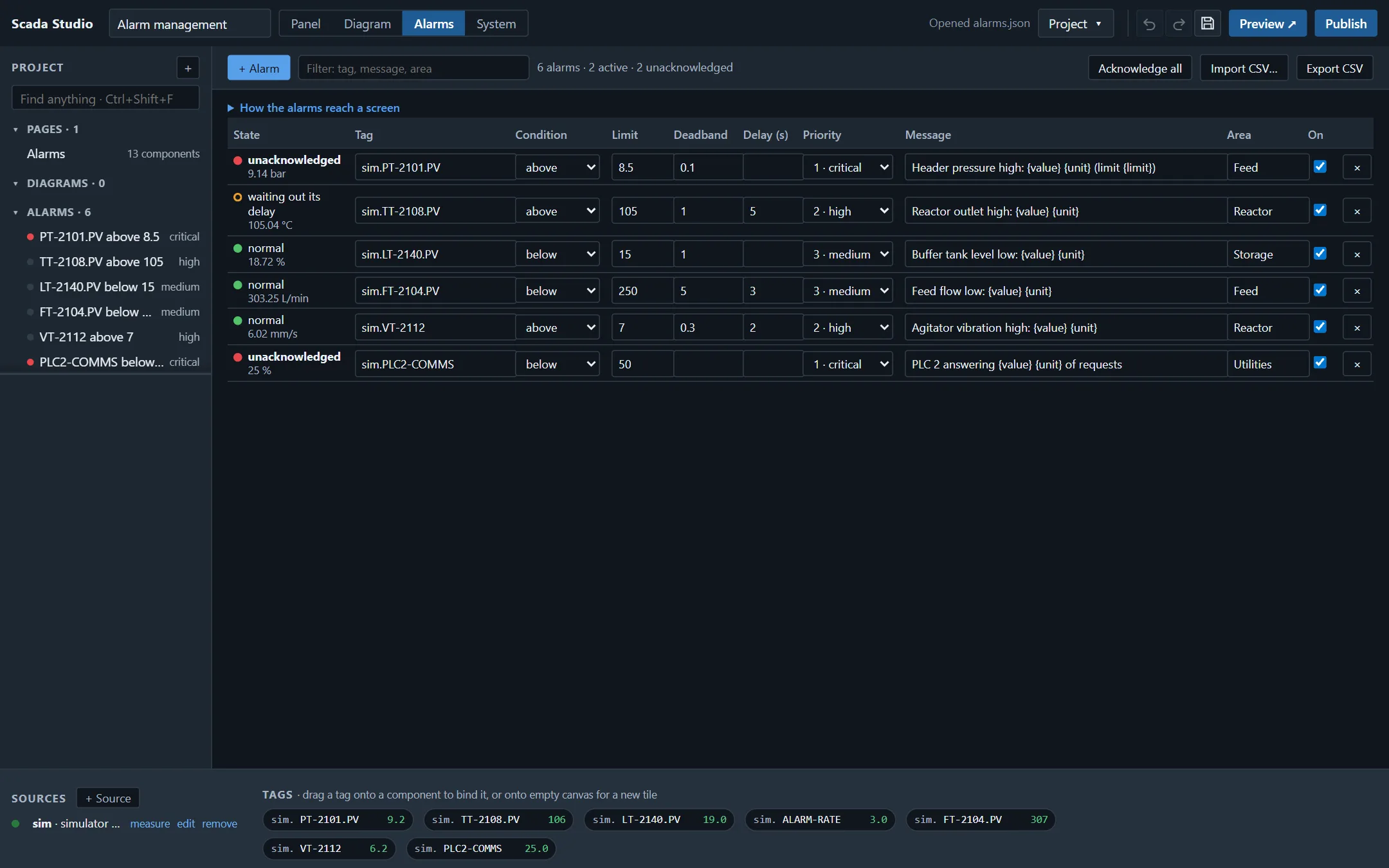
Alarms in the toolbar, beside Panel, Diagram and System, opens the table. One row is one alarm:
| Column | What it holds |
|---|---|
| State | What the alarm is doing now, evaluated by the designer against the project's own sources, with the tag's value under it. |
| Tag | The tag watched, as source.tag: sim.TT-2108.PV, station.plc.TEMP. The list offers every tag the sources carry. |
| Condition | above or below a limit, equals or not equal to a value, is on or is off for a switch, or not delivering: the source says the value is not good, or the link to it has been down for 5 seconds. |
| Limit | The number the value is compared with. A word works for equals on a text tag (FAULT). |
| Deadband | How far back past the limit the value has to go before the alarm clears. An alarm raised above 90 with a deadband of 2 clears below 88, so a value that hovers at the limit does not raise and clear it every sample. |
| Delay (s) | How many seconds the condition has to hold before the alarm is raised. A spike shorter than that wakes nobody. |
| Priority | 1 critical, 2 high, 3 medium, 4 low. |
| Message | What the operator reads. {tag}, {value}, {limit}, {unit} and {area} are filled in; empty, the condition in words: TT-2108.PV high: 93.1 °C (limit 92). |
| Area | The part of the plant, for filtering a summary. |
| On | Off keeps the alarm in the table and stops evaluating it. An alarm switched off while it stands leaves the summary at once (the history records it as disabled), as an alarm taken out of service does. |
+ Alarm adds a row on the first tag; dragging a tag from the strip at the bottom onto the table adds one on that tag. A new alarm starts above a limit near the top of the tag's range, so it can be seen firing at once; change the condition or the limit and the state column follows within a second. A row the project could not run - no tag, a tag no source carries, a condition that is not one of the seven, a limit that is not a number, two alarms with one id - turns red, says why, and is not evaluated: its state reads not watched, and it raises nothing until it is put right. A condition the table does not know is shown as written, with a question mark.
A plant has hundreds of alarms, and they are usually written in a spreadsheet. Export CSV writes the table with a header row (id, tag, condition, limit, deadband, delay, priority, message, area, unit, enabled); Import CSV… reads one back. A row whose id is already in the table updates it - the columns the sheet has replace the alarm's, an empty cell clears that field (not the id, the tag or the condition), and the columns the sheet does not have are kept - a row without an id is added, and a row without a tag is skipped. The priority is 1 to 4 or its word (critical, high, medium, low); one that is neither is set to high and named after the import. The condition may be written as the table writes it - is on, is off, equal to, not equal to, not delivering - or as a sheet does - High, low, HH, LL, >, <, >=, <=, =, != - and enabled takes no, n, off, false or 0 for an alarm that is off. The export starts with a byte-order mark, so a spreadsheet opens °C as °C. Ctrl+Z takes an import back.
The states
The states are the ones ISA-18.2 defines, and the ones the Alarm grid draws:
| State | Meaning |
|---|---|
| unacknowledged | The condition holds and nobody has responded. |
| acknowledged | The condition holds; an operator has seen it. |
| returned, unacknowledged | The condition cleared before anybody responded. The alarm stays on the summary until somebody does - an intermittent fault must not be invisible. |
| shelved | An operator hid it for a time (the Alarm actions block offers 15 minutes to 8 hours). It is still evaluated; it comes back when the time is up. |
| normal | Nothing to see: it leaves the summary. |
On a screen
The project's alarms are a source of their own, named alarms, with five tags:
| Tag | Value |
|---|---|
| alarms.summary | The list an operator has to see - active, returned and unacknowledged, shelved - worst first, in the record the Alarm grid and the Alarm banner read. |
| alarms.active | How many are active, not counting the shelved ones. |
| alarms.unacknowledged | How many wait for an operator, not counting the shelved ones. |
| alarms.total | How many are on the summary, not counting the shelved ones. |
| alarms.highest | The most urgent priority waiting, 0 for none. |
An Alarm grid or an Alarm banner placed from the palette starts bound to alarms.summary; How the alarms reach a screen, above the table in the Alarms view, places one on the current page in a click. A status tile bound to alarms.active counts them; on a station's screen it goes stale with everything else while the station is down, rather than going on showing a count.
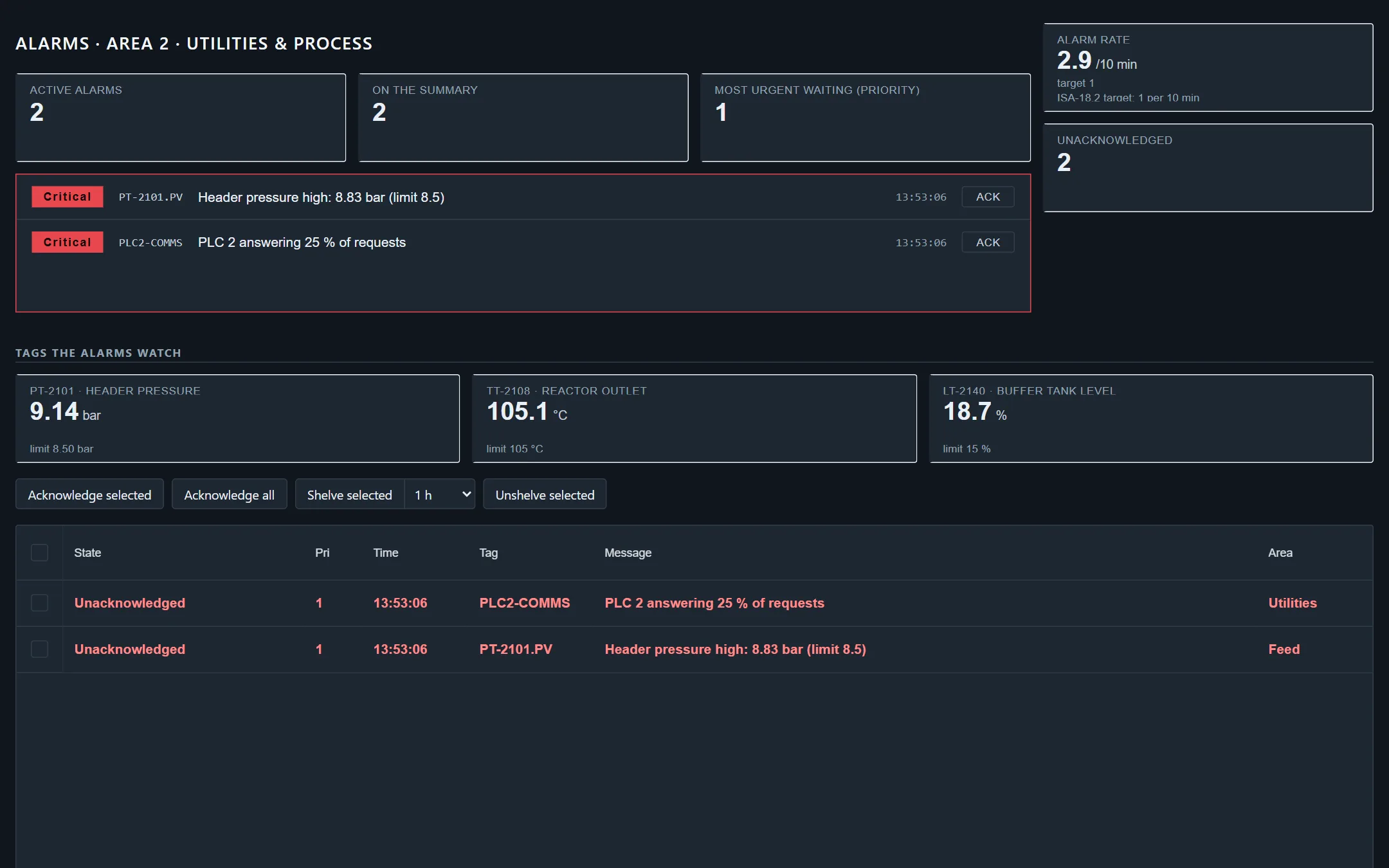
The banner has an Ack button on each alarm not yet acknowledged. The grid shows a checkbox on each row, and the Alarm actions block is its buttons - placed with the grid by How the alarms reach a screen (a grid placed from the palette comes without it), or from the palette's Alarm handling group: Acknowledge selected, Acknowledge all, Shelve selected for 15 minutes to 8 hours, Unshelve selected. It acts on the alarm grid of the same page (or the one named in its grid setting, looked for in the same app first). A ticked row stays with its alarm when the list changes: a new alarm sorted above it does not take the tick. What the operator does on either goes back to where the alarms are evaluated; when the station refuses it - a viewer, a session that ended - the screen says why.
Where they are evaluated
- On the station, for an app it serves. The station evaluates the table of every app it serves from the moment the app is published, with no screen open, and every screen of the app reads the same summary: an acknowledgement on one is seen on all of them. Publishing a new version keeps the state of an alarm whose tag and condition did not change - a new message does not re-raise what an operator already acknowledged.
- In the page, everywhere else: in the designer, in Preview, and in an app exported as files and served by any web server. The same engine runs in the browser (studio-alarms.js is one file, read by both sides), against the page's own sources. A source whose link is down for 5 seconds (10 while it first connects) gives its watched tags to the engine as bad, so a not delivering alarm is raised in the page as it is on the station; the next sample clears it.
The Alarm nodes of a message flow and of a diagram raise into the same summary, so an alarm that needs logic - a comparison of two tags, a state machine - is acknowledged the same way as one from the table.
After a restart
A crash, an update or a power cut does not empty the summary. The station keeps the alarms an operator still has to see - active, returned and not acknowledged, or shelved - beside its configuration as they change (alarms-state.json), and takes them back when the app starts:
- the first value of each tag decides what is still active: an alarm that returned while the station was down is cleared then - one nobody had acknowledged stays on the summary until somebody does, one already acknowledged returns to normal;
- an acknowledgement or a shelving made before the restart still holds, with who made it;
- an alarm a flow raised comes back as returned, for its flow to raise again if it still holds.
Acknowledging, and who did
On a station with sign-in, acknowledging and shelving are an operator's actions: a viewer's screen shows the alarms and cannot acknowledge them. The station records who did what in two places:
- the audit trail (alarm.acknowledge, alarm.shelve, alarm.unshelve, with the user and the alarms), hash-chained with everything else the station does - see Security;
- the alarm history, alarms.jsonl beside the station's configuration: one line for every alarm raised, cleared, acknowledged, shelved and unshelved, with the time, the app, the tag, the priority, the message, the value and the user. It is renamed with a date and a new one begins at 5 MB (alarms.maxBytes in the configuration).
The Agent API serves both: GET /api/alarms is the summary, GET /api/alarms/history?app=&from=&to=&limit= the history, and POST /api/alarms/acknowledge, /shelve and /unshelve are what the screens call.
What it does not do
Alarm flooding analysis, suppression by design (an alarm hidden while its unit is shut down) and out-of-service states are not in the table; the Alarm grid draws them when an application sets them. There is no mail or text message built in: the Notify node of a message flow or a diagram posts an alarm to a webhook, which a mail or chat service can take from there.