Product
Security
On this page · 14 sections
What is exposed
The agent listens on one TCP port (8800 by default) for HTTP and WebSocket. It serves static files (the apps, the runtime, the designer), an API, and the tag stream. It makes outbound connections only to the sources in its configuration and, from flows, to the URLs an HTTP request or Notify node is given. It sends nothing elsewhere: no telemetry, no update check, no activation call. The Smart UI components in the browser check their licence key on the device and call nowhere either, so a station and its screens run the same with no Internet at all.
The fence around the port
Every request meets the same checks before it reaches a route; each is a line in the configuration, and each has a check in the agent's test suite.
Origins. A browser page may call the API and open the WebSocket only from the agent's own origin, from the same machine (localhost), or from an origin listed in "origins": ["https://designer.example.com"]. A page of any other origin gets no CORS answer and a 403; on the WebSocket the handshake itself is refused. A program without an Origin header (a script, a gateway) is not a page and passes this check - it must then authenticate. "origins": ["*"] opens the API to every page, as before 1.15; do not do that on a station.
Tokens never in a URL. A token travels in Authorization: Bearer on the API and in the first message { "type": "auth", "token" } on the WebSocket (or the same header, from a program). ?token= is refused, so no token lands in a proxy log, a browser history or a bookmark.
Bodies and rates. A request body is read up to limits.bodyBytes (8 MiB) and dropped with 413 past it; an address gets limits.requestsPerMinute (600) on the API and limits.loginsPerMinute (20) on the login, then 429 with Retry-After. A WebSocket frame or message past limits.wsFrameBytes (1 MiB) closes the socket with code 1009; at most limits.wsClients (256) connections are open, each with at most limits.subscriptionsPerClient (5000) tags; a client is pinged every limits.wsPingMs (30000) and dropped when silent for two intervals.
A policy on every page. Every HTML page the agent serves - a published app, the designer, the documentation, its own home page - carries a Content-Security-Policy: scripts only from the agent itself and the page's own inline scripts by their hash, styles and fonts from itself and from Google Fonts (the documentation's typeface), no plugins, frames only from itself (frameAncestors in the configuration widens that for an embedding portal), plus X-Content-Type-Options: nosniff and Referrer-Policy: no-referrer. "csp": false turns the policy off; a string replaces it.
Nothing from a project reaches a page as markup. Project names, flow names, tag names, alarm messages and every other value shown on the home page are escaped.
Roles, tokens and users
With auth configured, every API call and every WebSocket needs to be someone. Three roles: view reads tags, the status, the flows, the alarms and the logs; operate also writes tags, acknowledges and shelves alarms, loads recipes, runs a job by hand, writes to the shift log, classifies a stop and moves an order on; engineer also publishes and removes apps, manages the users and reads the audit trail. A write from a viewer is refused with a message; a call without identity is refused with 401.
Two ways to be someone:
- A token (auth.tokens) for a screen on the wall, a gateway or a script: node agent.js --add-token gateway --role operate prints the token once and stores only its SHA-256, so the configuration file does not hold the secret. Give each its own, so one can be withdrawn. (A token written in clear, as the earlier releases did, still works and is named at start as one to replace.)
- A user with a password (auth.users, added with node agent.js --add-user NAME --role ROLE and the password in AGENT_PASSWORD): the configuration holds an scrypt hash, never the password. A user logs in at POST /api/login and gets a session token that works exactly like a configured token until it expires (auth.sessionHours, 12 by default, one hour at the least: a fraction of an hour is read as 1, and 0 as the default 12). Five wrong passwords from one address block that address for five minutes.
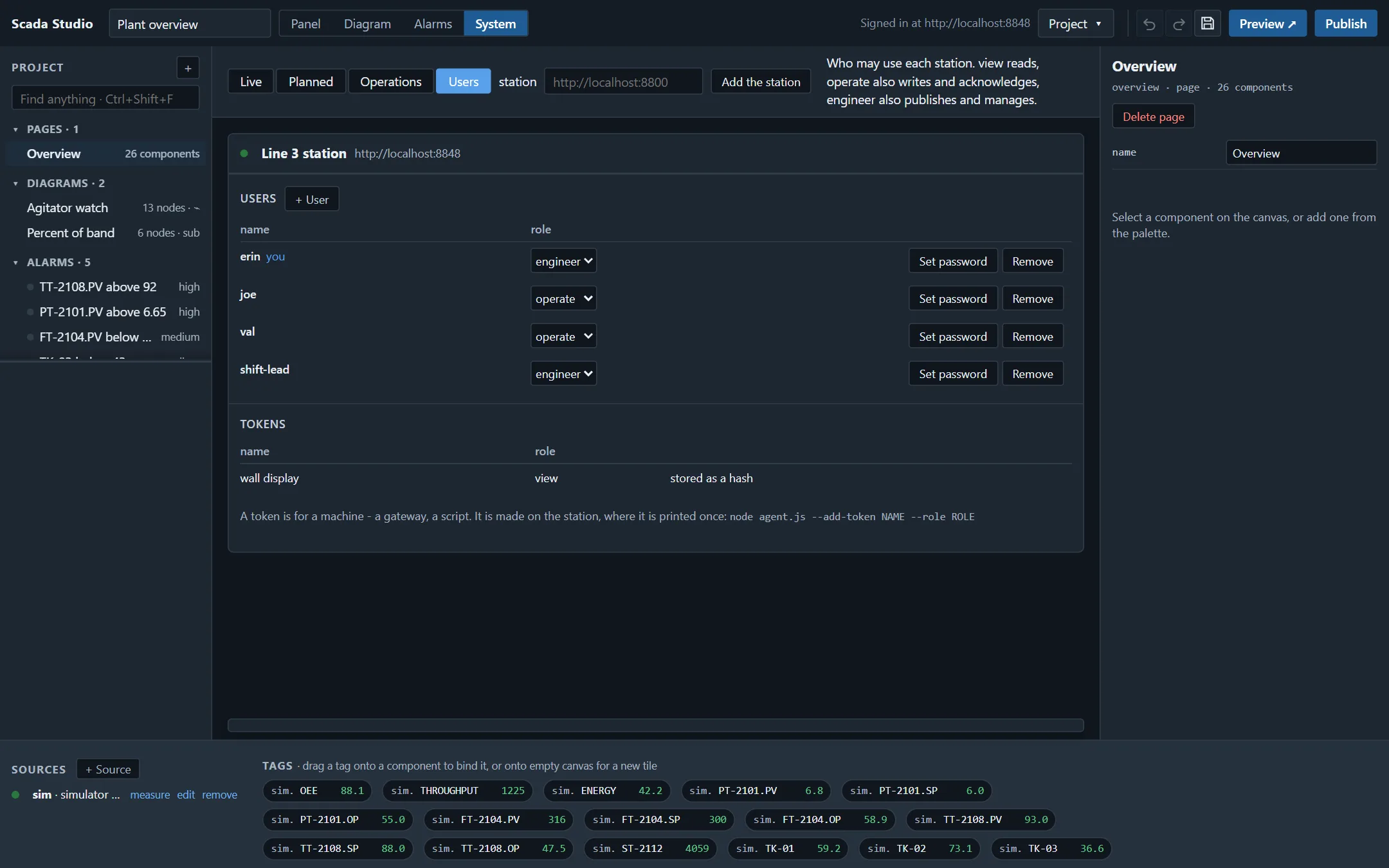
Managing the users from the designer. The first engineer is made on the station itself with --add-user: a station without sign-in refuses to take a first user over the network from whoever asks. From then on an engineer manages the users in the designer's System › Users (the routes GET and POST /api/users, DELETE /api/users/<name>): a user added, a role changed, a password set or a user removed takes effect at once - no restart - and a user whose role or password changed is signed out, to sign in again. A password is at least 10 characters and not one of the first anybody would try. Two refusals keep the station manageable: the last engineer is not demoted or removed, and nobody removes themselves. Every user changes their own password at POST /api/me/password with the current one. Each change is written to the configuration (only auth.users) and to the audit trail. Tokens are listed there but made on the station, where one is printed once.
Sessions survive a restart. They are kept in sessions.json next to the configuration: the SHA-256 of each token with its name, role and expiry, the whole file under an HMAC whose key is in sessions.key, readable by the owner only. A copied file opens no session (it holds hashes), and an edited one - a role promoted by hand - fails its HMAC and is refused whole, which the agent says at start.
The app pages, the runtime files and the designer are served without identity. Everything an app shows comes over the WebSocket; what the files hold is the project itself - its pages, its bindings and whatever its sources say - and that is readable by anyone who can open the app. An app whose agent asks for a login shows a sign-in dialog and keeps the session in that browser tab; a project's agent source can instead carry a token for a screen that must never ask, and that token is readable by anyone who can open the app. So the station refuses to publish a project whose token can do more than view (a wall display shows; operators sign in), and serves an older app or kept version without such a token. The designer's Publish dialog takes an engineer token or a sign-in; either stays in the designer's browser, never in the project.
A session that ends ends everywhere. A socket is checked again at every write, so a screen left open after its user signed out, was demoted to view or was removed writes nothing more; the station closes such sockets and the screen asks for a sign-in again. A sign-out is written to sessions.json at once, so a station stopped a moment later does not bring the session back.
A signature is not bypassed. A tag that any app of the station writes only with an electronic signature is refused to a recipe, a job and an order, which cannot sign (a recipe that holds one is saved with a warning), and a screen that writes it without asking for a signature is offered the signing panel for that write.
Code: what runs and where
A Math node and a Formula node are not code. Their text is read by the product's own formula language - arithmetic, comparisons, the functions of Math, if, while, for - an interpreter that reaches the node's inputs and nothing else: no globals, no prototypes, no calls but the maths functions, and a loop that does not end is stopped. They run everywhere, always.
A Function node is code: JavaScript with the message as msg. A station runs it only when its configuration says "flows": { "allowCode": true }; without that line a project with a Function node is refused at publishing, with the nodes named, and the pages the agent serves carry a policy without unsafe-eval, so a page-side Function node is refused by the browser too. With the line, agent-side Function nodes run in a sandbox thread of their app - a fresh context with no require, no process and none of the agent's objects, the message cloned in and the result cloned out, every call under a time limit (flows.codeTimeout, 1000 ms; a call past twice that restarts the thread). The sandbox keeps a runaway function from stalling the agent and keeps the code away from the agent's objects; it is not a security boundary against code written to escape Node's vm module, and Node says so of vm itself. That is why the line exists: whoever sets allowCode accepts the code of the projects published to that station, and whoever holds an engineer token can publish. Hand out engineer tokens accordingly.
The audit trail
Every agent keeps audit.jsonl next to its configuration: one JSON object per line, append-only, each line carrying the SHA-256 of the line before it. Recorded, among others: agent.start (version, port, the sources, a hash of the configuration), agent.stop, licence, login and login.failed, logout, tag.write (who, the tag, the value before and after), app.publish (who, the app, the SHA-256 of the project, how many code nodes), app.remove, user.add, user.change, user.remove, user.password and user.password.refused, token.add, alarm.acknowledge, alarm.shelve and alarm.unshelve, recipe.write (every entry), recipe.apply (every entry with the value before it), job.write (the whole action), job.run and job.failed (the clock, or the person who pressed Run now), a tag.write with via: "job" for every value a write job writes (a recipe job's values are in its recipe.apply), and the operators' shift log, stops and orders. An engineer reads it at GET /api/audit (?since=<seq>&limit=<n>&event=<e>&name=<who>, &format=csv for a spreadsheet in the Enterprise edition) and checks it at GET /api/audit/verify; node agent.js --audit-verify does the same from the command line and names the first entry that no longer follows the chain when a line was changed, removed or reordered. A chain alone does not show its end cut off - the shorter trail is still a whole chain - so the last entry's number and hash are also kept in audit.head.jsonl beside it, and a trail that stops before its head, or is missing altogether, is named too. Somebody with the rights to rewrite both files on the station is not stopped by this: an export to a system they cannot write to (GET /api/audit, as CSV in the Enterprise edition, or the trail copied off the station) is the answer to that. At 20 MB the file is archived as audit-<date>-<last entry>.jsonl and the next line continues the chain from the last hash. Writes are synchronous: a trail that may lose its last line at a crash is not a trail. A write marked as requiring an electronic signature is recorded with it - user id, printed name, meaning, reason, time, the record's hash, verified - after the agent has checked that the session the write came over is the signer's (the designer guide has the operator's side); the trail is then the Part 11 record, and the validation pack says so in words a QA reviewer expects.
TLS
node agent.js --make-cert --host station-7,10.0.0.7 writes a self-signed certificate and key next to the configuration; "tls": { "cert": "cert.pem", "key": "key.pem" } makes the agent speak HTTPS and WSS on its port. A browser trusts a self-signed certificate only when told to, once per machine; a plant with its own certificate authority puts its certificate and key in the same two fields. On a network you do not own, either of these, or a reverse proxy in front of the agent, is the line.
Running as a service
node agent.js --install makes the agent start with the machine: a systemd unit on Linux; on Windows a service through WinSW when winsw.exe is next to the agent (automatic start, restarted on failure, output rolled into log files, start and stop in the Event Log), otherwise a scheduled task defined in XML so that it never times out, restarts on failure and is not started twice. /healthz answers 200 while the agent serves (503 while it stops) for a watchdog or a load balancer; /metrics gives its counters and gauges in the Prometheus text format - tags, clients, sessions, samples, writes, refused requests, a gauge per source and a counter per flow.
Users from an identity provider
With auth.oidc the agent's users come from the company's OpenID Connect provider (Keycloak, Entra ID, Okta, Auth0, ADFS): the authorization-code flow with PKCE, the id_token verified against the provider's published keys (RS256 to ES384) with its issuer, audience, expiry and nonce checked, the user's groups mapped to a role by the configuration, every login and refusal in the trail. No LDAP binding: a directory reaches the agent through the provider in front of it. The agent guide has the configuration.
The licence
A licence token is verified by its signature, its expiry or maintenance date, the station it is bound to (a station token carries the fingerprint of the one station it was made for, from that station's activation request), and the publisher's revocation list; a token for another station, a developer seat on an agent, a withdrawn id or a build newer than the maintenance date runs the software as an evaluation and says why. Activation is offline: the station prints a request, the supplier returns a token, nothing calls anywhere. The licensing page has the editions.
The browser side
The designer keeps the project, the licence and the tokens in the browser's storage of the machine it runs on. A published app is static files plus one WebSocket. Treat a project file from elsewhere as you would treat a document with macros: read its Function nodes before publishing it to a station that allows code.
How the product is developed
Scada Studio and its agent are developed under the practices IEC 62443-4-1 asks of a product supplier, stated here so a buyer can check them rather than take them on faith:
- Threat model. The agent is a server on a plant or lab network reached by browsers and programs; the threats considered are a foreign page in an operator's browser (origins, CSP, tokens out of URLs), a client on the network without credentials (auth, rates, caps, the socket's limits), a published project carrying code (the code policy, the sandbox), a tampered file on the station (hashed secrets, the HMAC over sessions, the hash chain over the trail), and the loss of a record (synchronous audit writes, log rotation). Each threat has a line in the configuration and a check in the suite.
- Dependencies. The agent has none beyond Node.js; the drivers that need a native library (node-opcua, serialport, koffi) are optional and named in the SBOM. The designer and the runtime depend on the Smart.Industrial component library, which ships its own SBOM and security statement.
- Testing as evidence. npm run agent:check and npm run studio:check are the verification: every fence above is exercised against a running agent (a foreign origin refused on HTTP and WS, ?token= refused, a 2 MiB frame closed with 1009, a body past the cap refused with 413, an address past its rate answered 429, a session that survives a restart and a sessions file that does not survive an edit, a hashed token that logs in, an audit line that was changed named by the verifier, a code node refused on a station without allowCode and run in the sandbox on one with it, a page that runs under its policy without a violation). Their output is the test record of a release.
- Releases. Every release is a dated entry in the release notes; the download carries its SHA-256 and a signature (see below); a release with a security fix says so in its notes and in the advisory; a validation pack is generated for every release from the check suites; the support page has the long-term support lines and the backport check.
- Hardware. What the drivers have and have not been run against is on the verified hardware page, path by path, and nowhere is a path claimed beyond it.
Reporting a vulnerability, and what happens then
Report a vulnerability in Scada Studio, its agent or the Smart.Industrial components to support@jqwidgets.com with "Security" in the subject (the same address the component library's policy names), not in the public forum. Say which version, what you found, and how to reproduce it.
- Within 2 working days you have an acknowledgement and a contact.
- Within 10 working days you have an assessment: confirmed or not, severity, the versions affected, the plan.
- A fix ships in a release within 90 days of the report for a confirmed issue, sooner for a severe one; you are named in the notes if you wish.
- Coordinated disclosure: we ask that you give us those 90 days before publishing; we publish an advisory with the fix, naming the versions affected and the mitigation.
Scada Studio is placed on the EU market and falls under the Cyber Resilience Act. Under it, from 11 September 2026, an actively exploited vulnerability is notified to the CSIRT and ENISA within 24 hours of our becoming aware of it and the notification completed within 72 hours, and affected customers are told with the fix or the mitigation; advisories are published at the security page of the product site. The address above reaches the person on call for it.
Supported versions
A major release line receives security fixes for 24 months from its release; the newest line receives fixes and features. A fix for a supported line ships as a patch release of that line, so a station stays on the version it was validated with. The release notes name each line and its end of support.
Verifying a download
Next to every scada-studio-<version>.zip are scada-studio-<version>.zip.sha256 (the digest, in the form sha256sum -c reads) and scada-studio-<version>.zip.sig (an ECDSA P-256 signature over the file, DER, base64). The public key is release-public.pem in the zip and on the download page:
sha256sum -c scada-studio-1.15.0.zip.sha256
openssl dgst -sha256 -verify release-public.pem -signature <(base64 -d scada-studio-1.15.0.zip.sig) scada-studio-1.15.0.zip
node scripts/build-studio-dist.js --verify scada-studio-1.15.0.zip does both from the repository.