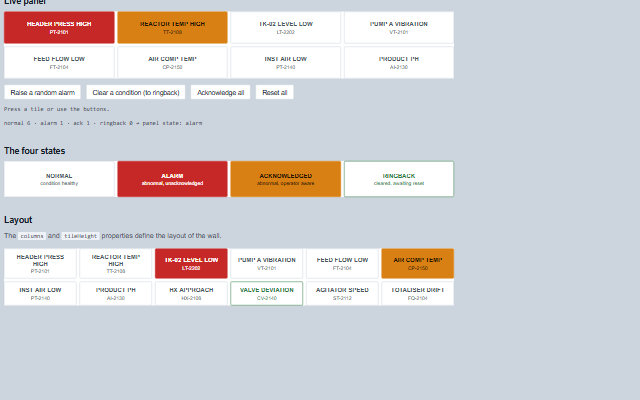
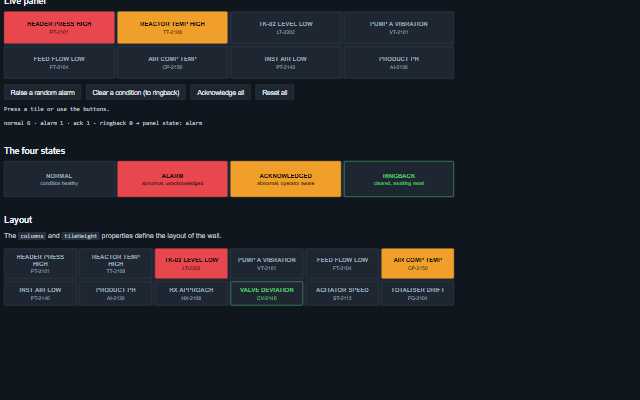
Annunciator displays a wall of tiles, one per monitored condition, following the ISA-18.1 alarm sequence: normal, alarm (unacknowledged, blinking fast), acknowledged (steady) and ringback (cleared but not reset, blinking slowly).
Pressing a tile raises an event to acknowledge the alarm or reset the ringback; the application returns the updated tile list.
English, German, French, Spanish, Chinese (locale packs)
In the demo: Live panel · The four states · Layout. Open the demo
Quick start
Install the package, load the two stylesheets and the component's module, and put the element on the page. The element below is the first one of the demo. Put the script after the module, in a <script type="module">, so that it runs once the component is defined.
The properties the demo sets, then the next ones; the API page lists all 3 with their types and defaults.
Name
Type, default
Description
columns
number 4
Sets or retrieves how many tiles are laid out per row.
tiles
array
Sets or retrieves the monitored conditions. Each entry is an object with: id - the identifier of the tile, returned in the events; label - the tile legend; detail - an optional second line, typically the tag; state - one of normal, alarm, ack or ringback, in any case. A tile without a state is normal; any other word is shown as an unknown state (dashed and hatched, read out as 'Unknown state') rather than as a normal tile, cannot be acknowledged, and makes the panel's state attribute 'unknown' unless a tile is in alarm. Assign a new array to update the component, or call redraw after modifying the array in place; an array that is deep-equal to the current one does not trigger a redraw. The keyboard stays on the same tile across an update.
tileHeight
number 64
Sets or retrieves the minimum height of a tile in pixels.
Events
The events carry their data in event.detail. acknowledge and reset are requests: a press on a tile in alarm asks for acknowledgement, a press on a tile in ringback asks for a reset, and the annunciator keeps tiles as they are until the application updates them. tileClick reports every press.
Event
Description and detail
acknowledge
This event is triggered when an operator presses a tile that is in the alarm state, or through acknowledgeAll. One press raises one event: the repeats of a held Enter or Space are ignored, and the same tile pressed again within 600 ms (a double click) is not acknowledged twice.
tileany The tile being acknowledged.
reset
This event is triggered when an operator presses a tile that is in the ringback state, the condition has cleared and the operator is resetting it. As with acknowledge, one press raises one event.
tileany The tile being reset.
tileClick
This event is triggered when a tile is pressed, in any state. It follows the acknowledge or reset event when one of those applies.
tileany The tile that was pressed.
Methods
Method
Description
acknowledgeAll()
Raises the acknowledge event once for every tile in the alarm state. Nothing is raised while the panel is disabled. The component does not change the tiles.
stateCounts() returns any
Returns how many tiles are in each state, as { normal, alarm, ack, ringback, unknown }. A state word the panel does not know is counted as unknown.
stateOf(tile) returns string
Returns the state of a tile as the panel reads it: normal, alarm, ack or ringback in any case, normal when the tile has no state, and unknown for any other word.
In Angular, React, Vue and Blazor
The same element with its wrapper. Each page has the installation steps and the full demo in that framework.
The Annunciator is an ISA-18.1 alarm tile wall. Each tile is a button, and the wall is a composite widget: a panel of forty tiles is one tab stop with two-dimensional arrow key navigation, not forty separate tab stops.
Roles: "group"
Key
Action
Tab
Moves into the wall, landing on the tile that holds the tab stop, and out again. The wall is one stop however many tiles it has.
Arrow Left/Right
Moves one tile along the row. Reversed when rightToLeft is set.
Arrow Up/Down
Moves one tile up or down the column, a whole row at a time, following the columns property, which is re-read on each keypress so a responsive wall stays navigable.
Home / End
Moves to the first / last tile on the wall.
Page Up / Page Down
Moves ten tiles back / forward, stopping at the ends.
Enter or Space
Presses the focused tile. A tile in alarm raises acknowledge; a tile in ringback raises reset; every tile raises tileClick. The panel does not change the tile state itself, the application does that once its control system has confirmed the action.
The component follows the theme on the page: the default theme, or the ISA-101 light and dark themes that ship with the package. It declares 5 CSS variables of its own, among them --smart-annunciator-columns, --smart-annunciator-tile-height, --smart-annunciator-gap, --smart-annunciator-alarm-blink. The CSS page lists them; the themes guide covers the tokens every component shares.