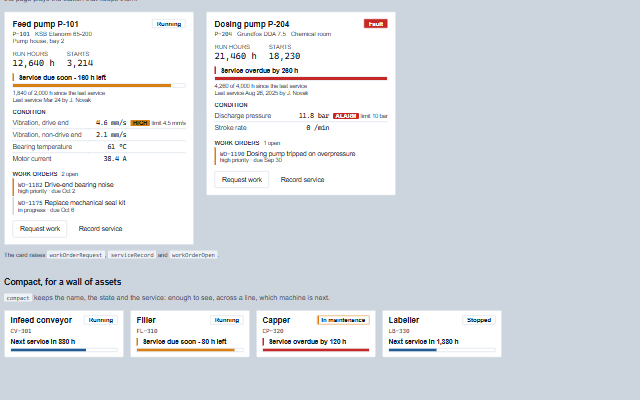
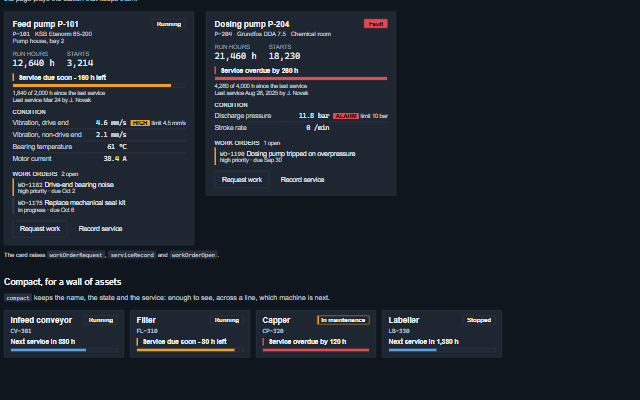
AssetCard is one machine as maintenance sees it: how long it has run, when it is next due for service, how it is doing and what is open against it.
Its first job is to answer "is it due" in hours - the service bar fills as the interval is used and says in words how much is left or by how much it is overdue. Colour is for what is abnormal: a service due soon or overdue, a condition reading out of band, a machine in fault. Request work and Record service raise events; the application puts them where the plant keeps its maintenance.
English, German, French, Spanish, Chinese (locale packs)
In the demo: Two pumps · Compact, for a wall of assets. Open the demo
Quick start
Install the package, load the two stylesheets and the component's module, and put the element on the page. The element below is the first one of the demo. Put the script after the module, in a <script type="module">, so that it runs once the component is defined.
const assetCard = document.getElementById('pump');

// raised when the operator sends a request for work on the asset
assetCard.addEventListener('workOrderRequest', (event) => {
    const { assetId, text, priority } = event.detail;
    // the component waits: carry out the request, then set the property from the result
});

// the same values as properties
assetCard.serviceInterval = 2000;
assetCard.name = 'Feed pump P-101';
assetCard.assetId = 'P-101';
assetCard.model = 'KSB Etanorm 65-200';
The properties the demo sets, then the next ones; the API page lists all 17 with their types and defaults.
Name
Type, default
Description
name
string
Sets or retrieves the name of the asset. It is the heading of the card and its accessible name.
assetId
string
Sets or retrieves the asset's identifier, as the plant's maintenance system knows it.
model
string
Sets or retrieves the maker and model.
location
string
Sets or retrieves where the asset stands.
runHours
number 0
Sets or retrieves the run hours, from the PLC's counter.
starts
number?
Sets or retrieves the number of starts, from the PLC's counter. Null hides it.
serviceInterval
number 0
Sets or retrieves the hours between services. 0 for an asset without an hours-based interval, which the card says rather than drawing an empty bar.
lastServiceHours
number 0
Sets or retrieves the run hours at the last service. The next is due at this plus the interval. When runHours is below it - a counter reset or replaced, or a service entered wrong - the card says the counter needs checking instead of showing a full interval.
lastServiceDate
string
Sets or retrieves when the last service was done, as an ISO date.
lastServiceBy
string
Sets or retrieves who did the last service.
condition
array
Sets or retrieves the condition readings as [{ label, value, unit, status, limit, direction }]. status is normal, warning or alarm; a reading out of band says so in words, with its limit. A warning names its side: direction 'high' or 'low' when given, otherwise high when a numeric value is above its limit and low when below it, and 'warning' when neither can be told.
workOrders
array
Sets or retrieves the work orders as [{ id, title, status, priority, due }]. Done orders are not listed. Assign a new array to update the component.
busy
boolean false
Sets or retrieves whether the application is sending a request or recording a service. Send and Record wait.
The events carry their data in event.detail. workOrderRequest and serviceRecord are requests: the asset card raises them only while readOnly and busy are false and keeps workOrders, lastServiceHours and lastServiceDate until the application sets them. workOrderOpen reports a click on a listed work order.
Event
Description and detail
workOrderRequest
This event is triggered when the operator sends a request for work on the asset.
assetIdstring The asset's identifier. textstring What needs doing. prioritystring high, normal or low.
serviceRecord
This event is triggered when a service is recorded, after the confirmation. The card does not restart the interval itself: the application records it and sets lastServiceHours.
assetIdstring The asset's identifier. runHoursnumber The run hours the service was done at.
workOrderOpen
This event is triggered when a work order is opened from the card, for the application to show it.
idstring The id of the work order. assetIdstring The asset's identifier.
In Angular, React, Vue and Blazor
The same element with its wrapper. Each page has the installation steps and the full demo in that framework.
The AssetCard is a group named after the asset. Its run hours and starts are a description list; the service line says in words how many hours are left or by how much the service is overdue, and the bar under it is a meter labelled by that line. A condition reading out of band says "high" or "alarm" beside its value, with its limit, so a reading is never abnormal by colour alone.
Roles: "group""meter"
Key
Action
Tab
Moves through the work orders, Request work and Record service, and the fields of an open form.
Enter or Space
Opens a work order, the request form, or the confirmation.
Ctrl+Enter
In the request text, sends the request.
Escape
Closes the form or the confirmation and returns focus to its button.
The component follows the theme on the page: the default theme, or the ISA-101 light and dark themes that ship with the package. It declares 5 CSS variables of its own, among them --smart-asset-card-fill, --smart-asset-card-warning, --smart-asset-card-alarm, --smart-asset-card-alarm-text. The CSS page lists them; the themes guide covers the tokens every component shares.