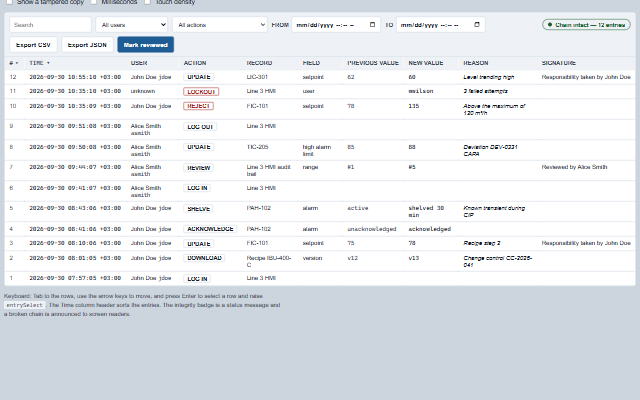
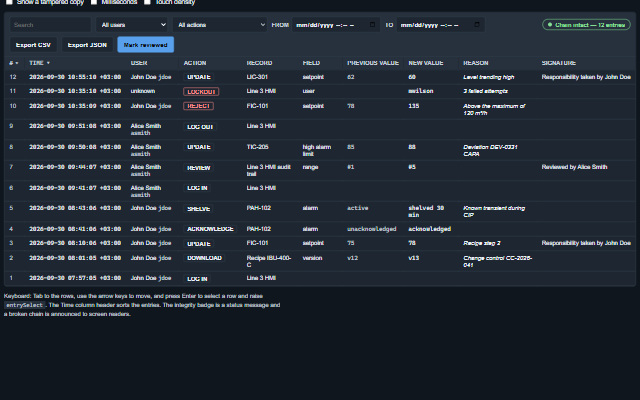
AuditTrail displays audit trail entries for review, as required by 21 CFR Part 11 §11.10(e).
Each entry shows the user, the timestamp with its UTC offset, the action, and for a change both the previous and the new value. The entries can be searched, filtered by user, action and time range, and exported as CSV or JSON including their hashes. When the entries carry a hash chain, the component verifies it and reports the result. The component is read-only: it does not create, edit, delete or reorder entries.
English, German, French, Spanish, Chinese (locale packs)
In the demo: Changing a setpoint with a signature. Open the demo
Quick start
Install the package, load the two stylesheets and the component's module, and put the element on the page. The element below is the first one of the demo. Put the script after the module, in a <script type="module">, so that it runs once the component is defined.
const auditTrail = document.getElementById('audit');

// raised by the 'Mark reviewed' button
auditTrail.addEventListener('reviewRequest', (event) => {
    const { entries, count, filter } = event.detail;
    // the component waits: carry out the request, then set the property from the result
});

// the same values as properties
auditTrail.label = 'Line 3 HMI audit trail';
auditTrail.showReview = true;
The properties the demo sets, then the next ones; the API page lists all 17 with their types and defaults.
Name
Type, default
Description
entries
array
Sets or retrieves the entries, as { seq, id, at, system, user, userName, action, record, field, oldValue, newValue, reason, signature, previousHash, hash }, in sequence. For a running feed use addEntry(), which verifies only the entry it adds.
showMilliseconds
boolean false
Determines whether the time column shows milliseconds.
showReview
boolean false
Determines whether a 'Mark reviewed' button is shown. The button raises the reviewRequest event with the entries shown; the application records the review, with a signature if required.
label
string
Sets or retrieves the table's caption and the accessible name. Empty shows 'Audit trail'.
density
string normal
Sets or retrieves the target size of the toolbar controls.
columns
array
Sets or retrieves the columns shown, in order, from seq, at, user, action, record, field, oldValue, newValue, reason, signature and system. Empty shows all but system.
sortDirection
string desc
Sets or retrieves the order by sequence: newest first, or oldest first. The Time header toggles it.
filter
object
Sets or retrieves the filter as { text, user, action, from, to }. text is searched across the entry, user and action are matched exactly, and from and to are ISO strings or epoch milliseconds. The toolbar edits the filter and raises the filterChange event.
showToolbar
boolean true
Determines whether the search, filters, integrity badge and export buttons are shown.
showIntegrity
boolean true
Determines whether the hash chain is verified and its verdict shown.
The events carry their data in event.detail. entrySelect and filterChange follow a change the audit trail has already made to selected or filter, export reports a download the audit trail starts itself, and integrityChange reports a new result of the chain check. reviewRequest is a request from the Review button, shown only while showReview is true, and the application carries out the review.
Event
Description and detail
entrySelect
This event is triggered when an entry is selected by click, Enter or select().
entryobject The entry.
filterChange
This event is triggered when the toolbar changes the filter.
filterobject { text, user, action, from, to } as applied.
integrityChange
This event is triggered when the chain verdict changes, an intact trail replaced by a copy that breaks, or the reverse.
integrityobject { ok, count, brokenAt, reason }, or null. statestring 'intact', 'broken' or 'none'.
export
This event is triggered when an export is downloaded. An export is itself an action that can be recorded in the audit trail.
formatstring 'csv' or 'json'. countnumber How many entries were exported. fileNamestring The file name offered.
reviewRequest
This event is triggered by the 'Mark reviewed' button. The application records the review.
entriesany[] The entries shown. countnumber How many. filterobject The filter in force.
Methods
Method
Description
addEntry(entry)
Adds an entry, for example from a Trail subscription that keeps the viewer up to date.
visible() returns array
Returns the entries the filter lets through, in display order.
count() returns number
Returns how many entries are held, filtered or not.
integrity() returns object
Returns the chain verification as { ok, count, brokenAt, reason }, or null when integrity is not shown, when there are no entries and no anchor, or when no entry carries a hash and requireChain is off. reason is 'link', 'hash', 'sequence' or 'missing' at the first entry that fails, 'unchained' when no entry carries a hash, 'count' when fewer entries than expectedCount are given, or 'head' when the chain does not contain expectedHead. The verdict is kept between refreshes: filtering and sorting do not re-verify, and addEntry() verifies only the entry it adds.
export(format, options?) returns string
Returns the complete trail as text, with every entry and every hash, regardless of the current filter. In CSV, a text value that a spreadsheet would run as a formula (starting with =, +, -, @, a tab or a carriage return) is prefixed with an apostrophe; numbers are written as they are. The JSON export is the exact copy that verifies.
download(format, options?)
Downloads the export as a file and raises the export event.
select(id)
Selects an entry by id and raises the entrySelect event. Pass an empty string to clear the selection.
In Angular, React, Vue and Blazor
The same element with its wrapper. Each page has the installation steps and the full demo in that framework.
The AuditTrail is an HTML table with a caption and column headers, so the table navigation of a screen reader works on it: reading a column, reading a row, jumping to a header. The rows have a roving tab stop: one stop for the table, the arrow keys move between rows and Enter selects a row. The toolbar controls are native inputs with labels. The chain verification result is a status message, and a broken chain is announced assertively. The previous value and the new value are two columns and both are read; neither is struck through, because struck-through text is skipped by some screen readers.
Roles: "group""status"
Key
Action
Tab
Moves through the toolbar, search, user, action, from, to, the export buttons, Mark reviewed, then the sort header, then onto the rows as one stop.
Arrow Down / Arrow Up
Move between rows.
Home / End
Move to the first / last row shown.
Enter / Space on a row
Selects it, raising entrySelect.
Enter / Space on the Time header
Toggles the sort order.
Typing in the search field
Narrows the rows as you type, raising filterChange. The row count is in the footer when rows are held back.
The component follows the theme on the page: the default theme, or the ISA-101 light and dark themes that ship with the package. It declares 10 CSS variables of its own, among them --smart-audit-size, --smart-audit-background, --smart-audit-header-background, --smart-audit-border. The CSS page lists them; the themes guide covers the tokens every component shares.