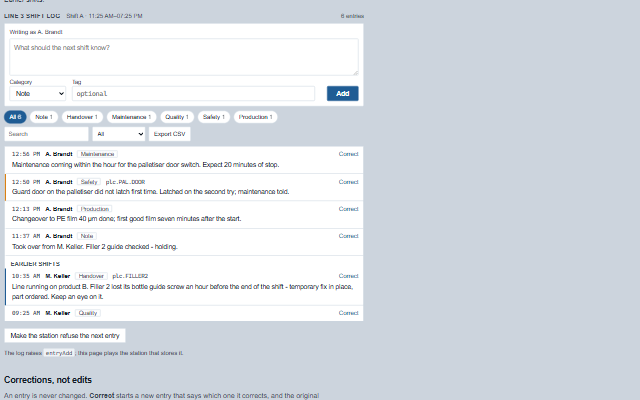
ShiftLog is the book on the control-room desk, kept where the screens are: what one shift needs the next to know that no tag says - that a filler jammed twice and was cleared by hand, that maintenance is coming at ten.
Entries are append-only, by category, and each names who wrote it; an entry is never edited, it is corrected by a new entry that says which one it corrects, so the log stays a record of what was known when. Handover entries carry the accent and safety entries the warning edge. The component writes nothing: adding an entry raises entryAdd, and the application stores it on the station, which stamps the time and the author.
Tag
<smart-shift-log>
Module
smart-industrial/source/modules/smart.shiftlog.js
Angular
ShiftLogModule from smart-industrial/angular/shiftlog
English, German, French, Spanish, Chinese (locale packs)
In the demo: A shift's log · Corrections, not edits · Read-only. Open the demo
Quick start
Install the package, load the two stylesheets and the component's module, and put the element on the page. The element below is the first one of the demo. Put the script after the module, in a <script type="module">, so that it runs once the component is defined.
const shiftLog = document.getElementById('log');

// raised when the operator adds an entry, with the Add button or Ctrl+Enter
shiftLog.addEventListener('entryAdd', (event) => {
    const { text, category, tag } = event.detail;
    // the component waits: carry out the request, then set the property from the result
});

// the same values as properties
shiftLog.label = 'Line 3 shift log';
shiftLog.author = 'A. Brandt';
The properties the demo sets, then the next ones; the API page lists all 14 with their types and defaults.
Name
Type, default
Description
entries
array
Sets or retrieves the entries as [{ id, at, author, role, category, text, tag, correcting }], the shape a Scada Studio station returns from /api/shiftlog. correcting is the id of the entry an entry corrects; the corrected entry stays, marked as corrected. Assign a new array to update the component.
label
string
Sets or retrieves the heading of the log. It is also the accessible name of the group.
shift
object?
Sets or retrieves the current shift as { name, from, to }. Entries from before from are listed under Earlier shifts.
author
string
Sets or retrieves the name shown as writing the next entry. It is only shown: the station stamps the author of the session that sends the entry.
busy
boolean false
Sets or retrieves whether the application is storing an entry. The Add button waits while it is set.
error
string
Sets the reason the station refused an entry, by its earlier name: it sets errorMessage. Reading it returns the element's error-reporting method, which reads as the message where text is wanted; read errorMessage for the message.
categories
array ["note","handover","maintenance","qua…
Sets or retrieves the categories an entry can have, and the filters above the list. Each is named through the category-<name> message, so a plant's own category needs a message too.
filter
string
Sets or retrieves the category the list is filtered to; empty lists every entry.
readOnly
boolean false
Sets or retrieves whether the log only shows the entries. The box and the Correct buttons are removed: a supervisor's view.
errorMessage
string
Sets or retrieves the reason the station refused an entry. When set, it is shown and announced, and the draft is put back into the box rather than lost - unless the operator has started another entry meanwhile, which is kept: the refused text then waits beside the reason, with a button that puts it back below what is in the box.
The events carry their data in event.detail. entryAdd is a request: the shift log raises it only while readOnly and busy are clear, shows the entry once the application adds it to entries, and puts the draft back when the application sets error. filterChange and searchChange follow a change the log has already made to filter or search, and after exportRequest the log downloads the CSV unless the application calls preventDefault().
Event
Description and detail
entryAdd
This event is triggered when the operator adds an entry, with the Add button or Ctrl+Enter. The component does not store it: the application sends it to the station, which stamps the time and the author, and hands back the entries. The box is cleared; if the application then sets error, the text comes back.
textstring The text of the entry. categorystring Its category. tagstring The tag it is about, when one was given. correctingstring The id of the entry it corrects, when it is a correction.
exportRequest
This event is triggered by Export CSV, with the file's text. The component then downloads it; an application that stores the file its own way calls preventDefault().
csvstring The CSV. countnumber The entries in it.
searchChange
This event is triggered when the search is changed in the box.
searchstring The words searched for.
filterChange
This event is triggered when the operator filters the list by a category.
categorystring The category filtered to; empty for every entry.
Methods
Method
Description
exportCsv() returns string
Returns the entries shown - after the category, the search and the period - as CSV: time, author, category, tag, text and the entry each corrects. A cell a spreadsheet would read as a formula is written as text.
In Angular, React, Vue and Blazor
The same element with its wrapper. Each page has the installation steps and the full demo in that framework.
The ShiftLog is a form and a list. The box is a labelled text area with its category and tag as labelled fields; the entries are an ordered list, newest first, each with its time, author and category as text before the entry itself. Handover and safety entries carry an accent edge, and the category is also written on every entry, so nothing is said by colour alone. An entry that a later one corrects stays in the list and says so in words.
Roles: "group""alert""presentation"
Key
Action
Tab
Moves through the text area, the category and tag fields, Add, the filters and the Correct buttons.
Ctrl+Enter
In the text area, adds the entry. Enter alone starts a new line, as it does in any text area.
Enter or Space
On a filter, lists that category. On Correct, starts a correction in the box.
Escape
Cancels a correction, keeping what was typed.
Typing in the search box
Narrows the entries as it is typed; the box keeps its text and focus when the station sends the log again.
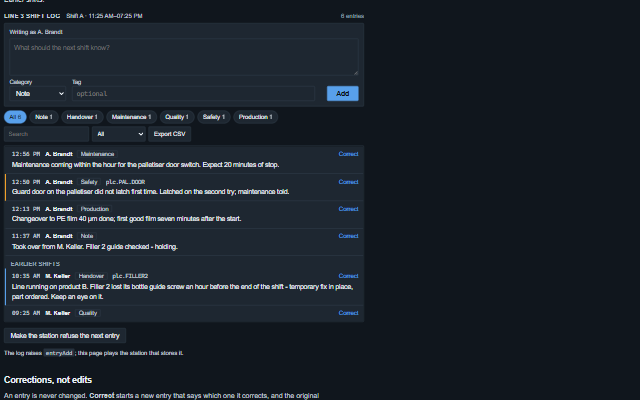
The component follows the theme on the page: the default theme, or the ISA-101 light and dark themes that ship with the package. It declares 4 CSS variables of its own, among them --smart-shift-log-handover, --smart-shift-log-safety, --smart-shift-log-error, --smart-shift-log-mono. The CSS page lists them; the themes guide covers the tokens every component shares.