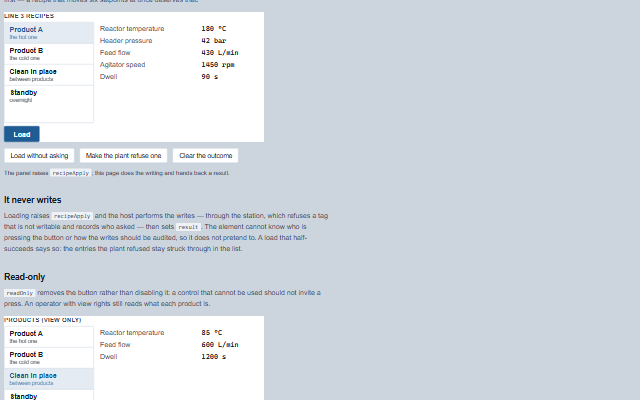
RecipePanel lists the recipes a line can be set to and loads one into the plant in a single action.
A recipe is a named set of values, and the panel shows what loading the chosen one would write - with the names an operator knows and the units they are in - before it writes anything. The panel never writes: loading raises the recipeApply event and the application performs the writes, then sets the result property. A load that half-succeeds is reported, and the entries the plant refused stay marked in the values table.
English, German, French, Spanish, Chinese, except the notice when a recipe changes during the confirmation, which stays in English (locale packs)
In the demo: Choosing a product · It never writes · Read-only. Open the demo
Quick start
Install the package, load the two stylesheets and the component's module, and put the element on the page. The element below is the first one of the demo. Put the script after the module, in a <script type="module">, so that it runs once the component is defined.
The properties the demo sets, then the next ones; the API page lists all 7 with their types and defaults.
Name
Type, default
Description
recipes
array
Sets or retrieves the recipes as [{ id, name, note, entries: [{ tag, label, value, unit }] }]. label is what an operator calls the value; without one the tag is shown, which is what an engineer calls it. Assign a new array to update the component.
selected
string
Sets or retrieves the id of the recipe whose values are shown. An empty value shows the first recipe.
label
string
Sets or retrieves the heading of the panel. It is also the accessible name of the group.
confirm
boolean true
Sets or retrieves whether loading asks first. When true, the confirmation names every value that is about to be written. A recipe moves several setpoints at once, so this is on by default. The confirmation is modal - the panel behind it does not respond and Tab stays on its two buttons - and it freezes what it names: Load it sends the recipe as it was shown. If that recipe changes underneath while the question is open (the list is refreshed, another recipe is selected), the question is withdrawn and the panel says so. The second click of the double-click that opened it, a press within 300 ms of opening and a held key do not answer it.
busy
boolean false
Sets or retrieves whether a load is in flight. The application sets it while it writes, so the button cannot be pressed twice and the panel says what it is doing. The panel also sets it itself as it raises recipeApply, so a double press is one load even when the application sets busy only after an await. It is released when the application sets busy to false or sets result, or after ten seconds.
result
object | null
Sets or retrieves what the last load did, as { name, applied, of, failed: [{ tag, error }], at }. The application sets it when the writes come back. The entries named in failed are marked refused in the values table, so a load that half-succeeded is visible rather than only logged. A load refused as a whole - the role may not load, the session ran out - wrote nothing, and is given as { name, error }, which the panel says in those words rather than as "0 of 5 written".
readOnly
boolean false
Sets or retrieves whether the panel only shows the recipes. The Load button is removed rather than disabled, because a control that cannot be used should not invite a press; the values are still readable.
Events
The events carry their data in event.detail. recipeSelect reports a choice the recipe panel has already made: it sets selected and then raises the event. recipeApply is a request: the panel raises it only while readOnly and busy are false, asks for confirmation first while confirm is true, writes nothing to the plant, and shows the outcome when the application sets result.
Event
Description and detail
recipeApply
This event is triggered when the operator loads a recipe, after the confirmation when one is asked for. The component does not write: the application performs the writes and then sets the result property. It cannot know who is pressing the button or how the writes should be audited, so it does not pretend to. With confirm on, the id and the values are the ones the confirmation showed.
idstring The id of the recipe. namestring The name of the recipe, as the operator saw it. entriesany[] The values to write, as [{ tag, value }].
recipeSelect
This event is triggered when a recipe is chosen, by pointer or by keyboard. It is also raised when the recipe already shown is chosen again. Nothing is written; only what the panel shows changes.
idstring The id of the recipe now shown. namestring Its name.
In Angular, React, Vue and Blazor
The same element with its wrapper. Each page has the installation steps and the full demo in that framework.
The RecipePanel is a list of recipes and the values loading one would write, all as text. The recipes are a listbox with one tab stop and arrow key navigation; the values are a table whose row headers are the names an operator knows. What a load did is a live region, so an operator who cannot see the panel still hears whether the plant took every value - assertively when it refused one, politely when it did not. An entry the plant refused is struck through and also carries the word refused, because a line through text is not a state a screen reader reports.
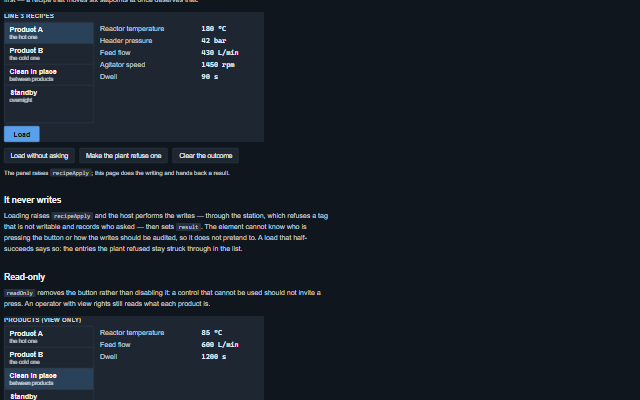
The component follows the theme on the page: the default theme, or the ISA-101 light and dark themes that ship with the package. It declares 4 CSS variables of its own, among them --smart-recipe-panel-refused-color, --smart-recipe-panel-done-color, --smart-recipe-panel-value-font, --smart-recipe-panel-list-width. The CSS page lists them; the themes guide covers the tokens every component shares.