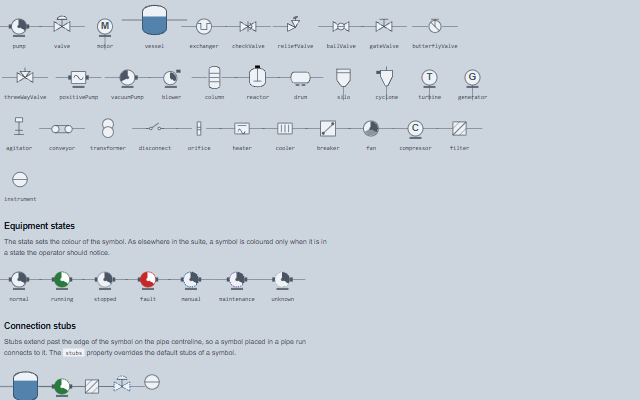
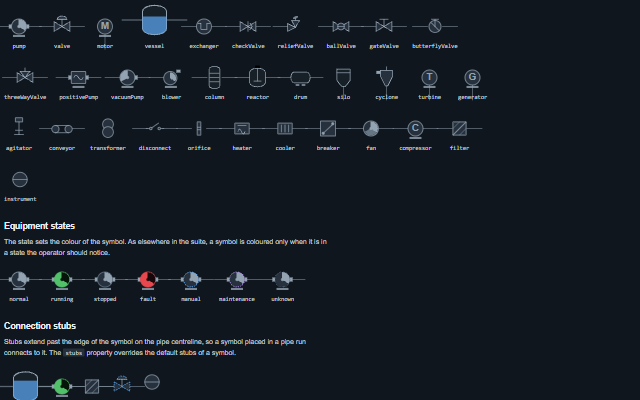
MimicSymbol displays one piece of equipment on a process diagram, such as a pump, a valve, a tank or a motor, with its tag, state and reading.
The symbols are drawn as SVG in a 100x100 viewBox and scale with the element. The state colours come from the theme, and clicking the symbol raises an event so the application can open the related faceplate.
English, German, French, Spanish, Chinese, except the symbol type in the spoken name, which is its identifier (for example reliefValve) (locale packs)
In the demo: The symbol library · Equipment states · Connection stubs · and more. Open the demo
Quick start
Install the package, load the two stylesheets and the component's module, and put the element on the page. The element below is the first one of the demo. Put the script after the module, in a <script type="module">, so that it runs once the component is defined.
const mimicSymbol = document.getElementById('r1');

// raised when the symbol is chosen, by click or by pressing Enter or Space while it has
// focus, typically used to select the item and open its detail
mimicSymbol.addEventListener('symbolClick', (event) => {
    const { label, symbol, state } = event.detail;
    // ...
});

// the same values as properties
mimicSymbol.symbol = 'pump';
mimicSymbol.label = 'P-2101A';
mimicSymbol.state = 'running';
mimicSymbol.value = '312 L/min';
The properties the demo sets, then the next ones; the API page lists all 11 with their types and defaults.
Name
Type, default
Description
label
string
Sets or retrieves the equipment tag shown beside the symbol.
level
number?
Sets or retrieves the content of a vessel as a percentage, drawn as a fill clipped to the vessel shape. Only the vessel symbol uses it.
selected
boolean false
Sets or retrieves whether the symbol is drawn as the current selection.
state
string normal
Sets or retrieves the equipment state, which sets how the symbol is drawn. In the Industrial themes running - the normal state - is drawn solid neutral and stopped as a light body, as ISA-101 asks, so colour is left for fault; elsewhere running is green. The smart-mimic-classic class on the symbol, the diagram or the page brings the green back in the Industrial themes, and the --smart-mimic-running-fill, --smart-mimic-running-stroke and --smart-mimic-running-detail custom properties set it outright. unknown means no data: the body is hollow and dotted, so it is not read as stopped, and the reading is struck through as not current.
symbol
string pump
Sets or retrieves the symbol to draw. The built-in set contains 33 ISA-5.1 shapes: pumps (centrifugal, positive displacement, vacuum), valves (control, check, relief, ball, gate, butterfly, three-way), vessels (vertical, column, reactor, drum, silo, cyclone), rotating equipment (motor, turbine, generator, fan, blower, compressor, agitator, conveyor), electrical equipment (breaker, transformer, disconnect) and inline devices (filter, exchanger, orifice, heater, cooler, instrument bubble). The names can be enumerated at run time from the static symbols map. The value is not restricted to the built-in names, because symbolTemplate can supply additional symbols. An unknown symbol without a template falls back to the pump.
value
string
Sets or retrieves a reading rendered under the symbol, already formatted with its unit. It is not reflected to an attribute: copying it to one on every update made the browser restyle every symbol of a large diagram.
labelPosition
string bottom
Sets or retrieves where the tag is rendered.
rotate
number 0
Sets or retrieves a rotation in degrees, for symbols that sit in a vertical run.
quality
string good
Sets or retrieves the quality of what the symbol shows: good, uncertain, bad or stale. Reflected to an attribute when not good. Bad drops the state colour (a state from a bad signal is not a state) and strikes the reading through; stale fades the symbol and its reading; uncertain dashes the outline. A mark in the corner - a cross, a clock, a question mark - says which without colour, and the quality is spoken in the symbol's name and shown as a tooltip on the reading.
stubs
string auto
Sets or retrieves which connection stubs are drawn. Stubs extend past the edge of the symbol on the pipe centreline, so a symbol placed in a pipe run connects to the line on either side.
The events carry their data in event.detail. symbolClick reports a click, Enter or Space on the mimic symbol and changes nothing. The application decides what to open.
Event
Description and detail
symbolClick
This event is triggered when the symbol is chosen, by click or by pressing Enter or Space while it has focus, typically used to select the item and open its detail. A disabled symbol raises nothing.
labelstring The symbol's tag. symbolstring Which symbol is drawn. statestring The equipment state at the time of the click.
In Angular, React, Vue and Blazor
The same element with its wrapper. Each page has the installation steps and the full demo in that framework.
A MimicSymbol is one piece of equipment on a process diagram. Because the operator clicks it to open its details, it is an interactive control: it is focusable, exposed as a button and operated with Enter or Space. A symbol placed on a diagram for display only can be removed from the tab order, in which case it is exposed as an image.
Roles: "button""img"
Key
Action
Tab
Moves focus to the symbol and away again, while it is interactive.
Enter or Space
Reports the symbol as chosen, raising symbolClick - the same event a pointer click raises. Space also has its default page-scroll suppressed, because a mimic usually sits inside a scrolling diagram.
The component follows the theme on the page: the default theme, or the ISA-101 light and dark themes that ship with the package. It declares 8 CSS variables of its own, among them --smart-mimic-symbol-size, --smart-mimic-fill, --smart-mimic-stroke, --smart-mimic-detail. The CSS page lists them; the themes guide covers the tokens every component shares.