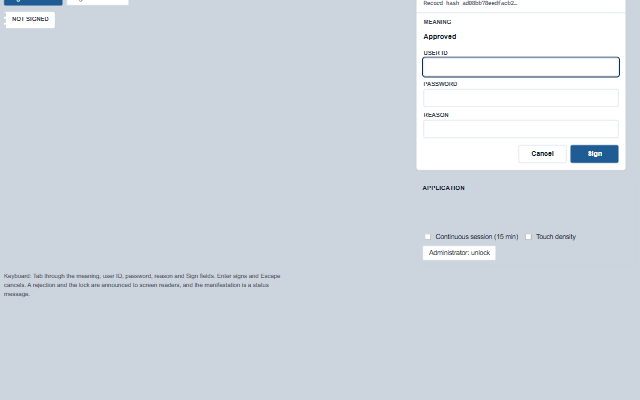
ESignature provides the electronic signature dialog described in 21 CFR Part 11.
It shows the record being signed and its hash, the meaning of the signature (approved, reviewed, authored, responsible, verified or witnessed), a user ID and password field, and an optional reason. The component does not verify credentials: it raises the signRequest event and waits for the application to call accept() or reject(). The resulting signature contains the SHA-256 hash of the record, and Smart.Industrial.Audit.verifySignature() checks later that the record still produces that hash. The hash has no key: it shows that a record changed after signing or that a signature was moved to another record, but anyone who can rewrite both the record and the stored signature can recompute it. Protection against deliberate alteration rests with the application's access control and audit trail. Failed attempts are counted and the dialog locks after maxAttempts. With continuousSession enabled, a repeat signing by the same user within sessionTimeout asks for the password only.
English, German, French, Spanish, Chinese (locale packs)
In the demo: Releasing a batch · Batch record B-2026-0912 · Application. Open the demo
Quick start
Install the package, load the two stylesheets and the component's module, and put the element on the page. The element below is the first one of the demo. Put the script after the module, in a <script type="module">, so that it runs once the component is defined.
const esignature = document.getElementById('sign');

// raised when the signer submits
esignature.addEventListener('signRequest', (event) => {
    const { userId, password, meaning } = event.detail;
    // verify userId and password on the server, then:
    esignature.accept({ userName: 'A. Brandt' });
    // or, when they do not verify: esignature.reject('wrong password');
});

// once the panel has rendered, open it for the record to sign; the promise resolves with the signature
esignature.whenRendered(() => {
    esignature.sign({ id: 'B-0912', title: 'Batch B-0912', fields: [{ label: 'Yield', value: '98.4 %' }] }, { meaning: 'approved' })
        .then((signature) => console.log(signature));
});

// the same values as properties
esignature.autoClose = 0;
esignature.requireReason = true;
The properties the demo sets, then the next ones; the API page lists all 16 with their types and defaults.
Name
Type, default
Description
record
object
Sets or retrieves the record being signed, as { id, title, fields: [{ label, value }] } or any object. The record is shown in the panel and the whole object is hashed into the signature. The panel takes a copy and its hash together, so what is signed is what was shown: a record assigned while the application is verifying a submitted signature does not change that signature (its recordId and recordHash stay those of the record submitted) and is shown once the request is answered.
meaning
string
Sets or retrieves the meaning of the signature. Empty asks the signer to choose.
lockMeaning
boolean false
Determines whether the meaning is shown as fixed text instead of a selection, for a step whose meaning is always the same, such as a release that is always an approval.
requireReason
boolean false
Determines whether a reason must be given before the request is raised.
sessionUserId
string
Sets or retrieves the signed-in user, when the application knows one. Pre-fills the user ID and, with continuousSession, is the user whose repeat signings need the password only.
sessionUserName
string
Sets or retrieves the printed name of the session user, used in the continuous-session hint and as the signer's name when the signer is the session user and the application's accept() gives no name.
continuousSession
boolean false
Determines whether a repeat signing by the session user within sessionTimeout of the last asks for the password only. The first signing always uses both components.
autoClose
number 2500
Sets or retrieves how long the manifestation stays after a signing before the panel closes, in milliseconds. 0 keeps it open until Close.
label
string
Sets or retrieves the panel's title. Empty shows 'Electronic signature'.
density
string normal
Sets or retrieves the target size. touch makes the fields and buttons 48px high.
The events carry their data in event.detail. signRequest is a request: the e-signature panel shows the signing as pending and waits, with no timeout, until the application calls accept() or reject(). signed, rejected, lockout, open and cancel report what the panel has already done.
Event
Description and detail
signRequest
This event is triggered when the signer submits. The application verifies the credentials and calls accept() or reject(). The password is in this event and nowhere else. record is the copy that was shown and recordHash its hash - the signature accept() builds carries the same.
userIdstring The user ID entered, or the session user's. passwordstring The password entered. meaningstring The meaning chosen. reasonstring The reason given, or ''. recordobject The record being signed. recordHashstring SHA-256 of the record, computed when the panel opened or the record property last changed. continuousboolean Whether this was a password-only signing. atstring When it was submitted, ISO 8601 with offset.
signed
This event is triggered when the application accepts.
This event is triggered when the application rejects.
reasonstring The reason given, or ''. attemptnumber How many refusals so far. remainingnumber Attempts left before the lock, or -1 when maxAttempts is 0.
lockout
This event is triggered when the refusals reach maxAttempts. The application enforces the same on the server.
userIdstring The user ID in the field at the time. attemptsnumber The refusals counted.
open
This event is triggered when the panel opens.
cancel
This event is triggered when the panel is closed without signing.
Methods
Method
Description
sign(record?, options?) returns any
Opens the panel for a record and returns a promise of the signature. The promise resolves when the application calls accept(), and rejects with { reason: 'cancel' | 'lockout' | 'superseded' } otherwise.
accept(verification?) returns object
Called by the application after it has verified the credentials. Builds the signature as { id, userId, userName, meaning, meaningLabel, reason, at, recordId, recordHash }, where recordId and recordHash are those of the record that was submitted, shows the manifestation, raises the signed event and resolves the promise. Returns the signature, or null when no signing was pending.
reject(reason?)
Called by the application when the credentials could not be verified or the signer is not authorised. Counts the attempt, shows the rejection and locks the panel after maxAttempts.
cancel()
Closes the panel without signing, raises the cancel event and rejects the promise. Does nothing while the panel is closed.
reset()
Clears the failed attempt count and the lock. Intended to be called by the application, not by the signer.
resetSession()
Clears the last signing, so that the next signing asks for both signature components again.
attempts() returns number
Returns the failed attempts since the last successful signing or reset().
isLocked() returns boolean
Returns whether the panel is locked.
isContinuous() returns boolean
Returns whether the next signing needs the password only.
In Angular, React, Vue and Blazor
The same element with its wrapper. Each page has the installation steps and the full demo in that framework.
The ESignature is a form inside a dialog: native inputs with labels, a native select for the meaning, a submit button, and the browser's own password field with its autocomplete attribute, so password managers and screen readers treat it as a login form. Opening the dialog moves focus to the first field the signer has to fill in. A rejection is an alert containing the reason and the remaining attempts; the lockout is announced assertively; and the manifestation, once the application accepts the signature, is a status message with the text the record will carry.
Roles: "dialog""alert""status"
Key
Action
Tab
Moves through the close button, the meaning, the user ID, the password, the reason, Cancel and Sign. On opening, focus lands on the first field still to be filled.
Enter
In the user ID, the password or the free-text reason: submits, raising signRequest when the meaning, user ID, password and (if required) reason are all given, and an alert naming the first that is missing otherwise. Enter in the meaning list or the preset reason list does not submit.
Escape
Cancels, raising cancel; after a signing, closes the manifestation. Does nothing while the application is verifying.
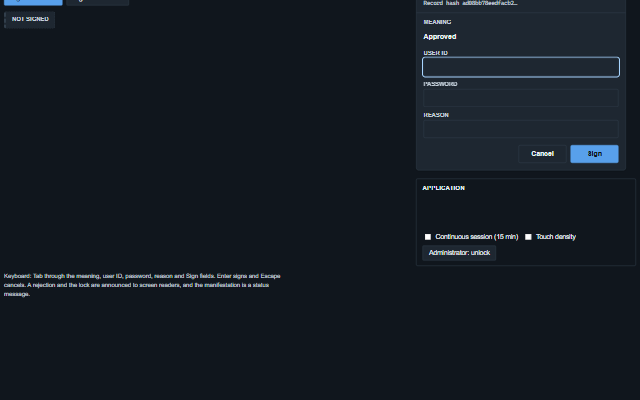
The component follows the theme on the page: the default theme, or the ISA-101 light and dark themes that ship with the package. It declares 9 CSS variables of its own, among them --smart-esign-size, --smart-esign-background, --smart-esign-header-background, --smart-esign-border. The CSS page lists them; the themes guide covers the tokens every component shares.