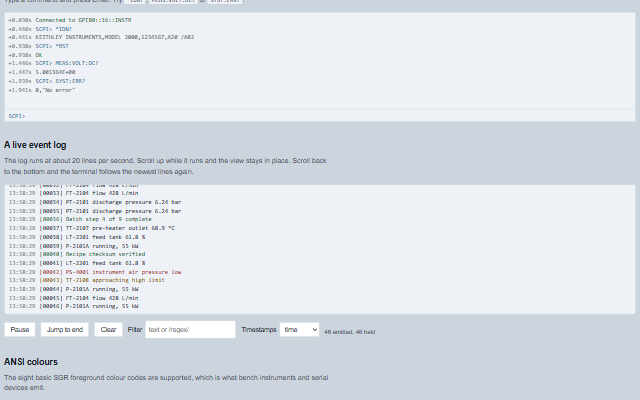
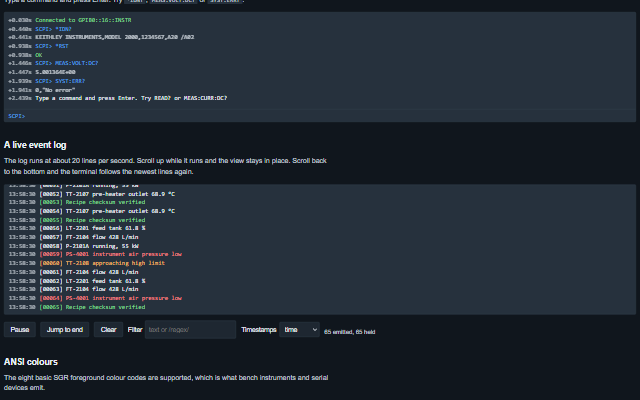
Terminal displays a stream of lines, such as an instrument session or an event log, at a high rate.
Lines are appended without re-rendering the existing content and kept in a ring buffer of a fixed length, so the DOM does not grow. Auto-scroll pauses while the user scrolls up to read and resumes when they scroll back to the end. ANSI colour codes are supported.
Tag
<smart-terminal>
Module
smart-industrial/source/modules/smart.terminal.js
Angular
TerminalModule from smart-industrial/angular/terminal
English, German, French, Spanish, Chinese (locale packs)
In the demo: An SCPI session · A live event log · ANSI colours. Open the demo
Quick start
Install the package, load the two stylesheets and the component's module, and put the element on the page. The element below is the first one of the demo. Put the script after the module, in a <script type="module">, so that it runs once the component is defined.
const terminal = document.getElementById('scpi');

// raised when a command is entered on the command line
terminal.addEventListener('command', (event) => {
    const { command } = event.detail;
    // the component waits: carry out the request, then set the property from the result
});

// the same values as properties
terminal.interactive = true;
terminal.prompt = 'SCPI> ';
The properties the demo sets, then the next ones; the API page lists all 9 with their types and defaults.
Name
Type, default
Description
filter
string
Sets or retrieves a filter, either as plain text matched case-insensitively or as a /regex/. The filter affects the view only: a filtered-out line stays in the buffer, so clearing the filter restores the history. An incomplete regular expression falls back to a substring match while it is being typed. Lines that leave the buffer leave the view by which lines they are, so a filtered view keeps every matching line still in the buffer.
interactive
boolean false
Sets or retrieves whether a command line is shown. Pressing Enter echoes the command as a transcript line and raises the command event. The application appends the response, because the component does not know what is connected.
maxLines
number 500
Sets or retrieves how many lines the ring buffer holds. Lowering it trims the oldest immediately. Never goes below one.
paused
boolean false
Sets or retrieves whether the terminal is frozen. A paused terminal keeps what it holds and drops anything appended, and write returns false so the application knows the line was not taken. While paused the command line sends nothing: the line stays in the box, the box says why, and Enter sends it once the terminal is resumed.
prompt
string >
Sets or retrieves the prompt of the command line, which is also used as the prefix when a command is echoed.
timestampFormat
string none
Sets or retrieves how each line is stamped.
announce
boolean false
Sets or retrieves whether new lines are announced to assistive technology. Off by default and rate-limited when on. Errors are announced immediately; other lines are announced at most once every few seconds.
ansiColors
boolean false
Sets or retrieves whether ANSI SGR escape codes are rendered as colours. The eight basic foreground colours, bold and reset are supported, which is what bench instruments and serial devices emit. When disabled, the colour codes are removed. Other escape sequences - erase line, cursor moves and visibility, window titles - and control characters such as NUL and BEL are always removed, and a carriage return goes back to the start of the line, so a progress line written over itself reads as its last state.
autoScroll
boolean true
Sets or retrieves whether the view follows the newest line. The view follows only while it is already scrolled to the bottom. Boolean attributes are presence-based, so set the property from script to turn it off.
Events
The events carry their data in event.detail. command is a request: the terminal raises it on Enter only while interactive is true, echoes the command line and leaves the response to the application. lineAppended reports a line the terminal has already added, the echo included.
Event
Description and detail
command
This event is triggered when a command is entered on the command line. The component echoes the command; the application appends the response. It is not raised while the terminal is disabled or paused, nor by the Enter that ends an IME composition. Up and Down on the command line bring back the last 50 commands sent.
commandstring What was typed, without the prompt.
lineAppended
This event is triggered when a line is appended.
lineobject The line: { id, text, level, at }. lengthnumber How many lines the buffer now holds.
Methods
Method
Description
write(text, level?) returns boolean
Appends one line. Returns false when the terminal is paused and the line was dropped. The text is escaped, so device output cannot inject markup.
writeMany(lines, level?) returns boolean
Appends several lines with one scroll and one announcement. Accepts strings or { text, level } objects.
clear()
Empties the buffer and the view.
scrollToEnd()
Scrolls to the newest line and resumes following new lines. Intended for a "jump to end" control.
snapshot() returns object[]
Returns the lines in the buffer, oldest first, as a copy that is not changed by later writes.
toText(filtered?) returns string
Returns the buffer as plain text, oldest first, including the timestamps when they are enabled, for export, a report or the clipboard.
In Angular, React, Vue and Blazor
The same element with its wrapper. Each page has the installation steps and the full demo in that framework.
The Terminal is a live log. Its lines arrive faster than a screen reader can follow, so the component is silent by default, rate-limited when announcements are enabled, and can be focused so that the log can be scrolled and read at the user's own pace.
Roles: "log"
Key
Action
Tab
Moves to the log, then to the command line when the terminal is interactive.
Arrow keys, Page Up / Page Down, Home / End
Scrolls the log once it has focus, using the browser's own scrolling. Scrolling away from the bottom stops the view from following new lines, so the reader's position is kept.
Enter
Sends the command on the command line, echoing it into the log as a transcript.
The component follows the theme on the page: the default theme, or the ISA-101 light and dark themes that ship with the package. It declares 4 CSS variables of its own, among them --smart-terminal-height, --smart-terminal-background, --smart-terminal-color, --smart-terminal-font. The CSS page lists them; the themes guide covers the tokens every component shares.