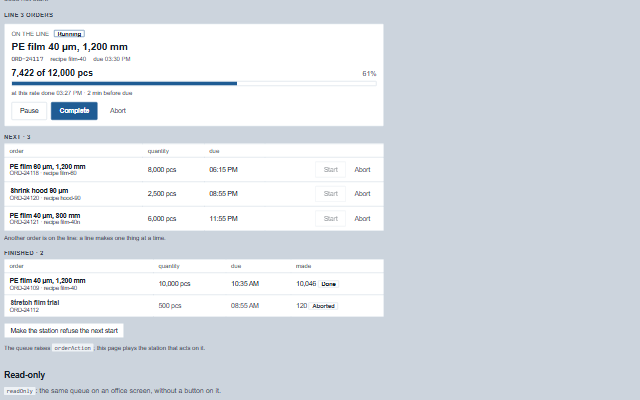
OrderQueue shows what a line is making, how far along it is, and what comes next.
The order on the line comes first, with its count against its quantity and, once it has run long enough to have a rate, when it will be done at that rate against when it is due. Start is offered on each queued order and refused, with the reason, while another order is on the line; Complete and Abort ask first, because a finished order is not started again. The component changes nothing: every button raises orderAction, and the application asks the station, which loads the order's recipe as it starts it and counts from the line's counter.
English, German, French, Spanish, Chinese (locale packs)
In the demo: A line's orders · Read-only. Open the demo
Quick start
Install the package, load the two stylesheets and the component's module, and put the element on the page. The element below is the first one of the demo. Put the script after the module, in a <script type="module">, so that it runs once the component is defined.
const orderQueue = document.getElementById('queue');

// raised when the operator starts, pauses, resumes, completes or aborts an order - after
// the confirmation, for complete and abort
orderQueue.addEventListener('orderAction', (event) => {
    const { id, action } = event.detail;
    // the component waits: carry out the request, then set the property from the result
});

// the same values as properties
orderQueue.label = 'Line 3 orders';
The properties the demo sets, then the next ones; the API page lists all 8 with their types and defaults.
Name
Type, default
Description
orders
array
Sets or retrieves the orders as [{ id, product, quantity, unit, due, recipe, status, produced, started, finished }], the shape a Scada Studio station returns from /api/orders. status is queued, running, paused, done or aborted. Assign a new array to update the component.
label
string
Sets or retrieves the heading of the queue. It is also the accessible name of the group.
busy
string
Sets or retrieves the id of the order the application is acting on. Its buttons wait. The queue also sets it itself as it raises orderAction, so a double press is one action even when the application sets busy only after an await. It is released when the application sets busy, refuses (errorMessage) or hands back the order changed, or after ten seconds.
error
string
Sets the reason the station refused an action, by its earlier name: it sets errorMessage. Reading it returns the element's error-reporting method, which reads as the message where text is wanted; read errorMessage for the message.
rate
number 0
Sets or retrieves the line's rate in units an hour, for the projection. Left 0, the rate is the running order's own so far, once it has run five minutes and made something.
showFinished
boolean true
Sets or retrieves whether finished and aborted orders are listed under the queue.
readOnly
boolean false
Sets or retrieves whether the queue only shows the orders. Every button is removed.
errorMessage
string
Sets or retrieves the reason the station refused an action. It is shown as an alert and announced.
Events
The events carry their data in event.detail. orderAction is a request: the order queue raises it only while readOnly is false, asks for confirmation first for complete and abort, and keeps orders until the application updates them. The application can set busy to the order id while it works.
Event
Description and detail
orderAction
This event is triggered when the operator starts, pauses, resumes, completes or aborts an order - after the confirmation, for complete and abort. The queue is not changed: the application asks the station and hands back the orders. A double press raises one action, and the answer to Complete or Abort has to be a second decision: the second click of the double-click that asked, or a press within 300 ms of the question, is not an answer.
idstring The id of the order. actionstring start, pause, resume, complete or abort.
In Angular, React, Vue and Blazor
The same element with its wrapper. Each page has the installation steps and the full demo in that framework.
The OrderQueue is a group for the order on the line and two tables below it, the queue and the finished orders. The order on the line has its count as text - "7,420 of 12,000 pcs" - and a progressbar with that text as its value. The projection is written, not implied: "at this rate done 13:40 · 20 min before due", or "… 40 min late", which also carries the warning edge.
Roles: "group""progressbar""alert"
Key
Action
Tab
Moves through Pause or Resume, Complete and Abort, then each queued order's Start and Abort.
Enter or Space
On Pause, Resume or Start, raises orderAction. On Complete or Abort, asks first.
Escape
Closes the confirmation and returns focus to the button that opened it.
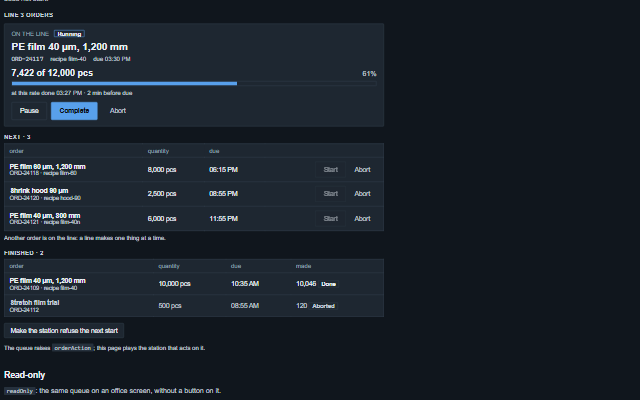
The component follows the theme on the page: the default theme, or the ISA-101 light and dark themes that ship with the package. It declares 4 CSS variables of its own, among them --smart-order-queue-fill, --smart-order-queue-late, --smart-order-queue-error, --smart-order-queue-mono. The CSS page lists them; the themes guide covers the tokens every component shares.