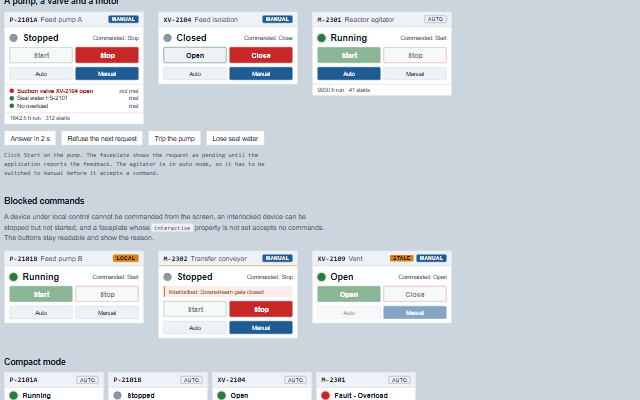
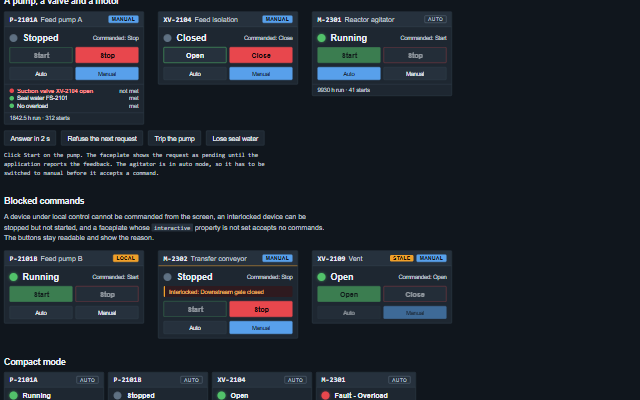
DeviceControl is a faceplate for a discrete device such as a motor, a pump or an on/off valve.
It shows the device feedback state next to the commanded state, the operating mode (auto, manual, local or out of service), the interlock, the start permissives, the run hours and the start count. Commands are requests: requestCommand raises the commandRequest event and shows the command as pending until the application updates the state, refuses the request, or pendingTimeout elapses. An interactive faceplate can request stop or close in any mode. Start and open also require manual mode, live feedback (quality not bad or stale), no active interlock and all permissives met. A command that does not meet these conditions raises the blocked event with the reason.
English, German, French, Spanish, Chinese (locale packs)
In the demo: A pump, a valve and a motor · Blocked commands · Compact mode. Open the demo
Quick start
Install the package, load the two stylesheets and the component's module, and put the element on the page. The element below is the first one of the demo. Put the script after the module, in a <script type="module">, so that it runs once the component is defined.
const deviceControl = document.getElementById('pump');

// raised when a command is requested
deviceControl.addEventListener('commandRequest', (event) => {
    const { tag, command } = event.detail;
    // the component waits: carry out the request, then set the property from the result
});

// the same values as properties
deviceControl.tag = 'P-2101A';
deviceControl.description = 'Feed pump A';
deviceControl.kind = 'pump';
deviceControl.state = 'stopped';
The properties the demo sets, then the next ones; the API page lists all 19 with their types and defaults.
Name
Type, default
Description
tag
string
Sets or gets the device tag, the first word of the accessible name and of every event.
description
string
Sets or gets the description shown beside the tag.
kind
string motor
Sets or gets the device type: motor, pump or generic devices are started and stopped, a valve is opened and closed.
state
string unknown
Sets or gets the device feedback as reported by the plant: running, stopped, starting, stopping, open, closed, opening, closing, fault or unknown. Feedback that matches the pending request completes the request. A fault is announced to assistive technology.
commanded
string
Sets or gets the last command reported by the plant (start, stop, open or close), shown as the filled command button. A command reported by the plant replaces a pending request from the screen.
mode
string auto
Sets or gets who commands the device: auto (the sequence), manual (the operator), local (a field switch; the screen can request stop or close only) or outOfService. Set by the application in response to the modeRequest event.
permissives
array
Sets or gets the start permissives as [{ label, met }]. Start and open are refused while one is not met, naming it. A permissive is met only when met is true, a non-zero number, or one of the strings 'true', '1', 'yes', 'on' or 'met'; 'false', 0, 'off', null and anything else are not met. An entry that is not an object is skipped.
discrepancy
boolean false
Sets or gets the application's finding that the feedback disagrees with the command, started, still stopped, shown as an alarm on the faceplate.
faultText
string
Sets or gets the fault's text, shown and announced with the fault state.
runHours
number?
Sets or gets the device's run hours, shown as a counter when given.
startCount
number?
Sets or gets the number of starts, shown as a counter when given.
interactive
boolean false
Sets or gets whether the screen may command the device at all. Off by default: a command requested from a faceplate the application has not enabled is refused with a reason.
The events carry their data in event.detail. commandRequest, modeRequest and resetRequest are requests: the device control raises them only while interactive is true, shows a command as pending, and keeps state and mode until the application sets them. A command still pending after pendingTimeout raises writeTimeout, blocked reports a refused command, and stateChange reports a new state from the application.
Event
Description and detail
commandRequest
This event is triggered when a command is requested. The application writes the command to the plant and reports the feedback through the state property; until then the faceplate shows the command as pending.
tagstring The device tag. commandstring start, stop, open or close.
modeRequest
This event is triggered when a mode is requested. The application answers by setting mode.
tagstring The device tag. modestring The requested mode.
resetRequest
This event is triggered when a fault reset is requested.
tagstring The device tag.
blocked
This event is triggered when a start, stop, open or close command could not be requested: the screen is not interactive, or, for start and open, the device is not in manual or is under local control, the feedback is bad or stale, an interlock holds it, or a permissive is not met.
tagstring The device tag. commandstring The command. reasonstring Why, in plain language.
writeTimeout
This event is triggered when a pending request got no feedback within pendingTimeout and was dropped.
tagstring The device tag. commandstring The command that was pending.
stateChange
This event is triggered when the feedback state changes.
tagstring The device tag. statestring The new state. oldStatestring The previous state.
Methods
Method
Description
requestCommand(command)
Requests a command: start or stop, open or close. Raises the commandRequest event and shows the command as pending, or raises the blocked event with the reason when the command cannot be requested. A command the device kind does not take, such as open on a pump, is ignored without an event. The same command requested again within one second, or a start or open that is already pending, is dropped. A command the feedback already reports, such as start on a running pump, raises commandRequest without being shown as pending. Does nothing while the faceplate is disabled.
requestMode(mode)
Requests a change of mode by raising the modeRequest event. The application responds by setting the mode property. Does nothing when the faceplate is not interactive or is disabled, when the mode is not in availableModes, or when it is already the current mode.
requestReset()
Requests a fault reset by raising the resetRequest event, while the state is fault. Does nothing when the faceplate is not interactive or is disabled.
refuse(reason)
Called by the application when it does not carry out the pending request. The request is no longer shown as pending and the reason is shown instead.
pendingCommand() returns string
Returns the command shown as pending, or null.
canRequest(command) returns boolean
Returns whether a command could be requested now. Stop and close need an interactive, enabled faceplate, in any mode. Start and open also need manual mode, live feedback (quality not bad or stale), no interlock and every permissive met. Returns false for a command the device kind does not take.
In Angular, React, Vue and Blazor
The same element with its wrapper. Each page has the installation steps and the full demo in that framework.
The DeviceControl is exposed as a group whose accessible name contains what an operator reads from the faceplate: "P-2101A, Feed pump A, Running, Manual", with the quality appended when it is not good, so stale feedback is not read as live. The state text is a status region and changes are announced as they happen; a fault is announced assertively with its text. The command buttons stay enabled when a request would be refused: pressing one raises the blocked event and shows the reason in the notice, which is also a status region, so a keyboard user learns why the command was refused. aria-disabled marks such a button as not currently effective without removing it from the tab order. aria-pressed on a command indicates whether it is the one the plant reports as in force, and on a mode whether it is the current mode. A pending request is shown as a dashed button and read as the notice "Start requested, waiting for feedback".
Roles: "group""status"
Key
Action
Tab
Moves through the commands. Start and Stop, or Open and Close, and Reset while faulted, and then the modes, in reading order. Every button is a tab stop.
Enter or Space
On a command, raises commandRequest and shows it as pending, or blocked with the reason; on Reset, raises resetRequest; on a mode other than the current one, raises modeRequest. Reset and the modes act only while the faceplate is interactive. The state and the mode do not change until the application answers.
The component follows the theme on the page: the default theme, or the ISA-101 light and dark themes that ship with the package. It declares 10 CSS variables of its own, among them --smart-device-width, --smart-device-lamp-size, --smart-device-panel, --smart-device-header. The CSS page lists them; the themes guide covers the tokens every component shares.