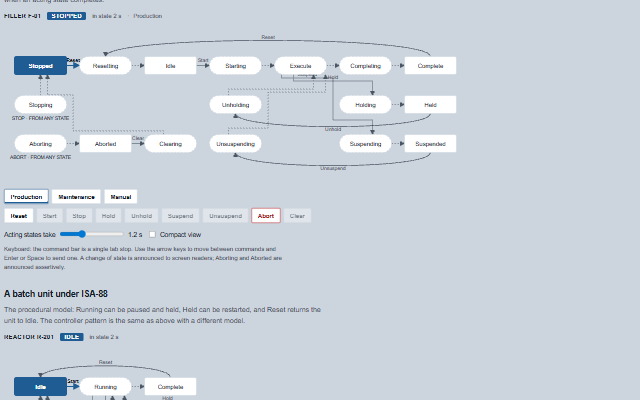
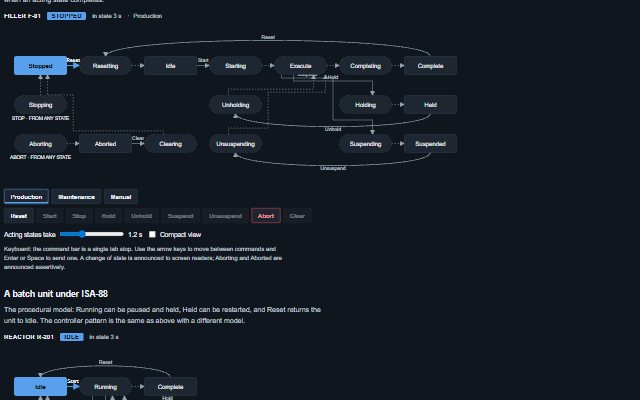
StateMachine displays the state model of a machine as a diagram with the current state highlighted, the time in the state, the unit mode and the commands that are available from the current state.
The PackML / ISA-TR88.00.02 model with its seventeen states and nine commands and the ISA-88 procedural model are built in, and a custom model can be supplied. A command press raises the commandRequest event; the application reports the state the controller reached. The canCommand(), target() and nextAutomatic() methods answer from the model, and the transitions taken are listed.
English, German, French, Spanish, Chinese, except the pending, timeout and confirm hints, which stay in English (locale packs)
In the demo: A filler under PackML control · A batch unit under ISA-88. Open the demo
Quick start
Install the package, load the two stylesheets and the component's module, and put the element on the page. The element below is the first one of the demo. Put the script after the module, in a <script type="module">, so that it runs once the component is defined.
const stateMachine = document.getElementById('filler');

// raised when a valid command is pressed
stateMachine.addEventListener('commandRequest', (event) => {
    const { command, from, to } = event.detail;
    // the component waits: carry out the request, then set the property from the result
});

// the same values as properties
stateMachine.model = 'packml';
stateMachine.state = 'Stopped';
stateMachine.label = 'Filler F-01';
stateMachine.mode = 'Production';
The properties the demo sets, then the next ones; the API page lists all 17 with their types and defaults.
Name
Type, default
Description
model
string packml
Sets or retrieves the state model. packml and isa88 include the states, commands and automatic transitions of their standards; custom uses the states and transitions properties.
state
string
Sets or retrieves the current state's id, as the controller reports it. A change is stamped, recorded in the history and raised as stateChange.
mode
string
Sets or retrieves the unit mode. Production, Maintenance, Manual, shown beside the state. PackML keeps mode and state orthogonal, and so does this.
modes
array
Sets or retrieves the unit modes offered as buttons. Pressing one raises the modeRequest event; the mode does not change until the application reports it.
view
string diagram
Sets or retrieves the view. diagram draws the whole model; compact hides the diagram and keeps the header with the state, its time and the mode, the mode buttons, the command bar and the history, for a faceplate or a machine list.
label
string
Sets or retrieves the machine's name, shown in the header and in the accessible name.
states
array
Sets or retrieves the states of a custom model as [{ id, label, kind, x, y }]. kind is wait for a state the machine stays in and acting for a state it passes through; x and y are grid positions on the diagram.
transitions
array
Sets or retrieves the transitions of a custom model as [{ from, to, command, many }]. A transition without a command is automatic and is taken when the acting state completes. many marks a command that is valid from many states; it is listed under its target state instead of being drawn as an arrow from each state. The command list of the model is derived from the transitions.
enteredAt
number
Sets or retrieves the time the current state was entered, as a timestamp. When the application sets enteredAt and state together, in either order in the same task, that time is kept for the new state and the previous state's duration is measured to it; a state change that comes without a time is stamped with the time of the change. When the state comes first, its stateChange event carries the time of the change and the history takes the controller's time when enteredAt follows. A controller that reports the time should supply it, so that the time in state is correct after a page reload.
showCommands
boolean true
Determines whether the command bar is shown. Every command of the model is listed and only the commands that are valid from the current state are enabled.
The events carry their data in event.detail. commandRequest and modeRequest are requests: the state machine raises them only while interactive is true and keeps state and mode until the application sets them. stateChange reports a new state from the application with the time spent in the previous state.
Event
Description and detail
commandRequest
This event is triggered when a valid command is pressed. The state does not change; the application sends the command to the controller and reports the state it reaches. Until the controller answers (a change of state) or pendingTimeout runs out, the component is busy and refuses the same command and every other one except Stop and Abort.
commandstring The command. fromstring The current state. tostring The state the model says the command leads to.
commandTimeout
This event is triggered when the controller did not answer a command - the state did not change - within pendingTimeout. The command is dropped, busy is cleared and the component says so.
commandstring The command that was not answered. statestring The state the controller still reports.
modeRequest
This event is triggered when a unit mode button is pressed. The mode does not change until the application reports it.
modestring The mode asked for. fromstring The mode in force.
stateChange
This event is triggered when the state property changes, when the application reports a new state.
fromstring The state left. tostring The state entered. atnumber When, as a timestamp. durationnumber How long the state left lasted, in milliseconds.
Methods
Method
Description
transitionsFrom(state?) returns array
Returns the transitions legal from a state, as [{ from, to, command }].
target(command, state?) returns string
Returns the state a command leads to from a state, or null when the command is not legal there.
canCommand(command) returns boolean
Returns whether a command is legal from the current state.
commands() returns array
Returns the commands legal from the current state, in the model's order.
nextAutomatic(state?) returns string
Returns the state an acting state completes into, or null for a wait state.
history() returns array
Returns the transitions taken, newest first, as [{ from, to, at, duration }].
timeInState() returns number
Returns the time spent in the current state, in milliseconds.
pending() returns string
Returns the command sent and not yet answered by the controller, or null.
In Angular, React, Vue and Blazor
The same element with its wrapper. Each page has the installation steps and the full demo in that framework.
The StateMachine consists of a diagram and a command bar. The diagram is SVG, named with the current state, and everything it draws is also available as text: the state badge, the time in the state, the mode and the history of transitions. The command bar is a composite widget with one tab stop and arrow key navigation. Every command of the model is listed and only the commands that are valid from the current state are enabled, so a screen reader user hears which commands exist as well as which are possible. A change of state is announced through the live region, assertively for an abort.
Roles: "group""img"
Key
Action
Tab
Moves through the mode buttons, then into the command bar landing on the command that holds the tab stop, and out again. The command bar is one stop however many commands there are.
Arrow Left/Right
Moves between the commands.
Home / End
Moves to the first / last command.
Enter or Space
On an enabled command, raises commandRequest; the controller moves and the application reports the state it reached. On a mode button, raises modeRequest.
The component follows the theme on the page: the default theme, or the ISA-101 light and dark themes that ship with the package. It declares 7 CSS variables of its own, among them --smart-state-machine-box-fill, --smart-state-machine-box-stroke, --smart-state-machine-arrow, --smart-state-machine-current. The CSS page lists them; the themes guide covers the tokens every component shares.