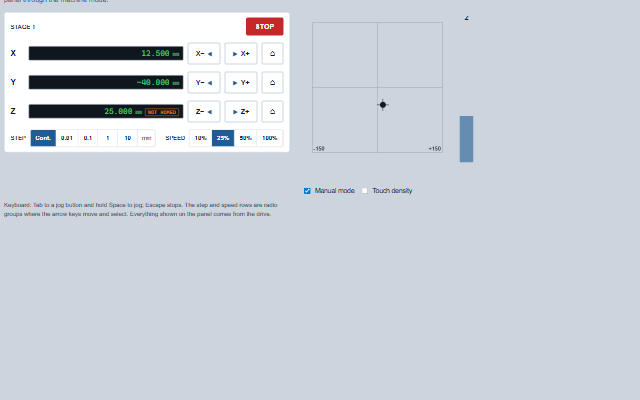
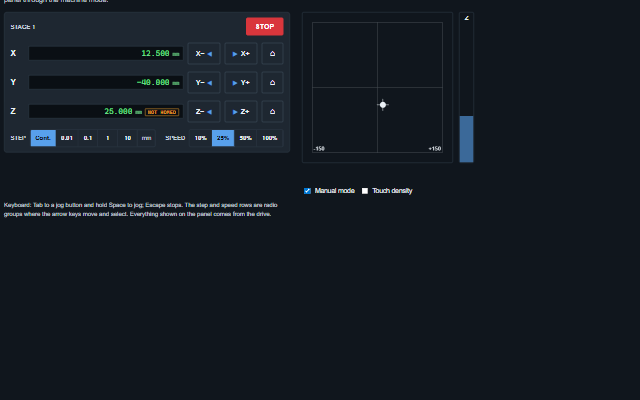
JogPanel is the manual motion panel of a machine pendant.
It shows one row per axis with the current position, jog minus and jog plus buttons and a home button, a step selector (continuous or a fixed increment), a speed override and a stop button. The component reports the operator actions through events; the positions are supplied by the application from the drive. A continuous jog raises jogStart and jogStop and is always ended when the pointer or key is released, focus is lost, an interlock is set or the stop button is pressed. Soft limits prevent jogging past the limit. The window losing the focus or the page being hidden also ends a continuous jog, and the Stop button stays enabled while the panel is disabled. In a narrow cell the buttons of an axis wrap under its position readout.
Tag
<smart-jog-panel>
Module
smart-industrial/source/modules/smart.jogpanel.js
Angular
JogPanelModule from smart-industrial/angular/jogpanel
Install the package, load the two stylesheets and the component's module, and put the element on the page. The element below is the first one of the demo. Put the script after the module, in a <script type="module">, so that it runs once the component is defined.
const jogPanel = document.getElementById('stage');

// raised when a home is requested
jogPanel.addEventListener('homeRequest', (event) => {
    const { axis } = event.detail;
    // the component waits: carry out the request, then set the property from the result
});

// the same values as properties
jogPanel.speed = 25;
jogPanel.label = 'Stage 1';
jogPanel.unit = 'mm';
The properties the demo sets, then the next ones; the API page lists all 14 with their types and defaults.
Name
Type, default
Description
axes
array
Sets or retrieves the axes as [{ id, label, unit, position, homed, min, max, state }]. position, homed and state are reported by the drive; min and max are soft limits. Setting the same axes again, in the same order, updates the rows in place as update() does and keeps a jog in progress; setting different axes ends it. For a running feed use update().
speed
number 25
Sets or retrieves the speed override, in percent, sent with every jog. Kept above 0 and no higher than the largest of speeds (100 when none is offered); anything else becomes the slowest speed offered.
unit
string mm
Sets or retrieves the unit for axes that name none.
interlocked
boolean false
Determines whether the panel is interlocked, the machine not in manual, a guard open. An interlocked panel ends any jog in progress, stays readable, shows interlockReason, and raises blocked instead of moving anything.
interlockReason
string
Sets or retrieves why the panel will not jog, shown under it while interlocked and read out when a button is pressed.
label
string
Sets or retrieves the name of the mechanism the panel moves, shown in the header and used in the accessible name.
density
string normal
Sets or retrieves the target size. touch makes the jog buttons 60px high for a gloved hand.
step
number 0
Sets or retrieves the selected step: 0 for continuous jogging, otherwise an increment in the axis unit. Changing the step ends a jog in progress. The step is kept to what the panel offers: 0 only while allowContinuous is true, otherwise a positive size no larger than the largest of steps. Anything else - a negative, 0 with Continuous switched off, a size larger than any offered - becomes the smallest step offered.
steps
array [0.01,0.1,1,10]
Sets or retrieves the step sizes offered.
allowContinuous
boolean true
Determines whether Continuous is offered as a step. Off, every jog is a step: a step of 0 becomes the smallest step offered, a continuous jog in progress ends, and jogStart() does nothing.
The events carry their data in event.detail. jogStart, jogStop, jogStep, homeRequest and stop are commands: the jog panel raises them and leaves the axis positions in axes to the application, and an interlock, a limit or another jog in progress raises blocked in place of a jog or homing request. stepChange and speedChange follow a change the panel has already made to step or speed.
Event
Description and detail
jogStart
This event is triggered when a continuous jog begins. jogStop always follows.
axisstring The axis id. directionnumber 1 or -1. speednumber The speed override, in percent.
jogStop
This event is triggered when a continuous jog ends, for any reason.
axisstring The axis id. directionnumber 1 or -1. durationnumber How long it ran, in milliseconds.
jogStep
This event is triggered when one increment is requested.
axisstring The axis id. directionnumber 1 or -1. stepnumber The increment, in the unit. speednumber The speed override, in percent.
homeRequest
This event is triggered when a home is requested.
axisstring The axis id, or null for all.
stop
This event is triggered by the Stop button, Escape, or stop().
stepChange
This event is triggered when a step is selected.
stepnumber The step, 0 for continuous. previousStepnumber The step before.
speedChange
This event is triggered when a speed is selected.
speednumber The speed, in percent. previousSpeednumber The speed before.
blocked
This event is triggered when a jog, step or home is refused. Nothing moves.
reasonstring Why, the interlock reason, the axis already jogging, or the limit. axisstring The axis id, or null.
Methods
Method
Description
update(id, patch)
Updates one axis with the values reported by the drive (position, homed, state, min, max, label, unit) and updates its row in place. Intended for a position subscription. A jog into a limit that the update reports as reached is ended.
axisList() returns array
Returns the axes as the panel holds them, with everything update() has reported.
jogStart(id, direction) returns boolean
Begins a continuous jog, as holding a jog button does. The jog ends with jogStop(). The request is refused, with the blocked event, while the panel is interlocked, while another axis is jogging, or when the jog would move into a soft limit. Does nothing while allowContinuous is false.
jogStop() returns boolean
Ends the continuous jog in progress, if there is one.
jogStep(id, direction) returns boolean
Requests one increment of the selected step, as pressing a jog button does when a step is selected. Does nothing when the step is continuous.
activeJog() returns object
Returns the continuous jog in progress as { axis, direction }, or null.
home(id?) returns boolean
Requests a homing cycle for one axis, or for all axes when no axis is given. Refused while the panel is interlocked or while an axis is jogging.
stop()
Ends a jog in progress and raises the stop event for everything else that moves.
In Angular, React, Vue and Blazor
The same element with its wrapper. Each page has the installation steps and the full demo in that framework.
The JogPanel is a group of buttons. Every jog button is its own tab stop, because a jog is an action and must not be reached by accident with an arrow key. Each button is named for what it does and, when it will not act, why: "Jog X plus", "Jog X plus, Z is jogging" or "Jog X plus, X at plus limit". The step and speed rows are radio groups with one tab stop each. The start of a jog, a step, a home request and a stop are announced; a refused press is announced assertively with the reason. The position readouts are plain text and not live regions, because a readout that updates at 10 Hz would interrupt everything else.
Roles: "group""radiogroup""radio""status"
Key
Action
Tab
Moves between the Stop button, each jog and home button, the step row and the speed row.
Space / Enter (down) on a jog button
In Continuous, begins the jog, raising jogStart. With a step selected, requests one increment, raising jogStep. Key repeat does nothing more.
Space / Enter (up) on a jog button
Ends the continuous jog, raising jogStop.
Focus leaving a jog button
Ends the continuous jog. A jog held by a key that has lost focus is not still jogging.
Escape
Anywhere in the panel: ends any jog and raises stop.
Arrow keys, Home, End in the step or speed row
Move focus and select, as in a radio group. Selecting a step ends any jog in progress.
The component follows the theme on the page: the default theme, or the ISA-101 light and dark themes that ship with the package. It declares 10 CSS variables of its own, among them --smart-jog-size, --smart-jog-background, --smart-jog-border, --smart-jog-accent. The CSS page lists them; the themes guide covers the tokens every component shares.
Engineering UnitsUnit conversion, resolution, unit systems and conversion through bindings.
ConnectivitySessions, adapters and bindings that route plant tags into components, with quality and staleness.
From a front panel to the browserEvery control and indicator of a test-and-measurement front panel mapped to a component, the mechanical actions, and where the data comes from.