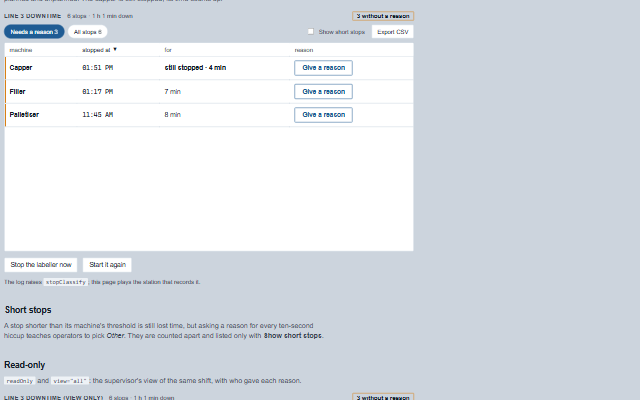
DowntimeLog lists every stop of a line and asks the person who was there why it stopped.
The station knows when a machine stopped - its running signal went false - and only the operator knows why; the reasons come from a list the plant chose, grouped as planned and unplanned, so OEE losses have causes that add up. The stops still waiting for a reason come first and the header counts them; a stop still going counts up; stops shorter than a machine's threshold are listed only when asked for, because asking a reason for every hiccup teaches operators to pick Other. The component writes nothing: a reason raises stopClassify, and the application records it on the station with who gave it.
English, German, French, Spanish, Chinese (locale packs)
In the demo: Stops waiting for a reason · Short stops · Read-only. Open the demo
Quick start
Install the package, load the two stylesheets and the component's module, and put the element on the page. The element below is the first one of the demo. Put the script after the module, in a <script type="module">, so that it runs once the component is defined.
const downtimeLog = document.getElementById('log');

// raised when the operator gives a stop its reason
downtimeLog.addEventListener('stopClassify', (event) => {
    const { id, reason, comment } = event.detail;
    // the component waits: carry out the request, then set the property from the result
});

// the same values as properties
downtimeLog.label = 'Line 3 downtime';
The properties the demo sets, then the next ones; the API page lists all 11 with their types and defaults.
Name
Type, default
Description
stops
array
Sets or retrieves the stops as [{ id, machine, machineName, from, to, seconds, short, reason, comment, classifiedBy }], the shape a Scada Studio station returns from /api/downtime. to is null while the machine is still stopped. Assign a new array to update the component.
reasons
array
Sets or retrieves the plant's reasons as [{ code, label, group }]. The picker shows them as large tiles, by group, in the order given.
label
string
Sets or retrieves the heading of the log. It is also the accessible name of the group.
busy
string
Sets or retrieves the id of the stop the application is recording a reason for. Its Save button waits.
view
string unclassified
Sets or retrieves which stops are listed: the ones waiting for a reason, or all of them.
showShort
boolean false
Sets or retrieves whether the stops shorter than their machine's threshold are listed and counted.
sortBy
string from
Sets or retrieves the column the stops are ordered by. The column headers set it: a second press turns the order round.
sortOrder
string desc
Sets or retrieves which way: newest, longest or last first, or the other way.
pageSize
number 100
Sets or retrieves how many stops are drawn at once; the rest are a "Show more" away.
readOnly
boolean false
Sets or retrieves whether the log only shows the stops and their reasons, with who gave them. Every button is removed.
The events carry their data in event.detail. stopClassify is a request: the downtime log raises it only while readOnly and busy are clear and shows the stop unclassified until the application writes the reason into stops. sortChange follows a change the log has already made to sortBy and sortOrder, and after exportRequest the log downloads the CSV unless the application calls preventDefault().
Event
Description and detail
stopClassify
This event is triggered when the operator gives a stop its reason. The list is not changed: the application records the reason on the station, which notes who gave it, and hands back the stops.
idstring The id of the stop. reasonstring The code of the reason. commentstring What the operator added, or an empty string.
exportRequest
This event is triggered by Export CSV, with the file's text. The component then downloads it; an application that stores the file its own way calls preventDefault().
csvstring The CSV.
sortChange
This event is triggered when the stops are ordered by a column header.
sortBystring The column. sortOrderstring asc or desc.
Methods
Method
Description
exportCsv() returns string
Returns the stops shown as CSV: machine, stopped, restarted, seconds, reason, comment and who gave it. A cell a spreadsheet would read as a formula is written as text.
In Angular, React, Vue and Blazor
The same element with its wrapper. Each page has the installation steps and the full demo in that framework.
The DowntimeLog is a table: one row per stop, with the machine as the row header and when it stopped, for how long and why as cells, all as text. Each row is also labelled as one sentence - "Filler, stopped at 08:10 for 7 min, no reason given" - and a stop waiting for a reason says so in words, not only with its edge. The reason picker is a fieldset of radio buttons whose legend asks the question.
Roles: "group""alert"
Key
Action
Tab
Moves through the view buttons, Show short stops, and the Give a reason and Change buttons.
Enter or Space
On Give a reason or Change, opens the picker.
Arrow keys
In the picker, move between the reasons.
Enter
In the comment field, saves the reason.
Escape
Closes the picker without saving, and returns focus to its button.
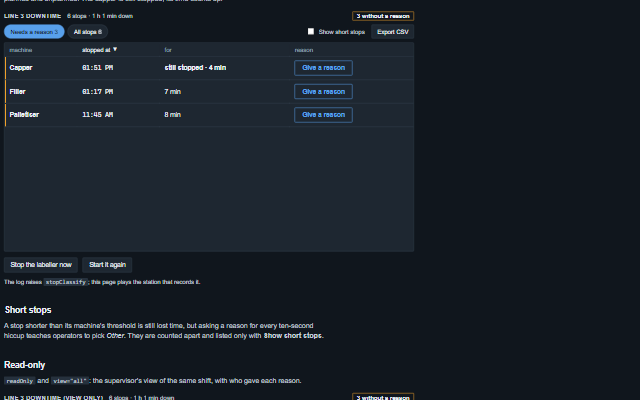
The component follows the theme on the page: the default theme, or the ISA-101 light and dark themes that ship with the package. It declares 3 CSS variables of its own, among them --smart-downtime-log-waiting, --smart-downtime-log-waiting-text, --smart-downtime-log-mono. The CSS page lists them; the themes guide covers the tokens every component shares.