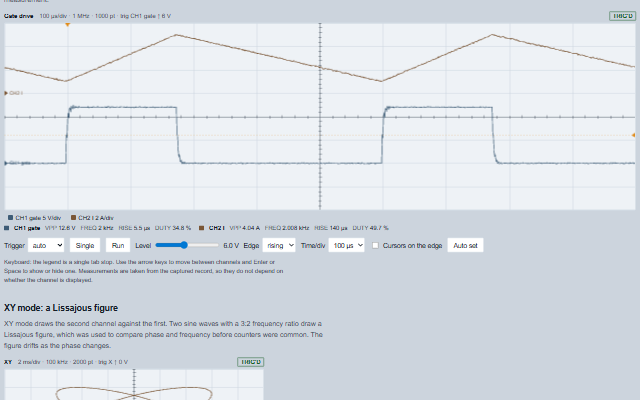
Scope is an oscilloscope display for time-domain signals.
It provides an edge trigger with level, hysteresis, holdoff and pre-trigger position in auto, normal and single modes, a graticule with a timebase in seconds per division and a vertical scale in units per division for each channel, time cursors, and automatic measurements such as peak to peak, RMS, mean, frequency, period, rise time, fall time and duty cycle. Samples are pushed in blocks into a ring buffer per channel. An XY mode draws one channel against another.
English, German, French, Spanish, Chinese (locale packs)
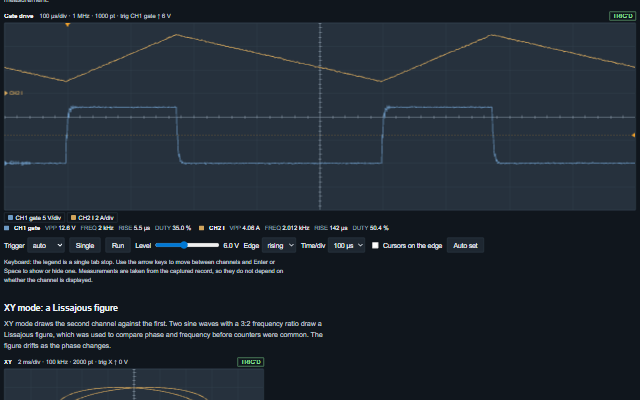
In the demo: A 2 kHz PWM gate drive and the switched current at 1 MS/s · XY mode: a Lissajous figure. Open the demo
Quick start
Install the package, load the two stylesheets and the component's module, and put the element on the page. The element below is the first one of the demo. Put the script after the module, in a <script type="module">, so that it runs once the component is defined.
const scope = document.getElementById('drive');

// raised when a channel is shown or hidden from the legend or through toggleChannel
scope.addEventListener('channelVisibilityChange', (event) => {
    const { index, field, visible } = event.detail;
    // ...
});

// the same values as properties
scope.sampleRate = 1000000;
scope.timePerDivision = 0.0001;
scope.triggerLevel = 6;
scope.triggerHysteresis = 0.5;
The properties the demo sets, then the next ones; the API page lists all 25 with their types and defaults.
Name
Type, default
Description
channels
array
Sets or retrieves the channels as [{ field, label, unit, color, voltsPerDivision, offset, visible }]. field is the key under which a pushed block carries the samples of the channel. A voltsPerDivision of null autoscales the channel; offset is in divisions from the centre line. Assign a new array to update the component.
sampleRate
number 1
Sets or retrieves the sample rate in samples per second. The timebase, the trigger's holdoff and every measurement follow from it. A value that is not a positive, finite number is taken as 1, with one console warning.
timePerDivision
number 0.001
Sets or retrieves the timebase in seconds per horizontal division. One screen is this times horizontalDivisions. A value that is not a positive, finite number is taken as 1 ms, with one console warning. A screen holds at most 2 000 000 samples; a longer timebase at the sample rate is shortened to fit, and the header shows the timebase drawn.
triggerLevel
number 0
Sets or retrieves the level the source has to cross, in the source's units. Drawn as an arrow at the right edge and a dotted line.
triggerEdge
string rising
Sets or retrieves which way the source has to cross the level.
triggerMode
string auto
Sets or retrieves the behaviour without a trigger. auto free-runs and captures the newest screen when nothing has triggered for about two screens; normal keeps the last capture until the next trigger; single captures once and stops until run or single arms the trigger again.
triggerHysteresis
number 0
Sets or retrieves how far past the level, in the source's units, the signal has to have been on the near side and has to reach on the far side for a crossing to count. A spike that pokes through the level and falls back is not an edge. The trigger point stays at the level crossing.
cursorA
number
Sets or retrieves the first time cursor, in seconds from the trigger. null hides it. With both cursors set the readout shows their interval, its reciprocal, and each channel's value at each cursor.
cursorB
number
Sets or retrieves the second time cursor, in seconds from the trigger. null hides it.
measurements
array ["vpp","vrms","frequency"]
Sets or retrieves the automatic measurements shown in the readout for each visible channel: vpp, vrms, vmean, vmax, vmin, frequency, period, riseTime, fallTime and dutyCycle. The frequency is measured from mid-level crossings with hysteresis, averaged over every full period in the record; rise and fall times are measured from 10% to 90% on the first edge.
label
string
Sets or retrieves the scope's name, shown in the header and in the accessible name.
The events carry their data in event.detail. trigger reports a screen the scope has already captured, and in single mode the scope stops itself after it. channelVisibilityChange follows a channel the scope has already shown or hidden in channels.
Event
Description and detail
trigger
This event is triggered on every capture, on a trigger, or on an auto free-run.
triggeredboolean True for a real trigger, false for an auto free-run capture. sourcestring The field triggered on. levelnumber The trigger level. timenumber The record's start relative to the trigger, in seconds.
channelVisibilityChange
This event is triggered when a channel is shown or hidden from the legend or through toggleChannel.
indexnumber Which channel. fieldstring The channel's field. visibleboolean Whether it is now drawn.
Methods
Method
Description
push(block) returns boolean
Appends a block of samples per channel and runs the trigger over it. Returns false when the scope is paused, has no channels, or the block is empty. A null, empty, non-numeric or infinite sample is no reading: a gap in the trace and in every measurement, never 0.
clear()
Removes every sample and the capture.
run()
Re-arms the trigger and resumes after stop or a single capture.
stop()
Stops capturing until run or single is called.
single()
Arms the trigger for one capture and then stops.
forceTrigger() returns boolean
Captures the newest screen regardless of the trigger. Returns false when there is nothing to capture.
autoSet()
Sets the timebase to show two or three cycles of the trigger source and the scale of every channel to fill about six divisions, based on the record on screen. This is the Auto Set function of an oscilloscope. The timebase is set only from a frequency measure() accepts, on the source's new scale - from the screen, or else from the whole ring; with none (DC, noise, a single transient) the timebase is left unchanged.
capture() returns object
Returns the record on screen as { time, sampleRate, triggerIndex, triggered, channels }, where channels maps each field to a copy of its samples and time is the start of the record relative to the trigger, in seconds. Returns null before the first capture.
measure(field?) returns object
Returns the automatic measurements of the captured record for one channel as { vmax, vmin, vpp, vmean, vrms, frequency, period, riseTime, fallTime, dutyCycle }, with NaN where a measurement is undefined. Frequency, period and duty cycle are measured from rising mid-level crossings with hysteresis and are NaN (shown as "--") unless the swing is at least a fifth of a division on the channel's scale, the record holds at least two full periods, and the periods agree within 25 % - so DC, noise and a single transient have no frequency. The duty cycle is taken over the whole periods. Rise and fall time are NaN when the swing is too small to have edges. Returns null before any capture.
toggleChannel(index, visible?)
Shows or hides one channel and raises the channelVisibilityChange event.
invalidate()
Redraws the plot on the next animation frame, so that many pushes between two frames cost one draw.
In Angular, React, Vue and Blazor
The same element with its wrapper. Each page has the installation steps and the full demo in that framework.
The Scope is drawn on a canvas, which is not accessible to a screen reader. Everything drawn on the canvas is therefore also available as text: the header contains the timebase, the sample rate and the trigger settings; the acquisition state is shown as a word as well as a colour; the measurement readout lists every value per channel; and the cursor readout contains the interval and the value of each channel at each cursor. The channel legend is a composite widget with one tab stop and arrow key navigation, so channels can be shown and hidden from the keyboard.
Roles: "img""group""list"
Key
Action
Tab
Moves into the legend, landing on the channel that holds the tab stop, and out again. The legend is one stop however many channels there are.
Arrow Left/Right
Moves between the channels. Reversed when rightToLeft is set.
Home / End
Moves to the first / last channel.
Enter or Space
Shows or hides the focused channel, raising channelVisibilityChange.
The component follows the theme on the page: the default theme, or the ISA-101 light and dark themes that ship with the package. It declares 4 CSS variables of its own, among them --smart-scope-height, --smart-scope-plot-background, --smart-scope-grid-color, --smart-scope-axis-color. The CSS page lists them; the themes guide covers the tokens every component shares.