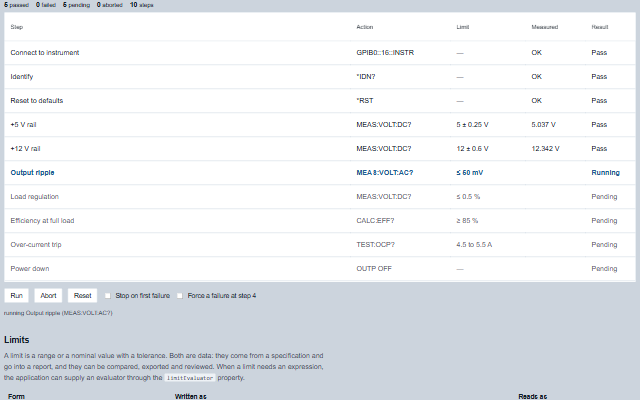
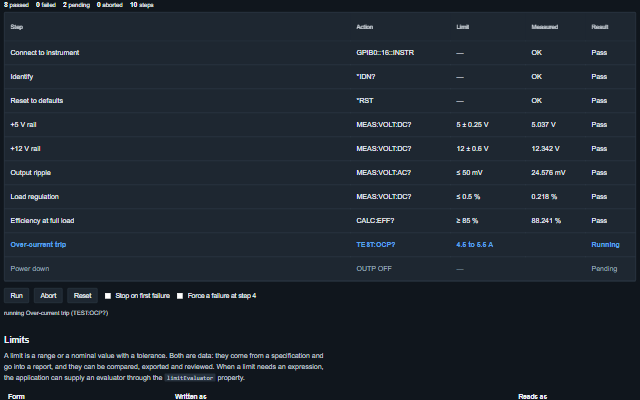
SequenceEditor is a step sequence editor and runner for test sequences, batch procedures and recipes.
It extends Table, so sorting, column resizing, virtualization, state persistence and export are inherited. Each step has a limit defined as a range or a nominal value with a tolerance, and the component evaluates the results against the limits, runs the sequence through its run state machine and produces a report. The component does not execute steps: it raises stepStart and waits for the application to call setResult. A custom limit evaluator can be supplied through the limitEvaluator property. Every Table property, method and event - columns, paging, sorting, filtering, selection, exportData and the rest - applies to the sequence editor as well; see the Table API.
English, German, French, Spanish, Chinese, except the built-in table controls and the step-limit texts, which stay in English (locale packs)
In the demo: A power supply acceptance test · Limits · The report. Open the demo
Quick start
Install the package, load the two stylesheets and the component's module, and put the element on the page. The element below is the first one of the demo. Put the script after the module, in a <script type="module">, so that it runs once the component is defined.
The properties the demo sets, then the next ones; the API page lists all 7 with their types and defaults.
Name
Type, default
Description
steps
array
Sets or retrieves the sequence as [{ id, name, action, unit, min, max, nominal, tolerance, value, skipped, aborted }]. Only id is required. A step with neither a range nor a nominal value is an action rather than a measurement: it can run but cannot fail on a value. The state of a step is derived from its measurement and its limit, so updating the measurement updates the verdict. Assign a new array to update the component.
stopOnFailure
boolean false
Sets or retrieves whether a failed step aborts the rest of the run.
currentStep
string | null
Sets or retrieves the id of the step being run. Null when nothing is running.
limitEvaluator
function?
Sets or gets a function (step, value) that returns true, false, or undefined to fall back to the built-in limit forms. Only needed for a limit that cannot be expressed as a range or as a nominal value with a tolerance.
mode
string edit
Sets or retrieves whether the sequence is being edited or run.
precisionDigits
number 3
Sets or gets the number of decimal places used when a measurement is shown.
showResults
boolean true
Sets or retrieves whether the result column is shown. The property is read when the default columns are built, so set it before the component is initialized. Boolean attributes are presence-based, so the column cannot be turned off from markup.
Events
The events carry their data in event.detail. The sequence editor executes no step itself: it sets currentStep, raises stepStart and waits, with no timeout, until the application calls setResult(). stepComplete, sequencePause and sequenceComplete follow changes the editor has already made to steps, currentStep and mode.
Event
Description and detail
sequenceComplete
This event is triggered when the run finishes or is aborted.
abortedboolean Whether it was aborted rather than completed. reportobject The full record.
sequencePause
This event is triggered when the run is paused.
stepany The step it paused at.
stepComplete
This event is triggered when a measurement is recorded against a step.
idstring | number The step's id. statestring The state it settled into. passedboolean Whether it passed. stepobject The step that completed.
resultRefused
This event is triggered when setResult is called for a step that is not the one running. The result is not recorded and the run does not move.
idstring | number The step the result was for. valueany The result that was refused. currentstring | number The step that is running.
stepStart
This event is triggered when the run reaches a step. The application performs the measurement and calls setResult; the component waits and does not execute anything itself.
idstring | number The step's id. stepobject The step. indexnumber Its position in the sequence.
Methods
Method
Description
abort()
Stops the run and marks every step that has not run as aborted, so that the report shows that the run did not finish.
limitText(step) returns string
Returns the limit of a step as it appears on a specification sheet: a range, a single bound, or a nominal value with a tolerance. An invalid limit is written with "(invalid limit)" after it, and warned about once in the console.
pause()
Pauses the run at the current step.
report() returns object
Returns the record of the run: the verdict, the number of steps in each state, and every step with its limit and measurement. A run passes only when no step failed and no step was left unrun.
run()
Starts the run at the first pending step and raises the stepStart event. Does nothing when the sequence is already running.
setResult(id, value) returns boolean
Records a measurement for a step and moves to the next step. While a step is current, only that step takes a result: a result for another step is refused, raises resultRefused, changes nothing and returns false. A non-numeric result is kept and shown, and the step is marked as not evaluated rather than as passed or failed.
skip(id)
Marks a step as not run and moves to the next step when the sequence is running.
stateOf(step) returns string
Returns the state of a step: pending, running, passed, failed, skipped, aborted or notEvaluated. The state is derived from the measurement and the limit. A step with a limit whose result cannot be judged against it - NaN, Infinity, a text such as n/a, or a limit that is itself invalid (a minimum above the maximum, a negative tolerance) - is notEvaluated, never passed; a report with such a step has not passed.
In Angular, React, Vue and Blazor
The same element with its wrapper. Each page has the installation steps and the full demo in that framework.
The SequenceEditor is built on Table and inherits its accessibility support: a table element with row and column semantics, a labelled toolbar and full keyboard navigation of the rows. In addition, the limit, the measurement and the verdict of every step are text in their own columns, so the result of a test is readable and not only conveyed by the colour of a row.
Key
Action
Tab
Moves into the sequence and between its toolbar controls and the table body.
The component follows the theme on the page: the default theme, or the ISA-101 light and dark themes that ship with the package. It declares 1 CSS variables of its own: --smart-sequence-height. The CSS page lists them; the themes guide covers the tokens every component shares.