



Grid for React
React version of this topic (compatible with React 19+). Keep the same configuration logic from JavaScript and pass it as component props.
What this topic covers: practical setup, the framework-specific API access pattern, and copy-adapt guidance for the examples in this page.
import React, { useMemo, useRef } from 'react';
import { Grid } from 'smart-webcomponents-react/grid';
import 'smart-webcomponents-react/source/styles/smart.default.css';

export default function App() {
  const componentRef = useRef(null);
  const componentProps = useMemo(() => ({
    // Copy this topic's JavaScript configuration here.
  }), []);

  return <Grid ref={componentRef} {...componentProps}></Grid>;
}
Use componentRef.current for API methods in this topic.
Grid Row Span
Enable Row Span
You can configure row spanning in the Grid. The feature is also known as 'cell merging'.
const componentProps = {
    dataSourceSettings: {
        dataFields: [
            { name: 'firstName', dataType: 'string' },
            { name: 'lastName', dataType: 'string' },
            { name: 'productName', map: 'product.name', dataType: 'string' },
            { name: 'quantity', map: 'product.quantity', dataType: 'number' },
            { name: 'price', map: 'product.price', dataType: 'number' },
            { name: 'total', map: 'product.total', dataType: 'number' }
        ]
    },
    dataSource: [
        {
            firstName: 'Andrew',
            lastName: 'Burke',
            product: {
                name: 'Ice Coffee', price: 10, quantity: 3, total: 30
            }
        },
        {
            firstName: 'Petra',
            lastName: 'Williams',
            product: {
                name: 'Espresso', price: 7, quantity: 5, total: 35
            }
        },
        {
            firstName: 'Anthony',
            lastName: 'Baker',
            product: {
                name: 'Frappucino', price: 6, quantity: 4, total: 24
            }
        },
        {
            firstName: 'Nancy',
            lastName: 'Green',
            product: {
                name: 'Frappucino', price: 6, quantity: 4, total: 24
            }
        },
        {
            firstName: 'Robin',
            lastName: 'Gray',
            product: {
                name: 'Cappucino', price: 6, quantity: 4, total: 24
            }
        },
        {
            firstName: 'John',
            lastName: 'Smith',
            product: {
                name: 'Espresso', price: 6, quantity: 4, total: 24
            }
        },
        {
            firstName: 'Mark',
            lastName: 'Hughes',
            product: {
                name: 'Latte', price: 6, quantity: 4, total: 24
            }
        },
        {
            firstName: 'Fred',
            lastName: 'Lochte',
            product: {
                name: 'Cappucino', price: 6, quantity: 4, total: 24
            }
        },
        {
            firstName: 'Malcolm',
            lastName: 'Franclin',
            product: {
                name: 'Espresso', price: 6, quantity: 4, total: 24
            }
        }
    ],
    columns: [
        {
            label: 'First Name', dataField: 'firstName', cellsVerticalAlign: 'center', rowSpan: (value) => {
                if (value === "Andrew") {
                    return 2;
                }
                else if (value === "Nancy") {
                    return 3;
                }
            }
        },
        { label: 'Last Name', dataField: 'lastName' },
        { label: 'Product', dataField: 'productName' },
        {
            label: 'Quantity', dataField: 'quantity', cellsAlign: 'right'
        },
        { label: 'Unit Price', dataField: 'price', cellsAlign: 'right', cellsFormat: 'c2' }
    ]
}
The CSS applied to the spanned cells is:
smart-grid-cell[rowSpan] {
    background: #0179D4;
    color: white;
}
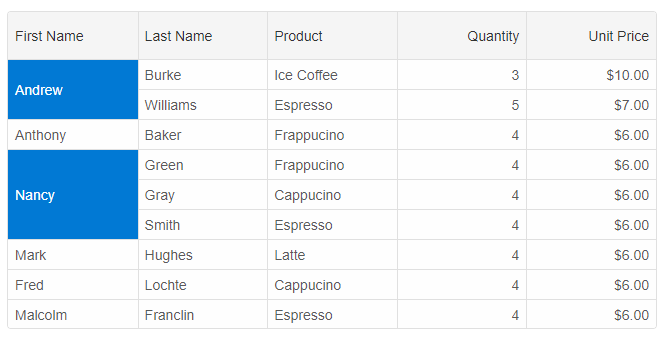
Note that when you apply sorting or filtering along with row spanning, you should be take into account which rows you span.
For example, if in the above example, Nancy and Andrew were to subsequent rows, the result will look strange.
An alternative way to merge cells is by using the
rowSpan property of the cell object. For example this spans the first cell of the second row.
rows[1].cells[0].rowSpan = 2;
Merge cells with equal values
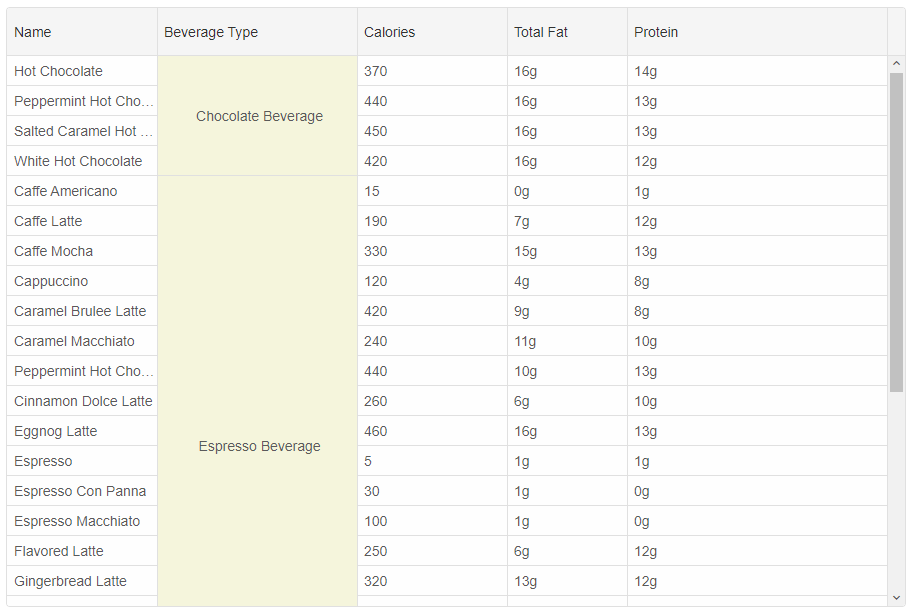
If we have a data source with equal values in a column, we may want to merge them. Let's look at this data source:
[{
 "id": "1",
 "name": "Hot Chocolate",
 "type": "Chocolate Beverage",
 "calories": "370",
 "totalfat": "16g",
 "protein": "14g"
 }, {
 "id": 2,
 "name": "Peppermint Hot Chocolate",
 "type": "Chocolate Beverage",
 "calories": "440",
 "totalfat": "16g",
 "protein": "13g"
}, {
 "id": "3",
 "name": "Salted Caramel Hot Chocolate",
 "type": "Chocolate Beverage",
 "calories": "450",
 "totalfat": "16g",
 "protein": "13g"
}, {
 "id": "4",
 "name": "White Hot Chocolate",
 "type": "Chocolate Beverage",
 "calories": "420",
 "totalfat": "16g",
 "protein": "12g"
}, {
 "id": "5",
 "name": "Caffe Americano",
 "type": "Espresso Beverage",
 "calories": "15",
 "totalfat": "0g",
 "protein": "1g"
}, {
 "id": "6",
 "name": "Caffe Latte",
 "type": "Espresso Beverage",
 "calories": "190",
 "totalfat": "7g",
 "protein": "12g"
}, {
 "id": "7",
 "name": "Caffe Mocha",
 "type": "Espresso Beverage",
 "calories": "330",
 "totalfat": "15g",
 "protein": "13g"
}, {
 "id": "8",
 "name": "Cappuccino",
 "type": "Espresso Beverage",
 "calories": "120",
 "totalfat": "4g",
 "protein": "8g"
}, {
 "id": "9",
 "name": "Caramel Brulee Latte",
 "type": "Espresso Beverage",
 "calories": "420",
 "totalfat": "9g",
 "protein": "8g"
}, {
 "id": "10",
 "name": "Caramel Macchiato",
 "type": "Espresso Beverage",
 "calories": "240",
 "totalfat": "11g",
 "protein": "10g"
}, {
 "id": "11",
 "name": "Peppermint Hot Chocolate",
 "type": "Espresso Beverage",
 "calories": "440",
 "totalfat": "10g",
 "protein": "13g"
}, {
 "id": "12",
 "name": "Cinnamon Dolce Latte",
 "type": "Espresso Beverage",
 "calories": "260",
 "totalfat": "6g",
 "protein": "10g"
}, {
 "id": "13",
 "name": "Eggnog Latte",
 "type": "Espresso Beverage",
 "calories": "460",
 "totalfat": "16g",
 "protein": "13g"
}, {
 "id": "14",
 "name": "Espresso",
 "type": "Espresso Beverage",
 "calories": "5",
 "totalfat": "1g",
 "protein": "1g"
}, {
 "id": "15",
 "name": "Espresso Con Panna",
 "type": "Espresso Beverage",
 "calories": "30",
 "totalfat": "1g",
 "protein": "0g"
}, {
 "id": "16",
 "name": "Espresso Macchiato",
 "type": "Espresso Beverage",
 "calories": "100",
 "totalfat": "1g",
 "protein": "0g"
}, {
 "id": "17",
 "name": "Flavored Latte",
 "type": "Espresso Beverage",
 "calories": "250",
 "totalfat": "6g",
 "protein": "12g"
}, {
 "id": "18",
 "name": "Gingerbread Latte",
 "type": "Espresso Beverage",
 "calories": "320",
 "totalfat": "13g",
 "protein": "12g"
}, {
 "id": "19",
 "name": "White Chocolate Mocha",
 "type": "Espresso Beverage",
 "calories": "470",
 "totalfat": "18g",
 "protein": "15g"
}, {
 "id": 20,
 "name": "Skinny Peppermint Mocha",
 "type": "Espresso Beverage",
 "calories": 130,
 "totalfat": "15g",
 "protein": "13g"
}, {
 "id": "21",
 "name": "Skinny Flavored Latte",
 "type": "Espresso Beverage",
 "calories": "120",
 "totalfat": "0g",
 "protein": "12g"
}, {
 "id": "22",
 "name": "Pumpkin Spice Latte",
 "type": "Espresso Beverage",
 "calories": "380",
 "totalfat": "13g",
 "protein": "14g"
}, {
 "id": "23",
 "name": "Caffe Vanilla Frappuccino",
 "type": "Frappuccino Blended Beverage",
 "calories": "310",
 "totalfat": "3g",
 "protein": "3g"
}, {
 "id": "24",
 "name": "Caffe Vanilla Frappuccino Light",
 "type": "Frappuccino Blended Beverage",
 "calories": "180",
 "totalfat": "0g",
 "protein": "3g"
}, {
 "id": "25",
 "name": "Caramel Brulee Frappuccino",
 "type": "Frappuccino Blended Beverage",
 "calories": "410",
 "totalfat": "13g",
 "protein": "4g"
}, {
 "id": "26",
 "name": "Caramel Brulee Frappuccino Light",
 "type": "Frappuccino Blended Beverage",
 "calories": "190",
 "totalfat": "0g",
 "protein": "3g"
}, {
 "id": "27",
 "name": "Eggnog Frappuccino",
 "type": "Frappuccino Blended Beverage",
 "calories": "420",
 "totalfat": "18g",
 "protein": "7g"
}, {
 "id": "28",
 "name": "Mocha Frappuccino",
 "type": "Frappuccino Blended Beverage",
 "calories": "400",
 "totalfat": "15g",
 "protein": "5g"
}, {
 "id": "29",
 "name": "Tazo Green Tea Creme Frappuccino",
 "type": "Frappuccino Blended Beverage",
 "calories": "430",
 "totalfat": "16g",
 "protein": "6g"
}]
We have rows with equal beverage type. To merge these cells, we will need to dynamically calculate the rowSpan. In the sample code below,
the 'rowSpan' function is called for each item in the 'Beverage Type' column. To calculate the row span, we traverse all rows and find these
which match the cell value.
const componentProps = {
	dataSourceSettings: {
		dataFields: [
			{ name: 'name', dataType: 'string' },
			{ name: 'type', dataType: 'string' },
			{ name: 'calories', dataType: 'int' },
			{ name: 'totalfat', dataType: 'string' },
			{ name: 'protein', dataType: 'string' }
		]
	},
	dataSource: '../../../scripts/beverages.json',
	columns:
		[
			{ label: 'Name', dataField: 'name', width: 150 },
			{
				label: 'Beverage Type', dataField: 'type', width: 200, rowSpan: (value, row) => {
					let itemsCount = 0;
					componentRef.current.forEachRow((record) => {
						if (record.data['type'] === value) {
							itemsCount++;
						}
					});

					return itemsCount;
				}
			},
			{ label: 'Calories', dataField: 'calories', width: 150 },
			{ label: 'Total Fat', dataField: 'totalfat', width: 120 },
			{ label: 'Protein', dataField: 'protein' }
		]
}
Row span based on row index
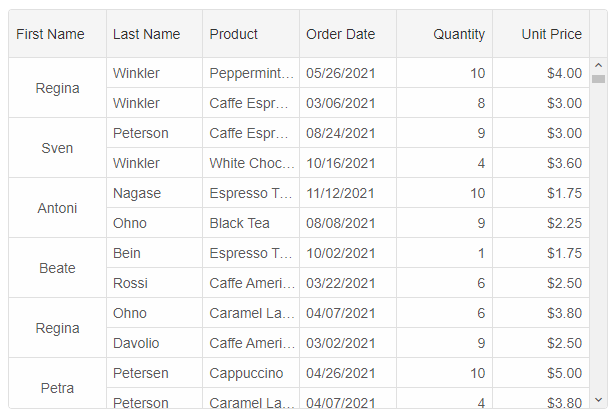
The following code applies row span depending on the value of the row index.
columns: [
	{
		label: 'First Name', dataField: 'firstName', rowSpan: (value, rowIndex, data) => {
			if (rowIndex % 2 === 0) {
				return 2;
			}
		}
	},
	{ label: 'Last Name', dataField: 'lastName'},
	{ label: 'Product', dataField: 'productName'},
	{ label: 'Order Date', cellsFormat: 'MM/dd/yyyy', dataField: 'date', columnGroup: 'order' },
	{ label: 'Quantity', dataField: 'quantity', columnGroup: 'order' },
	{ label: 'Unit Price', dataField: 'price', cellsFormat: 'c2', columnGroup: 'order' }
]
For AI tooling
Developer Quick Reference
Topic: grid-row-span Component: Grid Framework: React
Main methods: forEachRow()
Common config keys: dataSource, columns
Implementation Notes
Compatibility: React 19+ API access pattern: const componentRef = useRef(null) + componentRef.current.method()
Lifecycle guidance: Use useMemo for large config objects and call imperative API through componentRef.current after first render.
Common pitfalls:
- Recreating columns/dataSource objects on every render can reset component state.
- Calling API methods before ref is available causes runtime errors.
- Mixing controlled and imperative updates without sync can lead to stale UI.
Validation checklist:
- Keep config objects memoized when possible.
- Guard API calls with ref existence checks.
- Verify CSS theme import is present once per app.