



Getting Started with React Editor Component
Smart UI React targets React 18+ and current Node LTS for tooling; use TypeScript templates when you want typed props and events.
Demo source (Smart UI repo): react/source/editor/overview/App.jsx
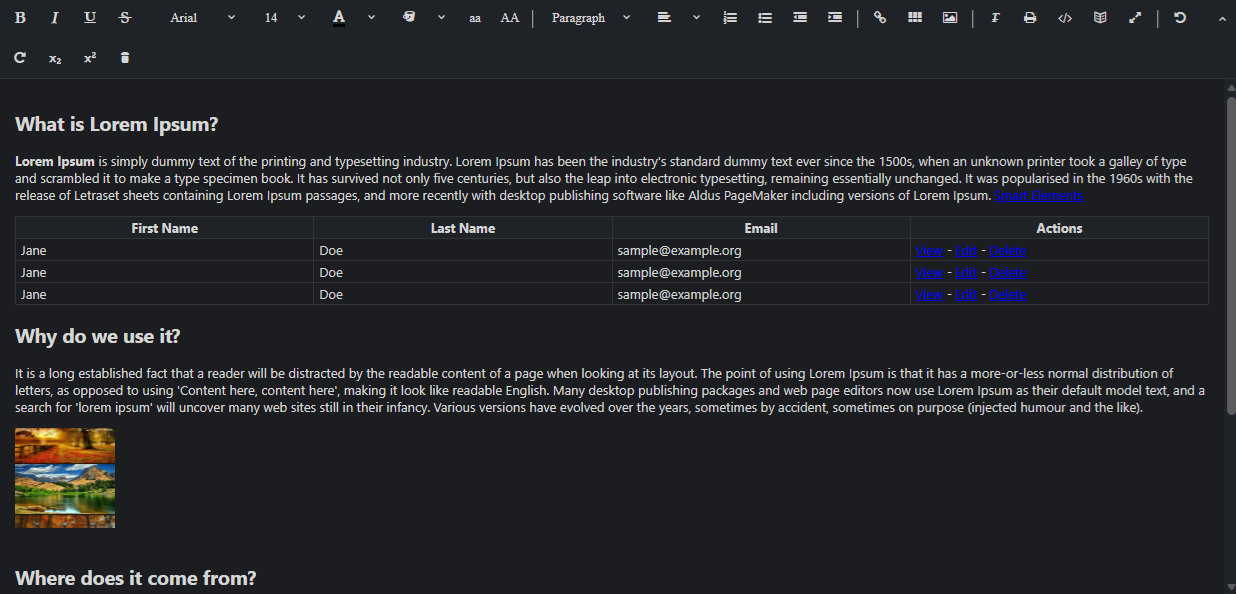
1 Create a Vite + React + TypeScript app
npm create vite@latest my-smart-app -- --template react-ts
cd my-smart-app
thennpm install
2 Install Smart UI for React
npm install smart-webcomponents-react
3 Import styles and render the component
Open src/App.tsx (or App.jsx if you chose JavaScript). The snippet below matches Smart UI React demos for this widget:
import 'smart-webcomponents-react/source/styles/smart.default.css';
import { useRef } from "react";
import { Editor } from 'smart-webcomponents-react/editor';

const App = () => {

	const editorRef = useRef(null);

	const toolbarItems = ['Bold', 'Italic', 'Underline', 'StrikeThrough',
		'FontName', 'FontSize', 'FontColor', 'BackgroundColor',
		'LowerCase', 'UpperCase', '|',
		'Formats', 'Alignment', 'OrderedList', 'UnorderedList',
		'Outdent', 'Indent', '|',
		'hyperlink', 'table', 'Image', '|', 'ClearFormat', 'Print',
		'SourceCode', 'splitmode', 'FullScreen', '|', 'Undo', 'Redo', 'subscript', 'superscript', 'delete'
	];

	const initEditor = () => {
	  if (editorRef.current) {
		editorRef.current.expandToolbar?.(); // optional chaining
	  }
	};

	return (
		<div>
			<Editor onReady={initEditor} ref={editorRef} id="editor" toolbarItems={toolbarItems}>
				<div>
					<h2>What is Lorem Ipsum?</h2>
					<p><strong>Lorem Ipsum</strong> is simply dummy text of the printing and typesetting
						industry. Lorem Ipsum has been the industry's standard dummy text ever
						since the 1500s, when an unknown printer took a galley of type and scrambled
						it to make a type specimen book. It has survived not only five centuries,
						but also the leap into electronic typesetting, remaining essentially unchanged.
						It was popularised in the 1960s with the release of Letraset sheets containing
						Lorem Ipsum passages, and more recently with desktop publishing software
						like Aldus PageMaker including versions of Lorem Ipsum. <a href="www.htmlelements.com"
							title="Smart Elements">Smart Elements</a>
					</p>
					<table className="wd-Table">
						<thead>
							<tr>
								<th>First Name</th>
								<th>Last Name</th>
								<th>Email</th>
								<th>Actions</th>
							</tr>
						</thead>
						<tbody>
							<tr>
								<td>Jane</td>
								<td>Doe</td>
								<td>sample@example.org</td>
								<td><a href="#">View</a> - <a href="#">Edit</a> - <a href="#">Delete</a>
								</td>
							</tr>
							<tr>
								<td>Jane</td>
								<td>Doe</td>
								<td>sample@example.org</td>
								<td><a href="#">View</a> - <a href="#">Edit</a> - <a href="#">Delete</a>
								</td>
							</tr>
							<tr>
								<td>Jane</td>
								<td>Doe</td>
								<td>sample@example.org</td>
								<td><a href="#">View</a> - <a href="#">Edit</a> - <a href="#">Delete</a>
								</td>
							</tr>
						</tbody>
					</table>
				</div>
				<div>
					<h2>Why do we use it?</h2>
					<p>It is a long established fact that a reader will be distracted by the
						readable content of a page when looking at its layout. The point of using
						Lorem Ipsum is that it has a more-or-less normal distribution of letters,
						as opposed to using 'Content here, content here', making it look like readable
						English. Many desktop publishing packages and web page editors now use
						Lorem Ipsum as their default model text, and a search for 'lorem ipsum'
						will uncover many web sites still in their infancy. Various versions have
						evolved over the years, sometimes by accident, sometimes on purpose (injected
						humour and the like).</p>
					<p>
						<img src="./../../../src/images/Album.png" width="100px" height="100px" />
					</p>
				</div>
				<br />
				<div>
					<h2>Where does it come from?</h2>
					<p>Contrary to popular belief, Lorem Ipsum is not simply random text. It
						has roots in a piece of classical Latin literature from 45 BC, making it
						over 2000 years old. Richard McClintock, a Latin professor at Hampden-Sydney
						College in Virginia, looked up one of the more obscure Latin words, consectetur,
						from a Lorem Ipsum passage, and going through the cites of the word in
						classical literature, discovered the undoubtable source. Lorem Ipsum comes
						from sections 1.10.32 and 1.10.33 of "de Finibus Bonorum et Malorum" (The
						Extremes of Good and Evil) by Cicero, written in 45 BC. This book is a
						treatise on the theory of ethics, very popular during the Renaissance.
						The first line of Lorem Ipsum, "Lorem ipsum dolor sit amet..", comes from
						a line in section 1.10.32.</p>
					<p>The standard chunk of Lorem Ipsum used since the 1500s is reproduced below
						for those interested. Sections 1.10.32 and 1.10.33 from "de Finibus Bonorum
						et Malorum" by Cicero are also reproduced in their exact original form,
						accompanied by English versions from the 1914 translation by H. Rackham.</p>
				</div>
				<div>
					<h2>Where can I get some?</h2>
					<p>There are many variations of passages of Lorem Ipsum available, but the
						majority have suffered alteration in some form, by injected humour, or
						randomised words which don't look even slightly believable. If you are
						going to use a passage of Lorem Ipsum, you need to be sure there isn't
						anything embarrassing hidden in the middle of text. All the Lorem Ipsum
						generators on the Internet tend to repeat predefined chunks as necessary,
						making this the first true generator on the Internet. It uses a dictionary
						of over 200 Latin words, combined with a handful of model sentence structures,
						to generate Lorem Ipsum which looks reasonable. The generated Lorem Ipsum
						is therefore always free from repetition, injected humour, or non-characteristic
						words etc.</p>
				</div>
			</Editor>
		</div>
	);
}


export default App;
4 Run the dev server
npm run dev
Open the URL Vite prints (often http://localhost:5173/).
Troubleshooting
- How do I get the editor content?
- Use editor.value to get the HTML content, or editor.textContent for plain text.
- How do I insert content at cursor position?
- Use editor.executeCommand('insertHTML', '<span>inserted</span>') to insert at the current cursor position.
TypeScript Support
Types ship with smart-webcomponents-react. Import the component and prop types:
import type { Editor, EditorProps } from 'smart-webcomponents-react/editor';
The generated wrappers expose on* callbacks (for example onChange) whose arguments are standard DOM Event values unless the widget typings narrow them further.
Accessibility
The Editor component follows WAI-ARIA best practices:
- Keyboard navigation - Tab, Arrow keys, Enter, and Escape are supported
- ARIA roles - Appropriate roles and labels are applied automatically
- Focus management - Visible focus indicators for keyboard users
- Screen readers - State changes are announced to assistive technology
- High contrast - Supports Windows High Contrast Mode and forced colors
For custom labeling, set aria-label or aria-labelledby attributes on the component.
Supported stacks: Smart UI targets Angular 17+, React 18+, Vue 3+, Node 18 LTS, and evergreen browsers; pin exact package versions to your org policy.