



GanttChart for Vue
Vue 3 version using Smart custom elements and template refs.
What this topic covers: practical setup, the framework-specific API access pattern, and copy-adapt guidance for the examples in this page.
<script setup>
import { onMounted, ref } from 'vue';
import 'smart-webcomponents/source/styles/smart.default.css';
import 'smart-webcomponents/source/modules/smart.ganttchart.js';

const component = ref();
const componentProps = {
  // Copy this topic's JavaScript configuration here.
};

onMounted(() => {
  Object.assign(component.value, componentProps);
});
</script>

<template>
  <smart-gantt-chart ref="component"></smart-gantt-chart>
</template>
Use component.value for API methods in this topic.
Build your web apps using Smart Custom Elements
Smart.GanttChart - Sorting
Sorting
Smart.GanttChart component uses a Table component which allows to sort the tasks/resources based on a column. The sortMode property determines the sorting mode of the element. Tasks/Resources can be sorted by setting the sortMode property to either one (allows to sort by a single column), many (allows to sort by multiple columns) or none ( disabled sorting ). By default sorting is disabled.
Once the sortMode property is configured to allow sorting, the user has two options to apply sorting to the tasks/resources:
- Click on a Table column header inside the GanttChart.
- Call the API's sort method by passing an array of strings which correspond to
taskColumn/resourceColumns column values or objects that contain the same with an
additional sortOrder attribute that allows to preset the sorting order ('asc' - ascending
order or 'desc' - descending order). For example:
const ganttChart = component.value;

component.value.sortMode = 'one';
component.value.sort([
 { value: 'duration', sortOrder: 'asc', type: 'task' },
 { value: 'progress', sortOrder: 'asc', type: 'resource' }
]);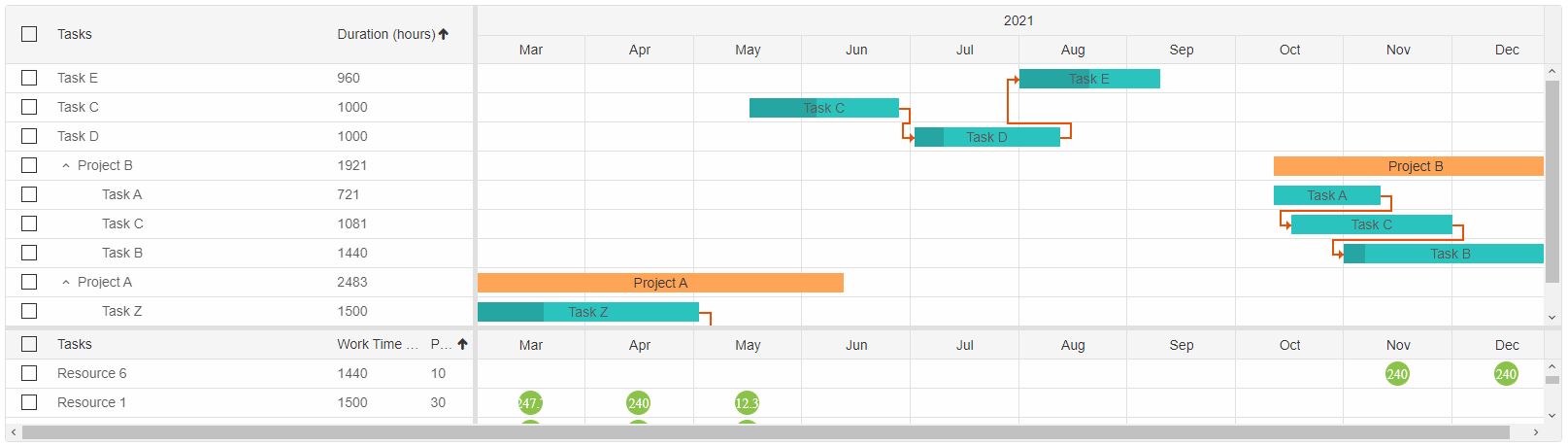
As a result the Tasks will be sorted by their duration in ascending order and the Resources will be sorted by progress in ascending order as well.
The timeline is updated as soon as a Table columns is sorted.
Sorting can be cleared at any time via the clearSort method.
component.value.clearSort()
For AI tooling
Developer Quick Reference
Topic: gantt-sorting Component: GanttChart Framework: Vue
Main methods: sort(), clearSort()
Common config keys: (none detected)
Implementation Notes
Compatibility: Vue 3+ API access pattern: const component = ref() + component.value.method()
Lifecycle guidance: Use template refs with