



Grid for Angular
Angular standalone version of this topic (compatible with Angular 17+). Import both the Smart UI component and module in the standalone component.
What this topic covers: practical setup, the framework-specific API access pattern, and copy-adapt guidance for the examples in this page.
import { Component, ViewChild, ViewEncapsulation } from '@angular/core';
import { CommonModule } from '@angular/common';
import { RouterOutlet } from '@angular/router';
import { GridComponent, GridModule } from 'smart-webcomponents-angular/grid';

@Component({
  selector: 'app-root',
  standalone: true,
  imports: [CommonModule, GridModule, RouterOutlet],
  templateUrl: './app.component.html',
  styleUrls: ['./app.component.css'],
  encapsulation: ViewEncapsulation.None
})
export class AppComponent {
  @ViewChild('grid', { read: GridComponent, static: false }) grid!: GridComponent;
}
<!-- app.component.html -->
<smart-grid #grid></smart-grid>
Use this.grid for API methods in this topic.
Grid Custom Cell Templates
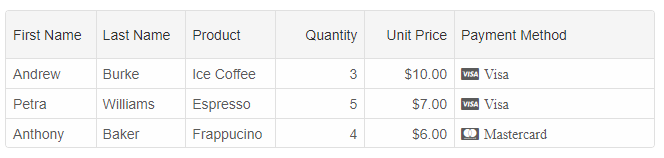
The column'stemplate property enables you to set a custom rendering in a grid cell. Let's look at the following example:
componentProps = {
    dataSourceSettings: {
        dataFields: [
            { name: 'firstName', dataType: 'string' },
            { name: 'lastName', dataType: 'string' },
            { name: 'productName', map: 'product.name', dataType: 'string' },
            { name: 'payment', map: 'product.payment', dataType: 'string' },
            { name: 'quantity', map: 'product.quantity', dataType: 'number' },
            { name: 'price', map: 'product.price', dataType: 'number' },
            { name: 'total', map: 'product.total', dataType: 'number' }
        ]
    },
    layout: {
        allowCellsWrap: true,
        rowHeight: 'auto'
    },
    behavior: {
        columnResizeMode: 'growAndShrink'
    },
    sorting: {
        enabled: true
    },
    dataSource: [
        {
            firstName: 'Andrew',
            lastName: 'Burke',
            product: {
                name: 'Ice Coffee', price: 10, quantity: 3, total: 30, payment: 'Visa'
            }
        },
        {
            firstName: 'Petra',
            lastName: 'Williams',
            product: {
                name: 'Espresso', price: 7, quantity: 5, total: 35, payment: 'Visa'
            }
        },
        {
            firstName: 'Anthony',
            lastName: 'Baker',
            product: {
                name: 'Frappucino', price: 6, quantity: 4, total: 24, payment: 'Mastercard'
            }
        }
    ],
    columns: [
        {
            label: 'First Name', dataField: 'firstName'
        },
        { label: 'Last Name', dataField: 'lastName' },
        { label: 'Product', dataField: 'productName' },
        {
            label: 'Quantity', dataField: 'quantity', cellsAlign: 'right'
        },
        {
            label: 'Unit Price', dataField: 'price', cellsAlign: 'right', cellsFormat: 'c2'
        },
        {
            label: 'Payment Method', dataField: 'payment', template: function (formatObject) {
                if (!formatObject.template) {
                    if (formatObject.value === 'Mastercard') {
                        formatObject.template = '<div style="font-family: FontAwesome;"><span style="margin-left: 7px;" class="far fa-cc-mastercard"></span><span style="margin-left: 5px;">' + formatObject.value + '</span></div>';
                    }
                    else {
                        formatObject.template = '<div style="font-family: FontAwesome;"><span style="margin-left: 7px;" class="far fa-cc-visa"></span><span style="margin-left: 5px;">' + formatObject.value + '</span></div>';
                    }
                }
                else {
                    if (formatObject.value === 'Mastercard') {
                        formatObject.template.firstChild.className = 'far fa-cc-mastercard';
                    }
                    else {
                        formatObject.template.firstChild.className = 'far fa-cc-visa';
                    }

                    formatObject.template.lastChild.innerHTML = formatObject.value;
                }
            }
        }
    ]
}
The 'Payment Method' column defines a custom template. It displays Visa and Mastercard icons in each cell depending on the cell's value. Note the if condition in the beginning of the function. When the template is created, the formatObject.template is still not set i.e a condition like this '!formatObject.template' can be used when you create the template. In all following function calls, the template will just need to be updated taking into account the cell's value.
Tags Template
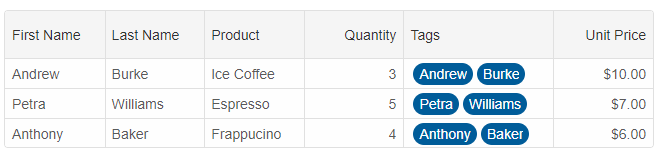
template: 'tags' is a built-in column template which renders tags in the Grid cells.
componentProps = {
    dataSourceSettings: {
        dataFields: [
            { name: 'firstName', dataType: 'string' },
            { name: 'lastName', dataType: 'string' },
            { name: 'productName', map: 'product.name', dataType: 'string' },
            { name: 'payment', map: 'product.payment', dataType: 'string' },
            { name: 'quantity', map: 'product.quantity', dataType: 'number' },
            { name: 'price', map: 'product.price', dataType: 'number' },
            { name: 'total', map: 'product.total', dataType: 'number' }
        ]
    },
    editing: {
        enabled: true
    },
    selection: {
        enabled: true,
        allowCellSelection: true,
        mode: 'extended'
    },
    filtering: {
        enabled: true
    },
    behavior: {
        columnResizeMode: 'growAndShrink'
    },
    sorting: {
        enabled: true
    },
    dataSource: [
        {
            firstName: 'Andrew',
            lastName: 'Burke',
            product: {
                name: 'Ice Coffee', price: 10, quantity: 3, total: 30, payment: 'Visa'
            }
        },
        {
            firstName: 'Petra',
            lastName: 'Williams',
            product: {
                name: 'Espresso', price: 7, quantity: 5, total: 35, payment: 'Visa'
            }
        },
        {
            firstName: 'Anthony',
            lastName: 'Baker',
            product: {
                name: 'Frappucino', price: 6, quantity: 4, total: 24, payment: 'Mastercard'
            }
        }
    ],
    columns: [
        {
            label: 'First Name', dataField: 'firstName'
        },
        { label: 'Last Name', dataField: 'lastName' },
        { label: 'Product', dataField: 'productName' },
        {
            label: 'Quantity', dataField: 'quantity', cellsAlign: 'right'
        }, {
            label: 'Tags', width: 150, template: 'tags', dataField: 'name', getCellValue: (id, dataField, data) => {
                return data.firstName + ', ' + data.lastName;
            }
        },
        {
            label: 'Unit Price', dataField: 'price', cellsAlign: 'right', cellsFormat: 'c2'
        }
    ]
}
Checkbox Template
For boolean columns, you can set the template to 'checkBox'.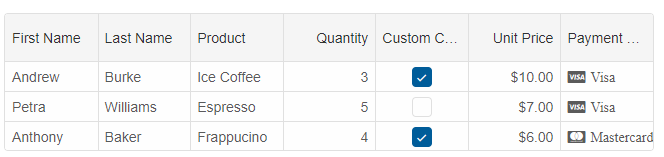
Dropdownlist Template
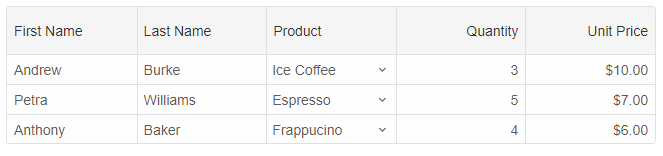
template = 'dropDownList' allows you to display a dropdownlist in cells.
columns: [
	{
		label: 'First Name', dataField: 'firstName'
	},
	{ label: 'Last Name', dataField: 'lastName' },
	{ label: 'Product', dataField: 'productName', template: 'dropDownList', editor: 'dropDownList' },
	{
		label: 'Quantity', dataField: 'quantity', cellsAlign: 'right'
	},
	{
		label: 'Unit Price', dataField: 'price', cellsAlign: 'right', cellsFormat: 'c2'
	}
]
Password Template
For rendering password fields, the password template could be useful. To set it, the template should be set to 'password'.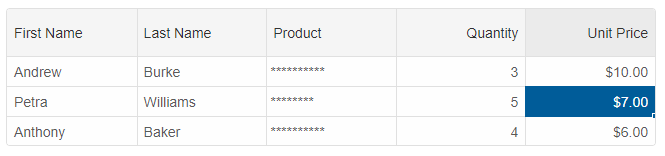
Color Template
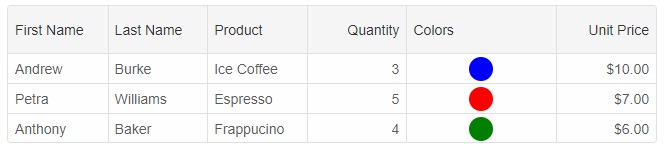
The template = 'color' renders colors in the grid cells.
columns: [
	{
		label: 'First Name', dataField: 'firstName'
	},
	{ label: 'Last Name', dataField: 'lastName' },
	{ label: 'Product', dataField: 'productName' },
	{
		label: 'Quantity', dataField: 'quantity', cellsAlign: 'right'
	}, {
		label: 'Colors', width: 150, template: 'color', dataField: 'name', getCellValue: (id, dataField, data) => {
			return ['blue', 'red', 'green'][id];
		}
	},
	{
		label: 'Unit Price', dataField: 'price', cellsAlign: 'right', cellsFormat: 'c2'
	}
]
Auto number Template
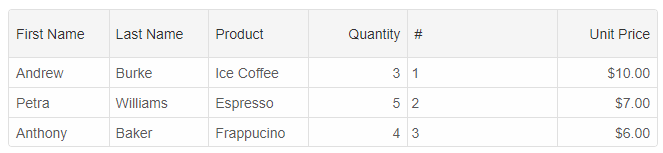
This template automatically generates and renders numbers in the column cells.
columns: [
	{
		label: 'First Name', dataField: 'firstName'
	},
	{ label: 'Last Name', dataField: 'lastName' },
	{ label: 'Product', dataField: 'productName' },
	{
		label: 'Quantity', dataField: 'quantity', cellsAlign: 'right'
	}, {
		label: '#', width: 150, template: 'autoNumber'
	},
	{
		label: 'Unit Price', dataField: 'price', cellsAlign: 'right', cellsFormat: 'c2'
	}
]
Progress template
This template allows you to render a progress bar for numeric cells with values from 0 to 1.
columns: [
	{
		label: 'First Name', dataField: 'firstName'
	},
	{ label: 'Last Name', dataField: 'lastName' },
	{ label: 'Product', dataField: 'productName' },
	{
		label: 'Quantity', dataField: 'quantity', cellsAlign: 'right'
	}, {
		label: 'Progress', width: 150, template: 'progress', dataField: 'name', getCellValue: (id, dataField, data) => {
			return [0.1, 0.5, 0.9][id];
		}
	},
	{
		label: 'Unit Price', dataField: 'price', cellsAlign: 'right', cellsFormat: 'c2'
	}
]
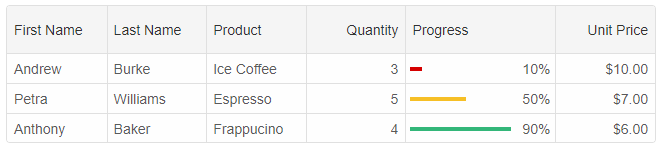
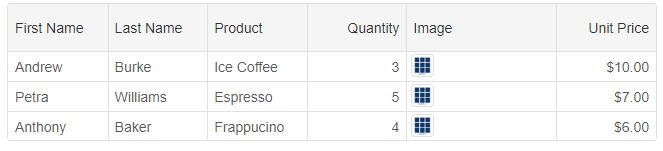
Image template
The image template allows you to display image(s) in the grid cells if the cell values are in base64 format.
    columns: [
        {
            label: 'First Name', dataField: 'firstName'
        },
        { label: 'Last Name', dataField: 'lastName' },
        { label: 'Product', dataField: 'productName' },
        {
            label: 'Quantity', dataField: 'quantity', cellsAlign: 'right'
        }, {
            label: 'Image', width: 150, template: 'image', dataField: 'name', getCellValue: (id, dataField, data) => {
                return '[{"value":"data:image/png;base64,iVBORw0KGgoAAAANSUhEUgAAAgAAAAIACAYAAAD0eNT6AAAAGXRFWHRTb2Z0d2FyZQBBZG9iZSBJbWFnZVJlYWR5ccllPAAAAyFpVFh0WE1MOmNvbS5hZG9iZS54bXAAAAAAADw/eHBhY2tldCBiZWdpbj0i77u/IiBpZD0iVzVNME1wQ2VoaUh6cmVTek5UY3prYzlkIj8+IDx4OnhtcG1ldGEgeG1sbnM6eD0iYWRvYmU6bnM6bWV0YS8iIHg6eG1wdGs9IkFkb2JlIFhNUCBDb3JlIDUuNi1jMTQyIDc5LjE2MDkyNCwgMjAxNy8wNy8xMy0wMTowNjozOSAgICAgICAgIj4gPHJkZjpSREYgeG1sbnM6cmRmPSJodHRwOi8vd3d3LnczLm9yZy8xOTk5LzAyLzIyLXJkZi1zeW50YXgtbnMjIj4gPHJkZjpEZXNjcmlwdGlvbiByZGY6YWJvdXQ9IiIgeG1sbnM6eG1wPSJodHRwOi8vbnMuYWRvYmUuY29tL3hhcC8xLjAvIiB4bWxuczp4bXBNTT0iaHR0cDovL25zLmFkb2JlLmNvbS94YXAvMS4wL21tLyIgeG1sbnM6c3RSZWY9Imh0dHA6Ly9ucy5hZG9iZS5jb20veGFwLzEuMC9zVHlwZS9SZXNvdXJjZVJlZiMiIHhtcDpDcmVhdG9yVG9vbD0iQWRvYmUgUGhvdG9zaG9wIENDIChXaW5kb3dzKSIgeG1wTU06SW5zdGFuY2VJRD0ieG1wLmlpZDo5QjI3MEFGRTVGQ0YxMUVCOUQ1RDg2RTFGRUZDQjA0RiIgeG1wTU06RG9jdW1lbnRJRD0ieG1wLmRpZDo5QjI3MEFGRjVGQ0YxMUVCOUQ1RDg2RTFGRUZDQjA0RiI+IDx4bXBNTTpEZXJpdmVkRnJvbSBzdFJlZjppbnN0YW5jZUlEPSJ4bXAuaWlkOjlCMjcwQUZDNUZDRjExRUI5RDVEODZFMUZFRkNCMDRGIiBzdFJlZjpkb2N1bWVudElEPSJ4bXAuZGlkOjlCMjcwQUZENUZDRjExRUI5RDVEODZFMUZFRkNCMDRGIi8+IDwvcmRmOkRlc2NyaXB0aW9uPiA8L3JkZjpSREY+IDwveDp4bXBtZXRhPiA8P3hwYWNrZXQgZW5kPSJyIj8+1dOk/AAADipJREFUeNrs3Y9x2koCwGG4SQHHleCUQObSAC6BlOBcKohLsCvwPZcQSjAN+MaUEEp4XAecNrfE8mb1Fwmbl++bYZzEWGBZ8f60Emi63+8nAMDv5W9WAQAIAABAAAAAAgAAEAAAgAAAAAQAACAAAAABAAAIAABAAAAAAgAAEAAAgAAAAAQAACAAAAABAAAIAAAQAACAAAAABAAAIAAAAAEAAAgAAEAAAAACAAAQAACAAAAABAAAIAAAAAEAAAgAAEAAAAACAAAQAAAgAAAAAQAACAAAQAAAAAIAABAAAIAAAAAEAAAgAAAAAQAACAAAQAAAAAIAABAAAIAAAAAEAAAgAABAAAAAAgAAEAAAgAAAAAQAACAAAAABAAAIAADgDXhnFTybffyytxbO1+7xbmo7wHbAkNuBGQAAQAAAAAIAABAAAIAAAAAEAAAgAAAAAQAACAAAQAAAAAIAABAAAIAAAAAEAAAgAABAAAAAAgAAEAAAgAAAAAQAACAAAAABAAAIAABAAAAAAgAAEAAAgAAAAAQAACAAAAABAAAIAABAAACAAAAABAAAIAAAAAEAAAgAAEAAAAACAAAQAACAAAAABAAAIAAAAAEAAAgAAEAAAAACAAAQAACAAAAABAAACAAAQAAAAAIAABAAAIAAAAAEAAAgAAAAAQAACAAAQAAAAAIAABAAAIAAAAAEAAAgAAAAAQAACAAAEAAAgAAAAAQAACAAAAABAAAIAABAAAAAAgAAEAAAgAAAAAQAACAAAAABAAAIAABAAAAAAgAAEAAAIAAAAAEAAAgAAEAAAAACAAAQAACAAAAABAAAIAAAAAEAAAgAAEAAAAACAAAQAACAAAAABAAAIAAAQAAAAAIAABAAAIAAAAAEAAAgAAAAAQAACAAAQAAAAAIAABAAAMBYpvv93loAADMAAIAAAAAEAAAgAAAAAQAACAAAQAAAAAIAABAAAIAAAAAEAAAgAAAAAQAAdPHOKng2+/jFpRHP2O7xbmo7wHbAkNuBGQAAQAAAAAIAABAAAIAAAAAEAAAgAAAAAQAACAAAQAAAAAIAABAAAIAAAAAEAAAgAABAAAAAAgAAEAAAgAAAAAQAACAAAAABAAAIAABAAAAAAgAAEAAAgAAAAAQAACAAAAABAAAIAABAAACAAAAABAAAIAAAAAEAAAgAAEAAAAACAAAQAACAAAAABAAAIAAAAAEAAAgAAEAAAAACAAAQAACAAAAABAAACAAAQAAAAAIAABAAAIAAAAAEAAAgAAAAAQAACAAAQAAAAAIAABAAAIAAAAAEAAAgAAAAAQAACAAAEAAAgAAAAAQAACAAAAABAAAIAABAAAAAAgAAEAAAgAAAAAQAACAAAAABAAAIAABAAAAAAgAAEAAAIAAAAAEAAAgAAEAAAAACAAAQAACAAAAABAAAIAAAAAEAAAgAAEAAAAACAAAQAACAAAAABAAAIAAAQAAAAAIAABAAAIAAAAAEAAAgAAAAAQAACAAAQAAAAAIAABAAAMBYpvv93loAADMAAIAAAAAEAAAgAAAAAQAACAAAQAAAAAIAABAAAIAAAAAEAAAgAAAAAQAACAAAQAAAAC+9swqezT5+2VsL52v3eDe1HWA7YMjtwAwAACAAAAABAAAIAABAAAAAAgAAEAAAgAAAAAQAACAAAAABAAAIAABAAAAAAgAAEAAAIAAAAAEAAAgAAEAAAAACAAAQAACAAAAABAAAIAAAAAEAAAgAAEAAAAACAAAQAACAAAAABAAAIAAAQAAAAAIAABAAAIAAAAAEAAAgAAAAAQAACAAAQAAAAAIAABAAAIAAAAAEAAAgAAAAAQAACAAAQAAAAAIAAAQAACAAAAABAAAIAABAAAAAAgAAEAAAgAAAAAQAACAAAAABAAAIAABAAAAAAgAAEAAAgAAAAAQAAAgAAEAAAAACAAAQAACAAAAABAAAIAAAAAEAAAgAAEAAAAACAAAQAACAAAAABAAAIAAAAAEAAAgAABAAAIAAAAAEAAAgAAAAAQAACAAAQAAAAAIAABAAAIAAAAAEAAAgAAAAAQAACAAAQAAAAAIAABAAACAAAAABAAAIAABAAAAAAgAAEAAAgAAAAAQAACAAAAABAAAIAABgLNP9fm8tAIAZAABAAAAAAgAAEAAAgAAAAAQAACAAAAABAAAIAABAAAAAAgAAEAAAgAAAAAQAACAAAICX3lkFvKbpdPrj49//+a958WERb+HPs9Ld1sVtV9w2xW313//8e9tm2cUy/0yWE3wqvn7V9/kWy7woPnzPfOp92+dVsdyn+H0P+Vy/xu//sNyLeEutSx/XxWNuGpYbfkYPI20Sl8Xjr4/4nvflvxfLmo65rP3++S6zj19e3H/3eDf1PxwBANW/ZMPgdBMH/iqHzy3DfYuvuS5+Gd+2WPysYlmrI57ysuLfw8C67bkOLjKD/xDP9abl/Rblj8XzCd/H9THxAbx9DgHwaoo9pqviw1PD4D+05St/fZdlLl/pRxOC5FsRAn/YSsEMAIwx+KcDTJjmv5/8f6p/V9qLv5g8Hx6YtNkrLgavWdVDF59b9tm7jbMV85EDYDt5nqbv/VwrXIZ1Wyxvl5l9COv2Krn/VZgNyMy2bOKymjxkHr/Jxv8OEAD8dQf/MDin09P3xUDzuebLbuNgtWx5rH2eGVjmpQG3z6BaHqjvkwFz1mddZKb/b5MwOvYwwE+5Y+txXYbbqngu4bG/Jc/na/Hv9+VoiH9et/jeGh8feD0OAfAarpIBc9Uw+P8crFoe+8+5Lw/kNTMEbQMg3VO9GGDv/zC7san5/GhiDIS99F0SNlc2WRAAMIT0mP/tCR5z3TDwNu3NLpJBfqhp+RdRkdm7/nEY4IQRsMv8PBY2WRAAMHgANL3srKeLzN7t9ohBrTwIr8tT4n1lpv9XFbFy6gF4JQBAAMC5mjUMbF0PAyxrZhOqHq/LMn8uNx4r39Xcb+xZgK3NBwQAjGGT7AkvX+Nx2w6sxfP75ZyFzN36vDrgxdn/yUxI+TFOehggY2eTBQEAYwzENz1Pyuu6Z7tKBrO2U9vl+22G2EOumf6vmmU42TR8fLlj3c8LEADQy33y9zAYPmQGnmOUl7WtGFgbDwPEzy8b9v77yJ39Xxcrp5wBWDTECCAAoLvd413Yo7zNDNhP4d3n4t7xsWYtAqDNwHpVM1AfMzDWTf/nHuskhwFihH0t/7gywQYIAOgdAdcVA0sYcL8XA9FDPPY+tFXHAEhfprdtuddcN8g2Tf9XBcaohwHi4P+QxNPtEK94AAQAlCMgvPnP9SR/klkY7MJswJ/hqnY9zhHI3j8OZuUBd1E149BhoD5m779yuac4DBDWa5hZiO/7/5Sst/sj3ngJEABQLQ4wHybV08yHtw3+Ht+Mp6268wnaHgZoNVAfGQDbhvdBGOwwQLi8bXor/jlcMjm8/W95tiVEx6c2784ICAA4JgK2cbD5R5wR2FSEwEO8xn1X24YAmLcYqE919n9TrIz9aoAQYu9dChgEAJwyBHZhRqC4hRmBy0n+JLubHucGbNPgSCLjl1cDZAbq3AxF+n4GbQbnTrMKr/BqgB9XaTzFyzKB1+VqgLzVGAiD/zoOqt8mL49NhwFqXbVH3vJVBKtkgF8mg3ybgbrPyXHpcp/Sq+Y16H2J4OJrppl1dbjMcvnNjsJzDOvwgy0RzADAa4bAZWawrdsTbhsAZYuav69Geu//vhZDrt/idp1Zx/Oeh1sAAQCDDVK59w1YHLnM9DDAojRQz5LlD/VGOMs3tpx0Hacn/X09w0MBm0x09Y21yQjbALwZDgFwLsIe+03PANjULPOwRx6m1hdxxqE8wO4m7c/+nzcMFOnA/b7tiYXFc3tKnuty6BP1wvKK5W7KjzP59dDIW7fL/Ez6nLw5b1gumAGAE80CdPkl3naaveowwIuz9Gum/1u/R35m+r/rqwpOdYneVc91+VasB3r+roeAAIC3IDMVffQeWc1hgKZL//Zx7HsKdH0Hw6EG0MWZbSrbgdbTsmG9gACAExnrF3J5YJ3Hs+IPsbEbcJr9qACIsVIe3Ea5NkA8F6AcVxcDXZvhJDIvm7zo+rLReP/y99z0Zk0gAKCN2ccvnU4si3v/XzsEwCwZFNYd9qzLj9P12Pe84vkfO/1f9VzH2js/91mA9ITRm7ZXmoz3u2lYHggA6OmhiIA/ilvjL+XSBWrSPbL7rgNxzZ71pmKwa3qTnnVdeIwwe3GqwwCbvuvzjbhPZgEO7yK5aNjWFpNfL4a0btjW4Gx5FQCn3vs/7A2H21U86/xw2yaDzrxikPs08NNaZQa5Iad9B7mmQHg+xfralmJolFcDnPsMQDhps1gv4SWN3zIRsI7f3ybZ1paT/Jn/n/yvxQwAjDMY/giB4vZH3Ps63G4y9z1cpGbo47Grir3Io2Wm/48Ni9EPA8TnV46xi7ZT6G8oAsJ6yl3MaBG3rXRby531f+lSyAgAGHaw7TO4hq/50HJv96JmbzY3WKSHAfrupc/H2vuv+XqvBqj+uf7YZibdDrmEAf86Dv5O/EMAwFB2j3fb4na48l/4eBt/Qe8ye2Cr+Ms4vGHO5w4nzvU5a708SHQ5Se/FmfktAuCoVy9k9s5HeTVAJjSuznF7C+uruF3GEGja1j7Hbe3Wnj+/g+l+v7cWAMAMAAAgAAAAAQAACAAAQAAAAAIAABAAAIAAAAAEAAAgAAAAAQAACAAAQAAAAAIAABAAAIAAAAABYBUAgAAAAAQAACAAAAABAAAIAABAAAAAAgAAEAAAgAAAAAQAACAAAAABAAAIAABAAAAAAgAAEAAAgAAAgN/S/wQYAPgECLCkVIDpAAAAAElFTkSuQmCC","label":"icon.png"}]';
            }
        },
        {
            label: 'Unit Price', dataField: 'price', cellsAlign: 'right', cellsFormat: 'c2'
        }
    ]
URL template
If you use: template = 'url', the grid will display anchor tags in cells for the valid urls.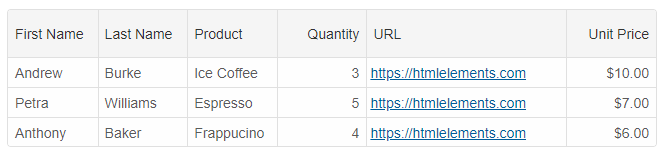
Email template
If you use: template = 'email', the grid will display anchor tags in cells for the valid emails.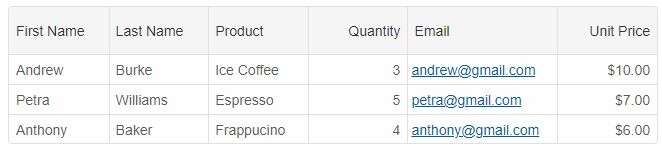
CreatedDate and UpdatedDate templates
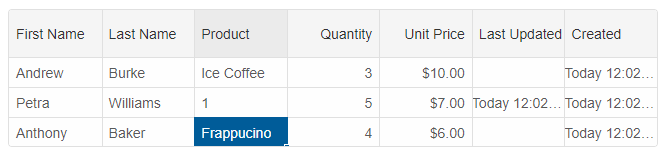
These templates allow you to display the dates related to the creation of a row and the last modification date of a row.
columns: [
	{
		label: 'First Name', dataField: 'firstName'
	},
	{ label: 'Last Name', dataField: 'lastName' },
	{ label: 'Product', dataField: 'productName' },
	{
		label: 'Quantity', dataField: 'quantity', cellsAlign: 'right'
	},
	{
		label: 'Unit Price', dataField: 'price', cellsAlign: 'right', cellsFormat: 'c2'
	},
	{
		label: 'Last Updated', template: 'updatedDate', dataType: 'date', allowEdit: false
	},
	{
		label: 'Created', template: 'createdDate', dataType: 'date', allowEdit: false
	}
]
For AI tooling
Developer Quick Reference
Topic: grid-cell-templates Component: Grid Framework: Angular
Main methods: (none detected)
Common config keys: layout, behavior, sorting, dataSource, columns, editing, selection, filtering
Implementation Notes
Compatibility: Angular 17+ (standalone) API access pattern: @ViewChild(...) + this.component.method()
Lifecycle guidance: Bind inputs declaratively and call imperative API through @ViewChild in/after ngAfterViewInit.
Common pitfalls:
- Using @ViewChild API too early (before view init).
- Omitting standalone imports for Smart modules in @Component.imports.
- Type mismatches between configuration fields and template bindings.
Validation checklist:
- Ensure module import exists in standalone component imports array.
- Use typed @ViewChild(..., { read: ComponentType }).
- Call imperative methods after view initialization.