



Grid for React
React version of this topic (compatible with React 19+). Keep the same configuration logic from JavaScript and pass it as component props.
What this topic covers: practical setup, the framework-specific API access pattern, and copy-adapt guidance for the examples in this page.
import React, { useMemo, useRef } from 'react';
import { Grid } from 'smart-webcomponents-react/grid';
import 'smart-webcomponents-react/source/styles/smart.default.css';

export default function App() {
  const componentRef = useRef(null);
  const componentProps = useMemo(() => ({
    // Copy this topic's JavaScript configuration here.
  }), []);

  return <Grid ref={componentRef} {...componentProps}></Grid>;
}
Use componentRef.current for API methods in this topic.
Grid Data Bind to Node.js and MySQL
In this tutorial we will show how we can bind the Data Grid component to data fetched from a Node.js server connected to a MySQL database. The server endpoint will be hosted using a web server comprised of Node.js running Express.js, that connects to a single MySQL datasource.
Database Setup
First, we will show how to set up our database.
Before you start you need to download and install the MySQL Database.
After that create a database called products and run the following SQL script to create products table and populate it with data:
    DROP TABLE IF EXISTS `products`;

    CREATE TABLE `products` (
      `first_name` varchar(20) DEFAULT NULL,
      `last_name` varchar(20) DEFAULT NULL,
      `product` varchar(20) DEFAULT NULL,
      `available` BOOLEAN,
      `quantity` int(11) DEFAULT NULL,
      `unit_price` float(11) DEFAULT NULL
    ) ENGINE=InnoDB DEFAULT CHARSET=utf8;


    LOCK TABLES `products` WRITE;

    INSERT INTO `products` VALUES ('Petra', 'Burke', 'Cappuccino', true, 2, 5.00),('Lars', 'Fuller', 'Cappuccino', true, 3, 5.00),('Nancy', 'Burke', 'Black Tea', true, 9, 2.25),
    ('Beate', 'Nagase', 'Cappuccino', true, 7, 5.00),('Beate', 'Burke', 'Espresso Truffle', false, 10, 1.75),('Nancy', 'Saavedra', 'Espresso Truffle', false, 2, 1.75),
    ('Regina', 'Fuller', 'Espresso con Panna', true, 5, 3.25),('Yoshi', 'Bjorn', 'Espresso Truffle', false, 5, 1.75),('Petra', 'Winkler', 'Caffe Espresso', true, 3, 3.00),
    ('Martin', 'Murphy', 'Green Tea', false, 2, 1.5);

    UNLOCK TABLES;
Node.js Server
We will be using express and body-parser for setting our /products server endpoint. The index.js file of our Node.js application will look like this:
      const express = require('express');
      const DataService = require('./data-service');
      const bodyParser = require('body-parser');

      const app = express()

      app.use(bodyParser.urlencoded({extended: false}));
      app.use(bodyParser.json());

      app.get('/products', (req, res) => {
        DataService.getData(req.body, (results) => {
          res.json({ rows: results });
        });
      });

      app.all('*', (req, res) => {
          res.send('404 - Not Found!')
      });

      const port = 3000;

      app.listen(port, () => { console.log(`Server listening to port: ${port}`) });
Requests to the database are handled by the DataService object that we import from data-service.js file.
The getData method uses a connection that is created for sending queries to the MySQL database usibg the mysql npm package.
The data-service.js file looks like this:
      const mysql = require('mysql');

      var connection = mysql.createConnection({
        host     : 'localhost',
        user     : 'root',
        password : 'mysqlpass',
        database : 'products'
      });

      connection.connect();

      const DataService = {
          getData(request, resultCallback) {

              connection.query('SELECT * FROM products.products;', function (error, results, fields) {
                  if (error) throw error;
                  console.log('results: ', results);
                  resultCallback(results);
              });
          }
      }

      module.exports = DataService;
Client Side
Finally, we need to configure our Smart Grid component so that it loads the data from our server using the virtualDataSource option.
The grid configuration will look like this:
      const componentProps = useMemo(() => ({
                editing: {
                    enabled: true,
                    action: 'none',
                    mode: 'row'
                },
                selection: {
                    enabled: true,
                    mode: 'extended',
                    allowCellSelection: true
                },
                appearance: {
                    alternationStart: 0,
                    alternationCount: 2
                },

                dataSource: new Smart.DataAdapter({
                    virtualDataSource: function (resultCallbackFunction, details) {
                        fetch('http://localhost:3000/products').then(response => response.json())
                      .then(data => {
                          resultCallbackFunction({
                            dataSource: data.rows,
                            virtualDataSourceLength: data.rows.length
                          });
                        })
                    },
                    dataFields: [
                        'first_name: string',
                        'last_name: string',
                        'product: string',
                        'available: number',
                        'quantity: number',
                        'unit_price: number'
                    ]
                }),
                columns: [
                    { label: 'First Name', dataField: 'first_name' },
                    { label: 'Last Name', dataField: 'last_name' },
                    { label: 'Product', dataField: 'product' },
                    { label: 'Available', dataField: 'available' },
                    { label: 'Quantity', dataField: 'quantity' },
                    { label: 'Unit Price', dataField: 'unit_price' }
                ]
}), []);
Result
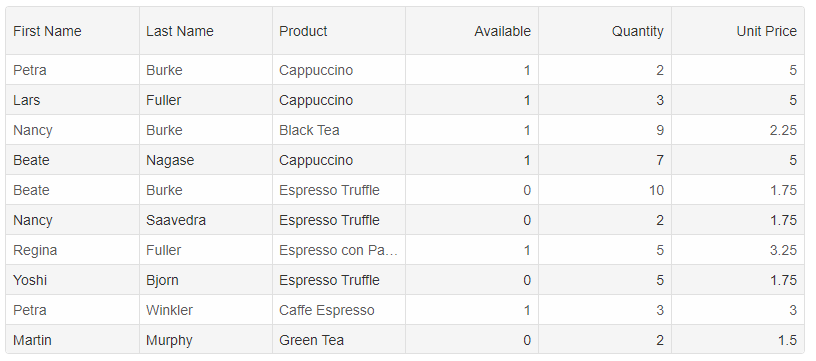
When you run the server and open the grid's page you should get the following result:
For AI tooling
Developer Quick Reference
Topic: grid-data-bind-nodejs-mysql Component: Grid Framework: React
Main methods: (none detected)
Common config keys: editing, selection, appearance, dataSource, virtualDataSource, columns
Implementation Notes
Compatibility: React 19+ API access pattern: const componentRef = useRef(null) + componentRef.current.method()
Lifecycle guidance: Use useMemo for large config objects and call imperative API through componentRef.current after first render.
Common pitfalls:
- Recreating columns/dataSource objects on every render can reset component state.
- Calling API methods before ref is available causes runtime errors.
- Mixing controlled and imperative updates without sync can lead to stale UI.
Validation checklist:
- Keep config objects memoized when possible.
- Guard API calls with ref existence checks.
- Verify CSS theme import is present once per app.