



Grid for React
React version of this topic (compatible with React 19+). Keep the same configuration logic from JavaScript and pass it as component props.
What this topic covers: practical setup, the framework-specific API access pattern, and copy-adapt guidance for the examples in this page.
import React, { useMemo, useRef } from 'react';
import { Grid } from 'smart-webcomponents-react/grid';
import 'smart-webcomponents-react/source/styles/smart.default.css';

export default function App() {
  const componentRef = useRef(null);
  const componentProps = useMemo(() => ({
    // Copy this topic's JavaScript configuration here.
  }), []);

  return <Grid ref={componentRef} {...componentProps}></Grid>;
}
Use componentRef.current for API methods in this topic.
Localization
All Smart UI components support localization - the process of adapting software to both the culture and language of an end user. All information such as text content, numeric and date formats and built-in Error messages thrown by the Custom Elements can be customized and set to multiple languages/cultures.
Setup Grid
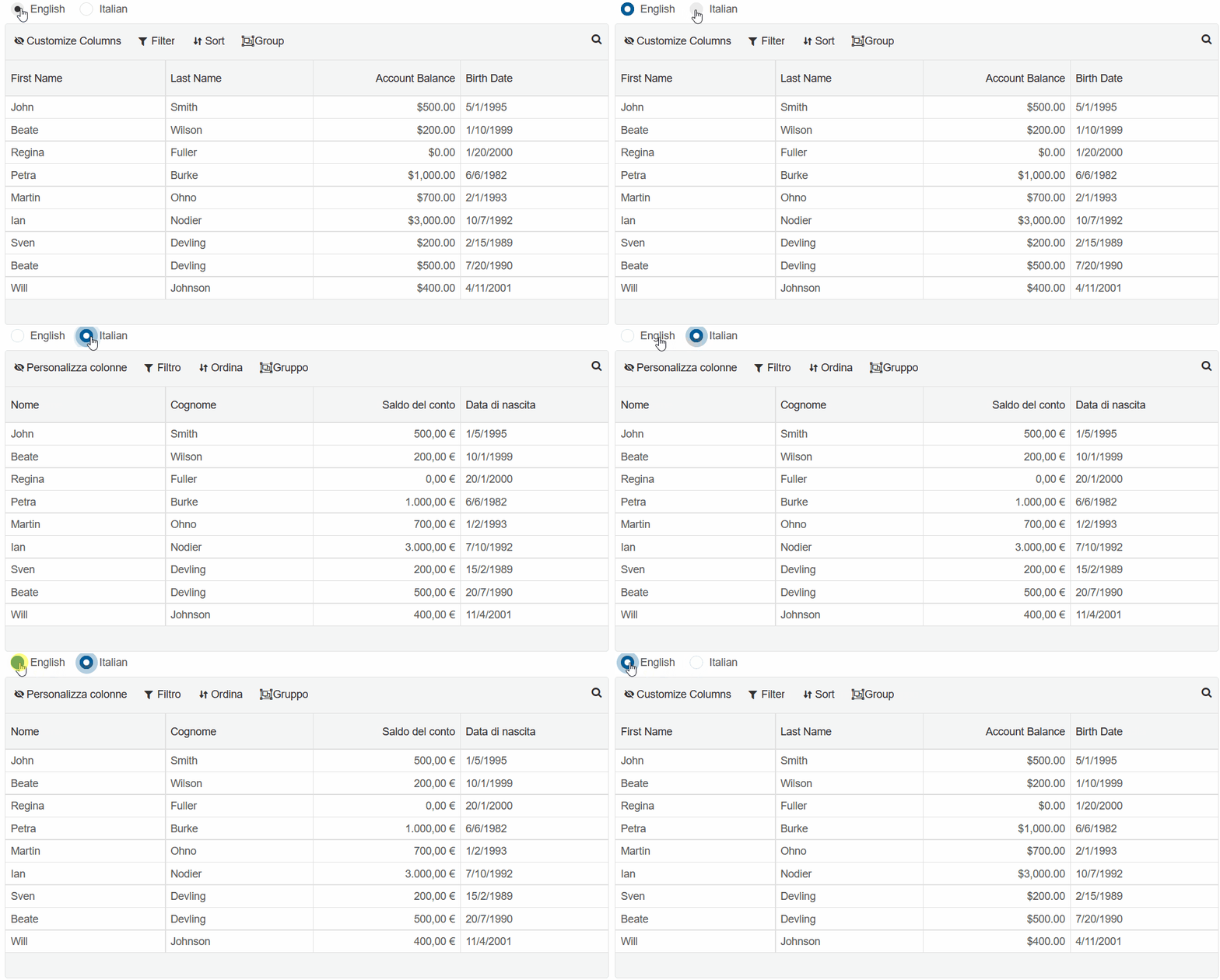
The demo below will showcase how to dynamically switch Smart.Grid's langauge between two different options -
English and Italian.
-
Follow the Download & Installation guide to set up Smart UI in your JS project
- Create a
<smart-grid>element and two radio buttons in your Web Page:<smart-radio-button group-name="Language" checked>English</smart-radio-button> <smart-radio-button group-name="Language">Italian</smart-radio-button> <smart-grid id="grid"></smart-grid>
- Then inside index.js, set the grid's properties.:
const componentProps = useMemo(() => ({
      header: {
        visible: true
      },
      columnMenu: {
        dataSource: {
          columnMenuItemRename: {
            visible: true
          },
          columnMenuItemEditDescription: {
            visible: true
          },
          columnMenuItemHide: {
            visible: true
          },
          columnMenuItemDelete: {
            visible: true
          }
        }
      },
      dataSource: new Smart.DataAdapter({
        dataSource: [{
            firstName: "John",
            lastName: "Smith",
            balance: 500,
            birthDate: "1995/05/01"
          },
          {
            firstName: "Beate",
            lastName: "Wilson",
            balance: 200,
            birthDate: "1999/01/10"
          },
          {
            firstName: "Regina",
            lastName: "Fuller",
            balance: 0,
            birthDate: "2000/01/20"
          },
          {
            firstName: "Petra",
            lastName: "Burke",
            balance: 1000,
            birthDate: "1982/06/06"
          },
          {
            firstName: "Martin",
            lastName: "Ohno",
            balance: 700,
            birthDate: "1993/02/01"
          },
          {
            firstName: "Ian",
            lastName: "Nodier",
            balance: 3000,
            birthDate: "1992/10/07"
          },
          {
            firstName: "Sven",
            lastName: "Devling",
            balance: 200,
            birthDate: "1989/02/15"
          },
          {
            firstName: "Beate",
            lastName: "Devling",
            balance: 500,
            birthDate: "1990/07/20"
          },
          {
            firstName: "Will",
            lastName: "Johnson",
            balance: 400,
            birthDate: "2001/04/11"
          },
        ],
        dataFields: [
          'firstName: string',
          'lastName: string',
          'balance: number',
          'birthDate: date',
        ]
      }),
      grouping: {
        enabled: true
      },
      filtering: {
        enabled: true
      },
      sorting: {
        enabled: true,
      },
      editing: {
        enabled: true
      },
      columns: [
        {
          label: 'First Name',
          dataField: 'firstName',
        },
        {
          label: 'Last Name',
          dataField: 'lastName',
        },
        {
          label: 'Account Balance',
          dataField: 'balance',
          cellsFormat: 'c2'
        },
        {
          label: 'Birth Date',
          dataField: 'birthDate',
          cellsFormat: 'd'
        },
      ]
}), []);
useEffect(() => {
  const buttons = componentRef.current.querySelectorAll("smart-radio-button")
  let engButton = buttons[0];
  let itButton = buttons[1]
  engButton.addEventListener('click', englishTranslate);
  itButton.addEventListener('click', italianTranslate);
}, []);

function englishTranslate(){

}
function italianTranslate(){

}
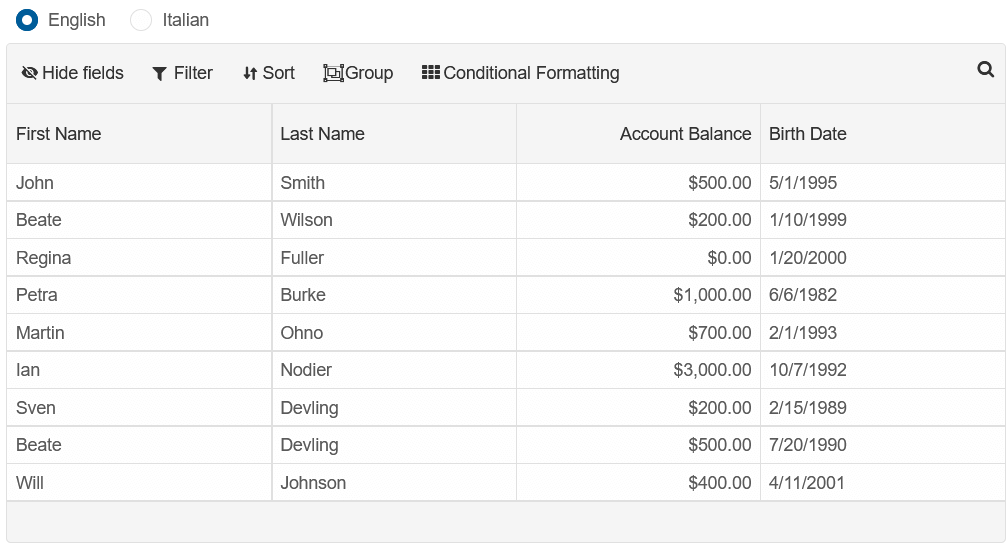
Localize Text Content
All messages, tooltips and text content the user can recieve are defined in the messages property.
By deafult, messages contains only an "en" key, which specifies the english translation of the text
content.
messages = {
  "en": {
    "invalidColumnProperty": "{{elementType}}: Invalid property name \"{{propertyName}}\" set for Column: \"{{type}}\"",
    "invalidRowProperty": "{{elementType}}: Invalid property name \"{{propertyName}}\" set for Row\"",
    "invalidCellValue": "Invalid cell value \"{{value}}\", Validation rule: \"{{validationRule}}\"",
    .....
  }
}
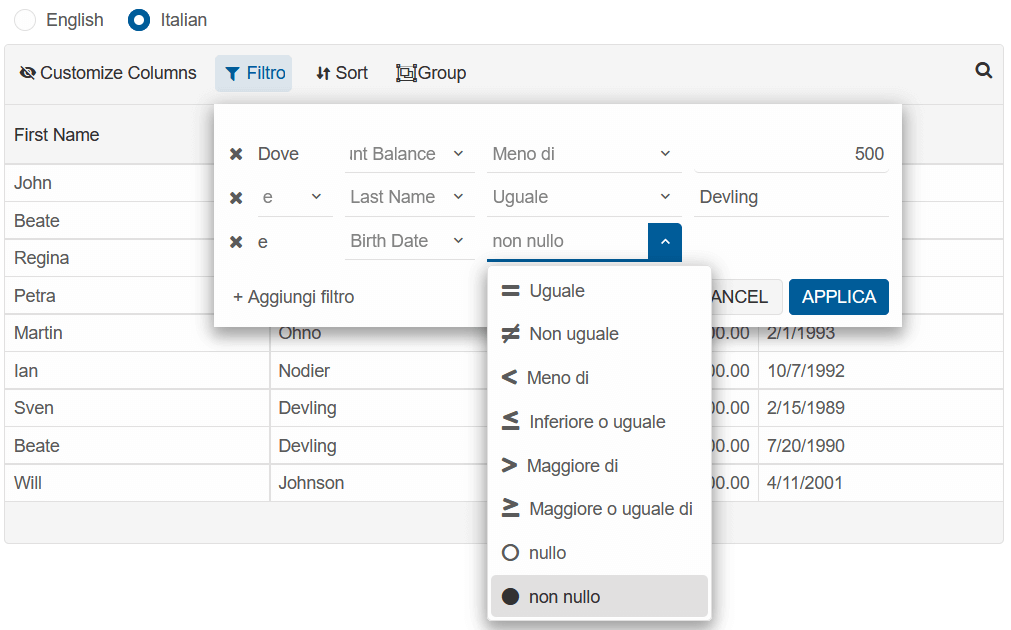
We will expand this by adding an Italian translation to all filter related content:
messages = {
  "en": {
    "invalidColumnProperty": "{{elementType}}: Invalid property name \"{{propertyName}}\" set for Column: \"{{type}}\"",
    "invalidRowProperty": "{{elementType}}: Invalid property name \"{{propertyName}}\" set for Row\"",
    "invalidCellValue": "Invalid cell value \"{{value}}\", Validation rule: \"{{validationRule}}\"",
    .....
  },
  "it":{
    "columnMenuItemFilter": "Filtro",
    "columnMenuItemRemoveFilter": "Rimuovi filtro",
    "commandBarFilter": "Filtro",
    "dialogFilterButtonConfirm": "FILTRO",
    "dialogFilterButtonCancel": "CLEAR",
    "dialogFilterHeader": "Filtra per",
    "dialogFilterMinLabel": "Min",
    "dialogFilterMaxLabel": "Massimo",
    "CLEAR_FILTER": "Cancella filtro",
    "STARTS_WITH": "Inizia con",
    "addFilter": "+ Aggiungi filtro",
    "and": "e",
    "filter": "Filtro",
    "filteredByMultiple": "{{n}} filtri",
    "filteredByOne": "1 filtro",
    "NOT_NULL": "non nullo",
    "NULL": "nullo",
    "CONTAINS": "Contiene",
    "DOES_NOT_CONTAIN": "Non contiene",
    "ENDS_WITH": "Finisce con",
    "EQUAL": "Uguale",
    "GREATER_THAN": "Maggiore di",
    "GREATER_THAN_OR_EQUAL": "Maggiore o uguale di",
    "LESS_THAN": "Meno di",
    "LESS_THAN_OR_EQUAL": "Inferiore o uguale",
    "NOT_EQUAL": "Non uguale",
    "where": "Dove",
    "apply": "Applica",
  }
}
When the messages have been set, the langauge/culture of the Grid is set using the locale property.
Modify the englishTranslate and italianTranslate functions to change the grid's locale when they
are executed:
function englishTranslate() {
  let grid = componentRef.current;
  componentRef.current.locale = 'en';

}

function italianTranslate() {
  let grid = componentRef.current;
  componentRef.current.locale = 'it';

}
Now, when the radio button is set to Italian, the text content of the Grid's filter will also be set to Italian:
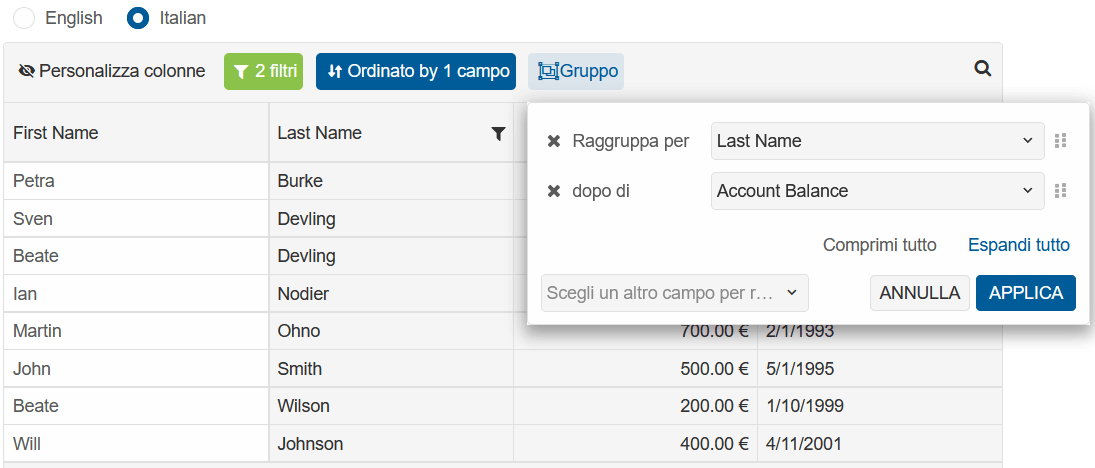
The object below is the full Italian translation of all possible messages:
let messages = {
  "en":{
    .....
  },
  "it": {
    "invalidColumnProperty": "{{elementType}}: Nome proprietà non valido \"{{propertyName}}\" impostato per Colonna: \"{{type}}\"",
    "invalidRowProperty": "{{elementType}}: nome proprietà non valido \"{{propertyName}}\" impostato per Row\"",
    "invalidCellValue": "Valore cella non valido \"{{value}}\", Regola di convalida: \"{{validationRule}}\"",
    "frozenColumns": "{{elementType}}: per bloccare/bloccare un gruppo di colonne, tutte le colonne al suo interno devono essere bloccate.",
    "frozenRows": "{{elementType}}: per bloccare/bloccare una cella speciale, tutte le righe al suo interno devono essere bloccate.",
    "columnGroups": "{{elementType}}: per favore, controlla l'inizializzazione dell'array di colonne di smartGrid. Le colonne in un gruppo di colonne dovrebbero essere fratelli nell'array di colonne.",
    "min": "Min: {{value}}",
    "max": "Massimo: {{value}}",
    "sum": "Somma: {{value}} ",
    "avg": "Media: {{value}}",
    "count": "Conteggio: {{value}}",
    "pagerFirstButton": "Primo",
    "pagerLastButton": "Ultimo",
    "pagerPreviousButton": "Precedente",
    "pagerNextButton": "Avanti",
    "pagerNavigateToLabel": "Vai a:",
    "pagerPageSizeLabel": "Mostra:",
    "pagerNavigateToInputPlaceholder": "",
    "pagerEllipsis": "...",
    "pagerSummaryString": "di",
    "pagerSummaryPrefix": "di",
    "pagerSummarySuffix": "",
    "columnMenuCustomizeType": "Personalizza tipo",
    "columnMenuItemRename": "Rinomina",
    "columnMenuItemEditDescription": "Modifica descrizione",
    "columnMenuItemDuplicate": "Duplica",
    "columnMenuItemInsertLeft": "Inserisci a sinistra",
    "columnMenuItemInsertRight": "Inserisci a destra",
    "columnMenuItemSortAsc": "Ordina {{mode}}",
    "columnMenuItemSortDesc": "Ordina {{mode}}",
    "columnMenuItemRemoveSort": "Rimuovi ordinamento",
    "columnMenuItemFilter": "Filtro",
    "columnMenuItemRemoveFilter": "Rimuovi filtro",
    "columnMenuItemGroupBy": "Raggruppa per questa colonna",
    "columnMenuItemRemoveGroupBy": "Rimuovi gruppo",
    "columnMenuItemHide": "Nascondi",
    "columnMenuItemDelete": "Elimina",
    "columnResizeTooltip": "larghezza: {{valore}}px",
    "rowResizeTooltip": "altezza: {{valore}}px",
    "commandBarAddRow": "Aggiungi",
    "commandBarDeleteRow": "Elimina",
    "commandBarBatchRevert": "Ripristina",
    "commandBarBatchSave": "Salva",
    "commandBarFilter": "Filtro",
    "commandBarSort": "Ordina",
    "commandBarSearch": "Cerca",
    "commandBarCustomize": "Personalizza",
    "commandBarGroup": "Gruppo",
    "commandColumnEdit": "Modifica",
    "commandColumnDelete": "Elimina",
    "commandColumnCancel": "Annulla",
    "commandColumnUpdate": "Aggiorna",
    "commandColumnMenu": "",
    "expandRow": "Espandi riga",
    "collapseRow": "Comprimi riga",
    "addNewRow": "Fai clic qui per aggiungere una nuova riga",
    "addNewColumn": "Fai clic qui per aggiungere una nuova colonna",
    "dialogChartHeader": "{{value}} Grafico",
    "dialogRowDetailHeader": "ID riga: {{value}}",
    "dialogDescriptionHeader": "Colonna: {{value}}",
    "dialogRowDetailButtonConfirm": "OK",
    "dialogRowDetailButtonCancel": "ANNULLA",
    "dialogEditHeader": "Modifica {{value}}",
    "dialogAddButtonConfirm": "AGGIUNGI",
    "dialogAddButtonCancel": "ANNULLA",
    "dialogEditButtonConfirm": "OK",
    "dialogEditButtonCancel": "ANNULLA",
    "dialogFilterButtonConfirm": "FILTRO",
    "dialogFilterButtonCancel": "CLEAR",
    "dialogDeleteButtonConfirm": "DELETE",
    "dialogDeleteButtonCancel": "ANNULLA",
    "dialogEditColumn": "Colonna: {{value}}",
    "dialogAddColumn": "Aggiungi colonna",
    "dialogAddHeader": "Aggiungi riga",
    "dialogDeleteHeader": "Elimina riga",
    "dialogFilterHeader": "Filtra per",
    "dialogFilterMinLabel": "Min",
    "dialogFilterMaxLabel": "Massimo",
    "conditionalFormatting": "Formattazione condizionale",
    "groupBarLabel": "Trascina qui l'intestazione di una colonna per raggrupparla in base a quella colonna",
    "dialogDeleteContent": "Sei sicuro di voler eliminare questa riga?",
    "calendar": {
      "/": "/",
      ":": ":",
      "firstDay": 1,
      "days": {
        "names": [
          "Domenica",
          "Lunedì",
          "Martedì",
          "Mercoledì",
          "Giovedi",
          "Venerdì",
          "Sabato"
        ],
        "namesAbbr": [
          "Dom",
          "Lun",
          "Mar",
          "Mer",
          "Gio",
          "Ven",
          "Sab"
        ],
        "namesShort": [
          "Do",
          "Lu",
          "Ma",
          "Me",
          "Gi",
          "Ve",
          "Sa"
        ]
      },
      "months": {
        "names": [
          "Gennaio",
          "Febbraio",
          "Marzo",
          "Aprile",
          "Maggio",
          "Giugno",
          "Luglio",
          "Agosto",
          "Settembre",
          "Ottobre",
          "Novembre",
          "Dicembre",
          ""
        ],
        "namesAbbr": [
          "Gen",
          "Feb",
          "Mar",
          "Apr",
          "Mag",
          "Giu",
          "Lug",
          "Ago",
          "Set",
          "Ott",
          "Nov",
          "Dic",
          ""
        ]
      },
      "AM": [
        "AM",
        "am",
        "AM"
      ],
      "PM": [
        "PM",
        "pm",
        "PM"
      ],
      "eras": [{
        "name": "A.D.",
        "start": null,
        "offset": 0
      }],
      "currencySymbol": "€",
      "currency": "EUR",
      "currencySymbolPosition": "after",
      "decimalSeparator": ".",
      "thousandsSeparator": ","
    },
    "CONTAINS": "Contiene",
    "DOES_NOT_CONTAIN": "Non contiene",
    "ENDS_WITH": "Finisce con",
    "EQUAL": "Uguale",
    "GREATER_THAN": "Maggiore di",
    "GREATER_THAN_OR_EQUAL": "Maggiore o uguale di",
    "LESS_THAN": "Meno di",
    "LESS_THAN_OR_EQUAL": "Inferiore o uguale",
    "NOT_EQUAL": "Non uguale",
    "RANGE": "Gamma",
    "CLEAR_FILTER": "Cancella filtro",
    "STARTS_WITH": "Inizia con",
    "addFilter": "+ Aggiungi filtro",
    "and": "e",
    "apply": "Applica",
    "booleanFirst": "☐",
    "booleanLast": "☑",
    "cancel": "Annulla",
    "CONTAINS_CASE_SENSITIVE": "Contiene  (case sensitive)",
    "dateFirst": "1",
    "dateLast": "9",
    "DOES_NOT_CONTAIN_CASE_SENSITIVE": "non contiene (case sensitive)",
    "EMPTY": "vuoto",
    "ENDS_WITH_CASE_SENSITIVE": "termina con (case sensitive)",
    "EQUAL_CASE_SENSITIVE": "uguale (case sensitive)",
    "filter": "Filtro",
    "customize": "Personalizza colonne",
    "filteredByMultiple": "{{n}} filtri",
    "filteredByOne": "1 filtro",
    "filterValuePlaceholder": "Valore",
    "find": "Trova",
    "findInView": "Trova",
    "firstBy": "Ordina per",
    "found": "{{nth}} di {{n}}",
    "from": "da",
    "noFilters": "Nessun filtro applicato",
    "noResults": "Nessun risultato",
    "noSorting": "Nessun ordinamento applicato",
    "NOT_EMPTY": "non vuoto",
    "NOT_NULL": "non nullo",
    "NULL": "nullo",
    "numberFirst": "1",
    "numberLast": "9",
    "ok": "OK",
    "or": "o",
    "pickAnother": "Scegli un altra colonna per ordinare",
    "sort": "Ordina",
    "group": "Gruppo",
    "sortedByMultiple": "Ordinato per {{n}} campi",
    "sortedByOne": "Ordinato per 1 campo",
    "STARTS_WITH_CASE_SENSITIVE": "inizia con  (case sensitive)",
    "stringFirst": "A",
    "stringLast": "Z",
    "thenBy": "dopo di",
    "where": "Dove",
    "collapseAll": "Comprimi tutto",
    "expandAll": "Espandi tutto",
    "noGrouping": "Nessun raggruppamento",
    "groupedByMultiple": "{{n}} gruppi",
    "groupedByOne": "1 gruppo",
    "firstByGroup": "Raggruppa per",
    "pickAnotherGroupBy": "Scegli un altro campo per raggruppare",
    "add": "Aggiungi condizione",
    "all": "Tutte le colonne",
    "between": "Tra",
    "close": "Chiudi",
    "column": "Colonna:",
    "condition": "Condizione:",
    "equal": "Uguale a",
    "fontFamily": "Famiglia di caratteri:",
    "fontSize": "Dimensione carattere:",
    "format": "Formato:",
    "greaterThan": "Maggiore di",
    "highlight": "Evidenziare",
    "lessThan": "Minore di",
    "notEqual": "Non uguale a",
    "remove": "Rimuovi condizione",
    "secondValue": "Secondo valore:",
    "text": "Testo",
    "value": "Valore"
  }
}
Date & Currency Localization
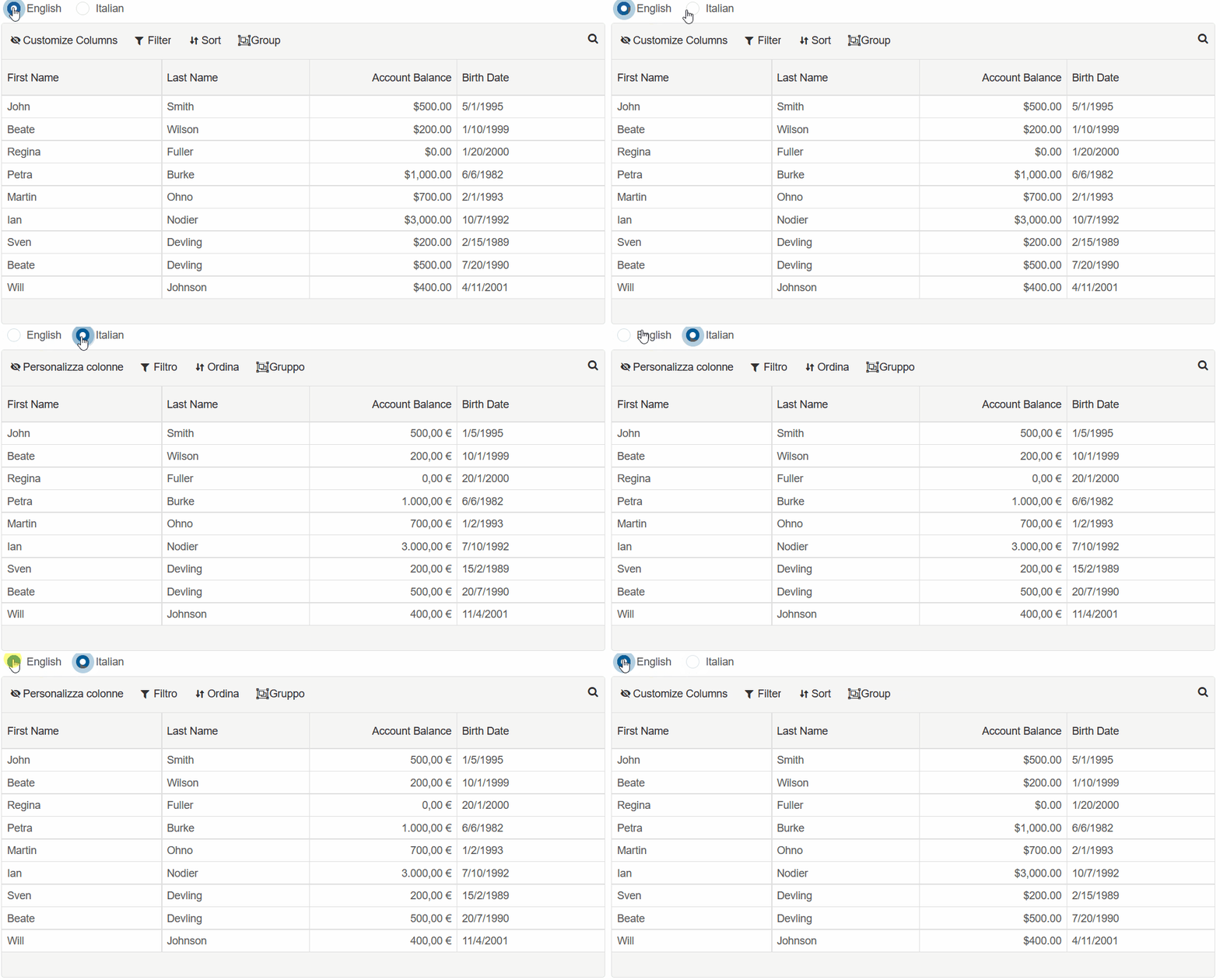
The format of each grid column is set using the formatSettings property.
The value can be localized using the Intl.NumberFormat or Intl.DateTimeFormat objects
Expand the translation functions so that the Account Balance and Birth Date column are localized, according to the language:
function englishTranslate() {
  let grid = componentRef.current;
  componentRef.current.locale = 'en';
  componentRef.current.beginUpdate();


  for (let i = 0; i < componentRef.current.columns.length; i++) {
    const column = componentRef.current.columns[i];

    setFormat(column, componentRef.current.locale);
  }

  componentRef.current.endUpdate(false);

}

function italianTranslate() {
  let grid = componentRef.current;
  componentRef.current.locale = 'it';
  componentRef.current.beginUpdate();


  for (let i = 0; i < componentRef.current.columns.length; i++) {
    const column = componentRef.current.columns[i];

    setFormat(column, componentRef.current.locale);
  }

  componentRef.current.endUpdate(false);

}

const setFormat = function (column, locale) {
  if (column.dataField === 'balance') {
      column.formatSettings = {
          Intl: {
              NumberFormat: {
                  style: 'currency',
                  currency: locale === 'it' ? 'EUR' : 'USD'
              }
          }
      }
  }

  if (column.dataField === 'birthDate') {
      column.formatSettings = {
          Intl: {
              DateTimeFormat: {
                locales: locale
              }
          }
      }
  }
}
Translating Column Labels
Column labels can be translated by first creating an object, which contains the label text, translated in the different languages:
const columnLabels = {
  'en': {
      'firstName': 'First Name',
      'lastName': 'Last Name',
      'balance': 'Account Balance',
      'birthDate': 'Birth Date',
    },
    'it': {
      'firstName': 'Nome',
      'lastName': 'Cognome',
      'balance': 'Saldo del conto',
      'birthDate': 'Data di nascita',
    }
}
Then, use this object to translate the labels on each language change:
function englishTranslate() {
  let grid = componentRef.current;
  componentRef.current.locale = 'en';
  componentRef.current.beginUpdate();


  for (let i = 0; i < componentRef.current.columns.length; i++) {
    const column = componentRef.current.columns[i];

    column.label = columnLabels[componentRef.current.locale][column.dataField];
    setFormat(column, componentRef.current.locale);
  }

  componentRef.current.endUpdate(false);

}
function italianTranslate() {
  let grid = componentRef.current;
  componentRef.current.locale = 'it';
  componentRef.current.beginUpdate();


  for (let i = 0; i < componentRef.current.columns.length; i++) {
    const column = componentRef.current.columns[i];

    column.label = columnLabels[componentRef.current.locale][column.dataField];
    setFormat(column, componentRef.current.locale);
  }

  componentRef.current.endUpdate(false);

}
For AI tooling
Developer Quick Reference
Topic: grid-localization Component: Grid Framework: React
Main methods: beginUpdate(), endUpdate()
Common config keys: header, dataSource, grouping, filtering, sorting, editing, columns
Implementation Notes
Compatibility: React 19+ API access pattern: const componentRef = useRef(null) + componentRef.current.method()
Lifecycle guidance: Use useMemo for large config objects and call imperative API through componentRef.current after first render.
Common pitfalls:
- Recreating columns/dataSource objects on every render can reset component state.
- Calling API methods before ref is available causes runtime errors.
- Mixing controlled and imperative updates without sync can lead to stale UI.
Validation checklist:
- Keep config objects memoized when possible.
- Guard API calls with ref existence checks.
- Verify CSS theme import is present once per app.