



Grid for Angular
Angular standalone version of this topic (compatible with Angular 17+). Import both the Smart UI component and module in the standalone component.
What this topic covers: practical setup, the framework-specific API access pattern, and copy-adapt guidance for the examples in this page.
import { Component, ViewChild, ViewEncapsulation } from '@angular/core';
import { CommonModule } from '@angular/common';
import { RouterOutlet } from '@angular/router';
import { GridComponent, GridModule } from 'smart-webcomponents-angular/grid';

@Component({
  selector: 'app-root',
  standalone: true,
  imports: [CommonModule, GridModule, RouterOutlet],
  templateUrl: './app.component.html',
  styleUrls: ['./app.component.css'],
  encapsulation: ViewEncapsulation.None
})
export class AppComponent {
  @ViewChild('grid', { read: GridComponent, static: false }) grid!: GridComponent;
}
<!-- app.component.html -->
<smart-grid #grid></smart-grid>
Use this.grid for API methods in this topic.
Build your web apps using Smart UI
Smart.Grid - Tree Grid
Tree Grid
In Tree Grid mode, the Smart.Grid web component displays data hierarchies. The first column of the grid reflects the hierarchy - parent cells have an expand/collapse arrow and child cells have an indentation. By clicking the arrow of a parent row, the visibility of its children is toggled. This action can be animated if appearance.allowRowToggleAnimation is set to true. The filtering, sorting, editing, and selection functionalities of the standard Grid are all available in Tree Grid mode.
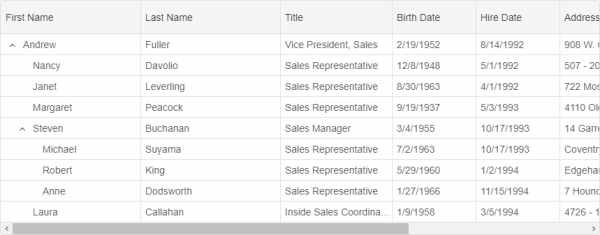
Tree Grid mode is automatically enabled when hierarchical data is passed to the component via the dataSource property.
Two types of hierarchical data are supported, described in the following sections.
Flat Hierarchical Data
If flat hierarchical data is passed to the Grid, the data source properties keyDataField (unique id of a record) and parentDataField (unique id of the parent record) have to be set in order to establish the hierarchical connections between data points, e.g.:
dataSource: new Smart.DataAdapter({
            dataSource: [{
                    "EmployeeID": 1,
                    "FirstName": "Nancy",
                    "LastName": "Davolio",
                    "ReportsTo": 2,
                    "Country": "USA",
                    "Title": "Sales Representative",
                    "HireDate": "1992-05-01 00:00:00",
                    "BirthDate": "1948-12-08 00:00:00",
                    "City": "Seattle",
                    "Address": "507 - 20th Ave. E.Apt. 2A"
                },
                {
                    "EmployeeID": 2,
                    "FirstName": "Andrew",
                    "LastName": "Fuller",
                    "ReportsTo": null,
                    "Country": "USA",
                    "Title": "Vice President, Sales",
                    "HireDate": "1992-08-14 00:00:00",
                    "BirthDate": "1952-02-19 00:00:00",
                    "City": "Tacoma",
                    "Address": "908 W. Capital Way"
                },
                {
                    "EmployeeID": 3,
                    "FirstName": "Janet",
                    "LastName": "Leverling",
                    "ReportsTo": 2,
                    "Country": "USA",
                    "Title": "Sales Representative",
                    "HireDate": "1992-04-01 00:00:00",
                    "BirthDate": "1963-08-30 00:00:00",
                    "City": "Kirkland",
                    "Address": "722 Moss Bay Blvd."
                },
                // more data...
            ],
            keyDataField: 'EmployeeID',
            parentDataField: 'ReportsTo',
            id: 'EmployeeID',
Nested Hierarchical Data
If nested hierarchical data is passed to the Grid, the data source property childrenDataField has to be set in order to establish what data field denotes the list of child data points, e.g.:
dataSource: new Smart.DataAdapter({
            dataSource: [{
                "EmployeeID": 2,
                "FirstName": "Andrew",
                "LastName": "Fuller",
                "Country": "USA",
                "Title": "Vice President, Sales",
                "HireDate": "1992-08-14 00:00:00",
                "BirthDate": "1952-02-19 00:00:00",
                "City": "Tacoma",
                "Address": "908 W. Capital Way",
                "expanded": "true",
                items: [{
                        "EmployeeID": 8,
                        "FirstName": "Laura",
                        "LastName": "Callahan",
                        "Country": "USA",
                        "Title": "Inside Sales Coordinator",
                        "HireDate": "1994-03-05 00:00:00",
                        "BirthDate": "1958-01-09 00:00:00",
                        "City": "Seattle",
                        "Address": "4726 - 11th Ave. N.E."
                    },
                    {
                        "EmployeeID": 5,
                        "FirstName": "Steven",
                        "LastName": "Buchanan",
                        "Country": "UK",
                        "Title": "Sales Manager",
                        "HireDate": "1993-10-17 00:00:00",
                        "BirthDate": "1955-03-04 00:00:00",
                        "City": "London",
                        "Address": "14 Garrett Hill",
                        "expanded": "true",
                        items: [{
                            "EmployeeID": 6,
                            "FirstName": "Michael",
                            "LastName": "Suyama",
                            "Country": "UK",
                            "Title": "Sales Representative",
                            "HireDate": "1993-10-17 00:00:00",
                            "BirthDate": "1963-07-02 00:00:00",
                            "City": "London",
                            "Address": "Coventry House Miner Rd."
                        }]
                    }
                ]
            }],
            childrenDataField: 'items',
            id: 'EmployeeID',
Tree Grid Checkboxes
The Tree Grid can display checkboxes in the cells by enabling checkBoxes.visible property. By enabling checkBoxes.hasThreeStates, the checkboxes may appear in indeterminate state depending on the checked state of sub-rows. The checkbox of a particular row can be disabled by setting allowCheck of its respective row object to false.
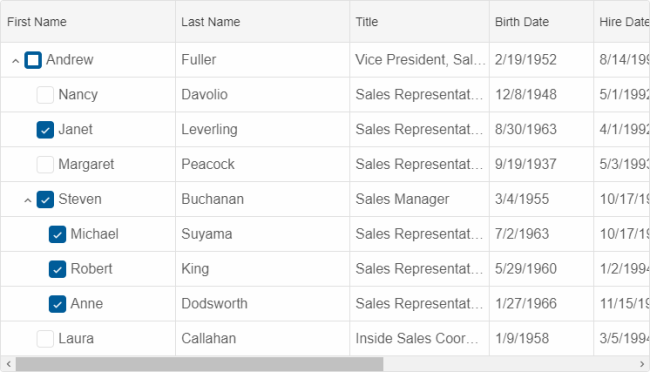
More information: property checkBoxes in the Grid API documentation.
Virtual Tree Grid
The virtual mode feature of Tree Grid allows child rows are generated on demand when a parent row is expanded. To be able to achieve this, the necessary related properties of the Grid's data source also have to be set, e.g.:
dataSource: new Smart.DataAdapter({
            virtualDataSourceLength: 20,
            virtualDataSourceCache: true,
            virtualDataSourceOnExpand: function(resultCallbackFunction, details) {
                setTimeout(function() {
                    const data = GetData().slice(0, 3);

                    if (details.row.level === 1) {
                        for (let i = 0; i < data.length; i++) {
                            data[i].leaf = true;
                        }

                        resultCallbackFunction({
                            dataSource: data
                        });
                    } else {
                        resultCallbackFunction({
                            dataSource: data
                        });
                    }
                }, 300);
            },
            virtualDataSource: function(resultCallbackFunction, details) {
                setTimeout(function() {
                    resultCallbackFunction({
                        dataSource: GetData().slice(0, 20)
                    });
                }, 300);
            },
- virtualDataSourceLength - the number of records in the remote data source.
- virtualDataSourceCache - if set to true, data is cached and will not be reloaded.
- virtualDataSourceOnExpand - a callback function whic is called when a row is expanded and dynamically fetches its children.
- virtualDataSource - a callback function which fetches only the portion of the remote data source that will be visible in the Grid.
Tree Grid-related Methods:
- checkRow - checks a TreeGrid row.
- checkAllRows - checks all TreeGrid rows.
- uncheckRow - unchecks a TreeGrid row.
- uncheckAllRows - unchecks all TreeGrid rows.
- toggleRow - toggles a TreeGrid row.
- collapseRow - collapses a TreeGrid row.
- collapseAllRows - collapses all TreeGrid rows.
- expandRow - expands a TreeGrid row.
- expandAllRows - expands all TreeGrid rows.
For AI tooling
Developer Quick Reference
Topic: grid-tree-grid Component: Grid Framework: Angular
Main methods: (none detected)
Common config keys: dataSource, virtualDataSource
Implementation Notes
Compatibility: Angular 17+ (standalone) API access pattern: @ViewChild(...) + this.component.method()
Lifecycle guidance: Bind inputs declaratively and call imperative API through @ViewChild in/after ngAfterViewInit.
Common pitfalls:
- Using @ViewChild API too early (before view init).
- Omitting standalone imports for Smart modules in @Component.imports.
- Type mismatches between configuration fields and template bindings.
Validation checklist:
- Ensure module import exists in standalone component imports array.
- Use typed @ViewChild(..., { read: ComponentType }).
- Call imperative methods after view initialization.