



Build your web apps using Smart UI
Smart.Kanban - configuration and usage
Kanban Complex Layouts
Smart.Kanban supports nested columns and Kanban swimlanes so that complex layouts that best suit user projects can be created.
Nested Columns
By adding columns to any column definition, nested columns can be visualized on the kanban board. They represent more specific statuses for tasks.
Smart('#kanban', class {
    get properties() {
        return {
            collapsible: true,
            dataSource: getKanbanHierarchicalData(),
            columns: [
                { label: 'To do', dataField: 'toDo' },
                { label: 'In progress', dataField: 'inProgress' },
                {
                    label: 'Testing', dataField: 'testing', orientation: 'horizontal', columns: [
                        {
                            label: 'Manual testing',
                            dataField: 'manualTesting',
                            columns:
                                [
                                    { label: 'Desktop devices', dataField: 'desktop' },
                                    { label: 'Mobile devices', dataField: 'mobile' }
                                ]
                        },
                        { label: 'Unit testing', dataField: 'unitTesting' }
                    ]
                },
                { label: 'Done', dataField: 'done' }
            ]
        };
    }
});
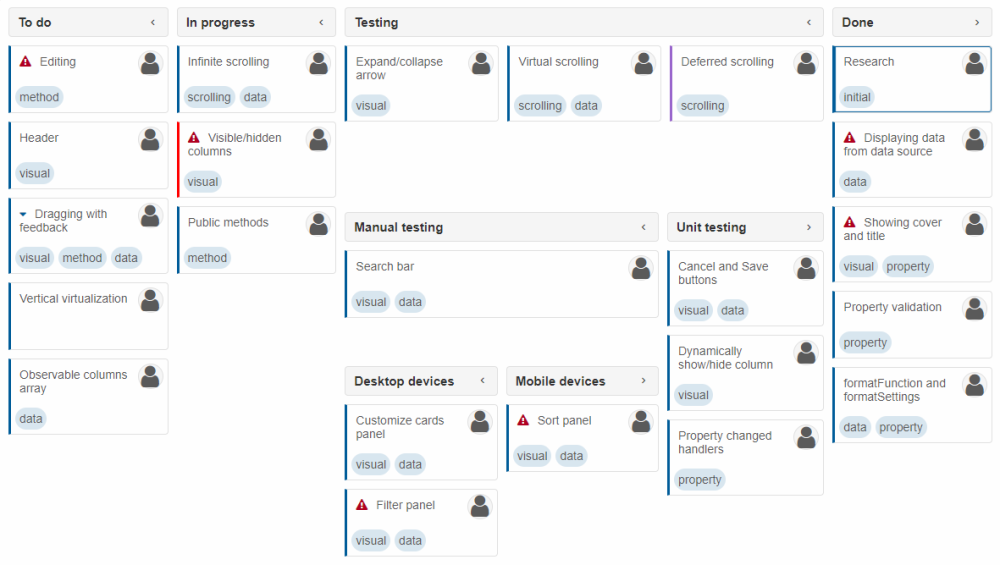
This code creates two sub-columns for "Testing" - "Manual testing" and "Unit testing". Moreover, "Manual testing" has two sub-columns of its own - "Desktop devices" and "Mobile devices".
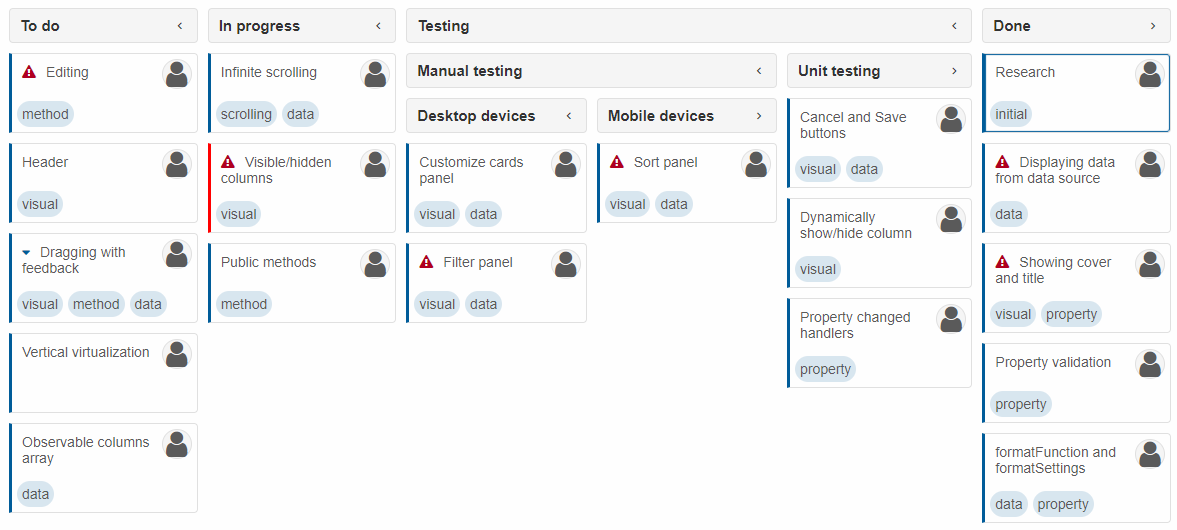
In some cases, it may be necessary for "parent" columns to only act as headers and not have tasks of their own. In that case, the property taskPosition, which is 'all' by default, can be set to 'leaf' to allow tasks only in columns that do not have sub-columns of their own (leaves):
Nested Tabs
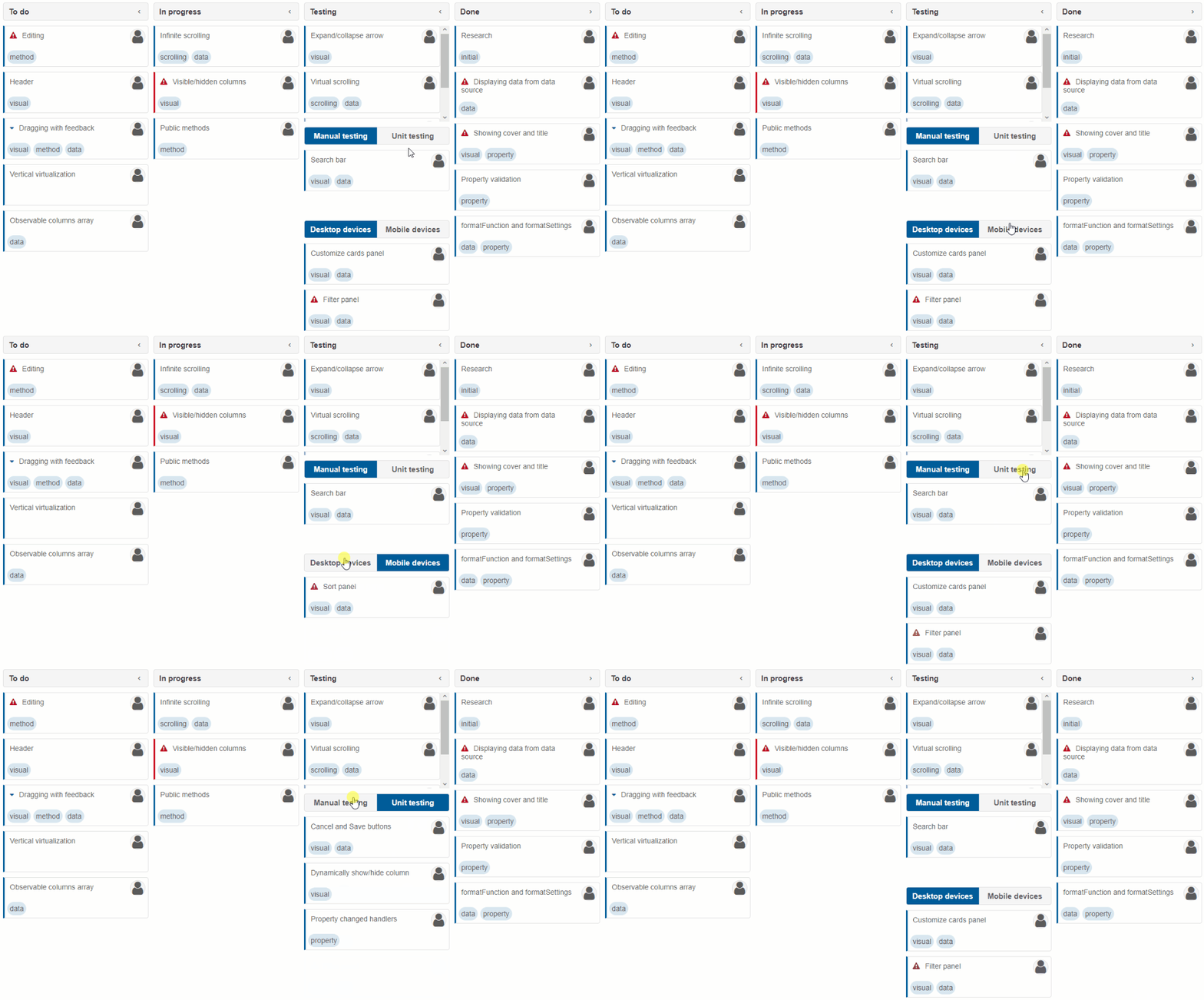
By default, status hierarchy is represented by nested columns. This behavior is controlled by the property hierarchy (by default its value is 'columns'). If hierarchy is set to 'tabs', nested columns are replaced with tab views instead:
Swimlanes
Swimlanes are an alternative type of hierarchy in Kanban. Swimlanes are categories applicable to all, some, or only one column that are represented by colored bands. To set them, the property swimlanes has to be defined. The swimlane field has to be defined to a task's data point in order to place it in a particular swimlane. Otherwise, it is placed in the top swimlane of its status column.
Important notice: when swimlanes are enabled, any nested columns are ignored.
const data = [
    {
        text: 'Research of energy business',
        userId: 3,
        status: 'done',
        swimlane: 'client1'
    },
    {
        text: 'Create Gannt chart',
        userId: 2,
        status: 'inProgress',
        swimlane: 'client1'
    },
    {
        text: 'Develop prototype',
        userId: 4,
        status: 'testing',
        swimlane: 'client1'
    },
    {
        text: 'Data extrapolation',
        userId: 3,
        status: 'inProgress',
        swimlane: 'client1'
    },
    {
        text: 'Prepare requirements',
        userId: 1,
        status: 'done',
        swimlane: 'client2'
    },
    {
        text: 'Try out new simulation',
        userId: 1,
        status: 'testing',
        swimlane: 'client2'
    },
    {
        text: 'Create blueprints for new product',
        userId: 1,
        status: 'toDo',
        swimlane: 'client2'
    },
    {
        text: 'Calculate hours necessary for "EMV" project',
        userId: 2,
        status: 'toDo',
        swimlane: 'other'
    },
    {
        text: 'Distribute final product',
        userId: 4,
        status: 'done',
        swimlane: 'other'
    }
];

Smart('#kanban', class {
    get properties() {
        return {
            collapsible: true,
            dataSource: data,
            editable: true,
            swimlanes: [
                { label: 'Client "Energo"', dataField: 'client1' },
                { label: 'Client "Sim-Prod Ltd."', dataField: 'client2', color: '#C90086' },
                { label: 'Other clients', dataField: 'other', color: '#03C7C0' }
            ],
            userList: true,
            users: [
                { id: 0, name: 'Andrew', image: '../../images/people/andrew.png' },
                { id: 1, name: 'Anne', image: '../../images/people/anne.png' },
                { id: 2, name: 'Janet', image: '../../images/people/janet.png' },
                { id: 3, name: 'John', image: '../../images/people/john.png' },
                { id: 4, name: 'Laura', image: '../../images/people/laura.png' }
            ],
            columns: [
                { label: 'To do', dataField: 'toDo' },
                { label: 'In progress', dataField: 'inProgress' },
                { label: 'Testing', dataField: 'testing' },
                { label: 'Done', dataField: 'done' }
            ]
        };
    }
});
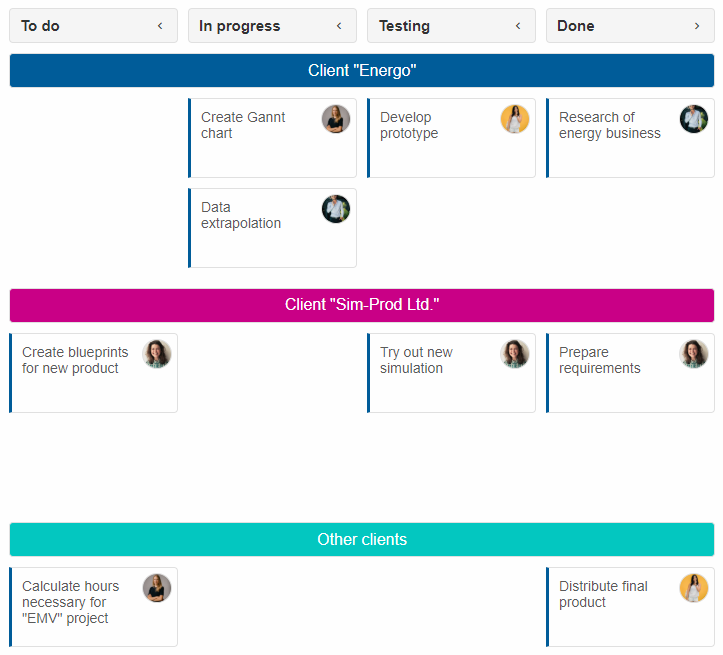
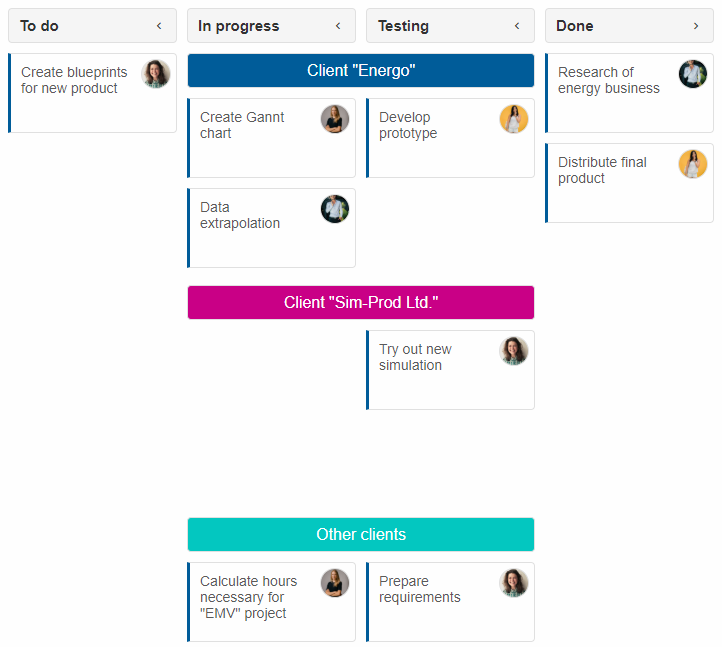
Swimlanes can span only some columns. This is controlled by the properties swimlanesFrom and swimlanesTo which have to be set to column indexes. The following image shows a kanban with swimlanesFrom: 1 and swimlanesTo: 2:
For AI tooling
Developer Quick Reference
Topic: kanban-complex-layouts Component: Kanban Framework: JavaScript
Main methods: (none detected)
Common config keys: dataSource, columns
Implementation Notes
Compatibility: Modern browsers / Web Components API access pattern: const component = document.querySelector(...) + component.method()
Lifecycle guidance: Initialize configuration first, then invoke imperative API when element is available in DOM.
Common pitfalls:
- Calling methods before element initialization.
- Reassigning large configuration partially without understanding merge behavior.
- Missing required module script import for component type.
Validation checklist:
- Ensure module scripts and CSS are loaded once.
- Keep data schema aligned with columns/series definitions.
- Verify method calls target initialized component instance.