



Getting Started with DockingLayout Web Component
Smart UI Web Components work with current evergreen browsers and Node 18+ for local tooling; pin package versions to match your project policy.
Smart UI is distributed as the smart-webcomponents NPM package. You can also use the full download from the Download page.
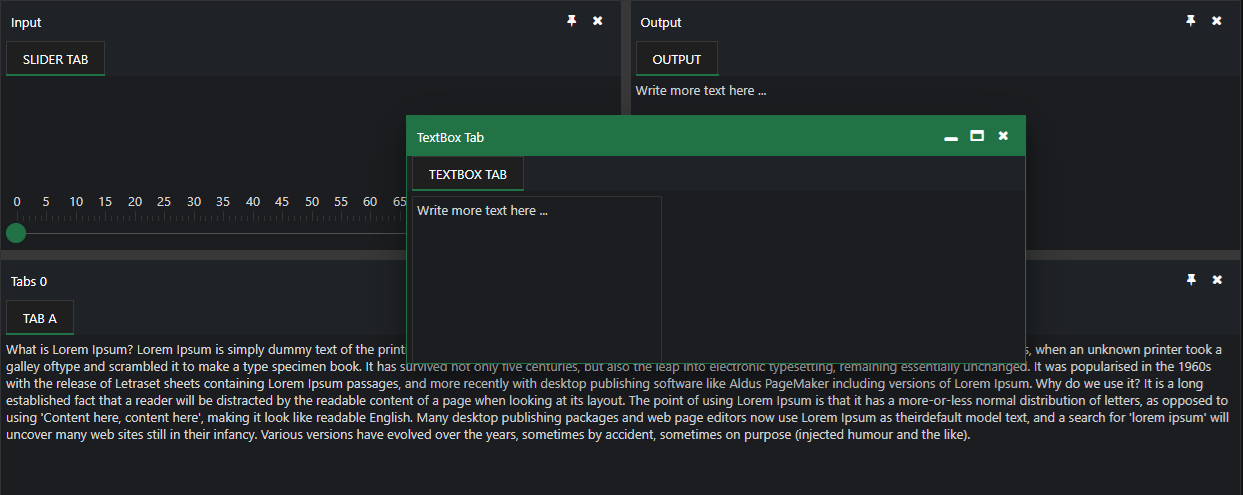
Quick start
- Install the package:
npm install smart-webcomponents
- Load the DockingLayout module (ES module script):
<script type="module" src="node_modules/smart-webcomponents/source/modules/smart.dockinglayout.js"></script>
- Add the default stylesheet (prefer angular.json / bundler entry in app codebases; for plain HTML use a link):
<link rel="stylesheet" type="text/css" href="node_modules/smart-webcomponents/source/styles/smart.default.css" />
- Add markup in one of two ways - semantic custom element (the component tag is in your HTML) or a host
div(you mount programmatically with appendTo):
Semantic element (id matches the selector in Smart()):
<smart-docking-layout id="dockinglayout"></smart-docking-layout>
Host container (id matches appendTo on Smart.DockingLayout):
<div id="dockinglayoutContainer"></div>
- Initialize after the module loads: define a const dockinglayoutOptions object, then either bind with Smart('#dockinglayout', ...) on the semantic tag or use new Smart.DockingLayout({ ...dockinglayoutOptions, appendTo: '#dockinglayoutContainer' }) on the host
div:
<script type="module"> import 'node_modules/smart-webcomponents/source/modules/smart.dockinglayout.js'; const dockinglayoutOptions = { layout: [ { type: 'LayoutGroup', orientation: 'horizontal', items: [ { type: 'LayoutGroup', items: [ { type: 'LayoutPanel', id: 'tabPanel', label: 'Input', items: [{ label: 'TextBox Tab', content: 'Write more text here ... ' }, { label: 'Slider Tab', content: '' }] }, { type: 'LayoutPanel', label: 'Output', items: [ { id: 'outputTab', label: 'Output', headerPosition: 'none', content: 'Write more text here ...' } ] } ], orientation: 'vertical' }, { id: 'item0', label: 'Tabs 0', items: [{ label: 'Tab A', selected: true, content: 'What is Lorem Ipsum? ' + 'Lorem Ipsum is simply dummy text of the printing and typesetting industry. Lorem Ipsum has been the industry's standard dummy text ever since the 1500s, when an unknown printer took a galley of' + 'type and scrambled it to make a type specimen book. It has survived not only five centuries, but also the leap into electronic typesetting, remaining essentially unchanged. It was popularised in ' + 'the 1960s with the release of Letraset sheets containing Lorem Ipsum passages, and more recently with desktop publishing software like Aldus PageMaker including versions of Lorem Ipsum. ' + 'Why do we use it? ' + 'It is a long established fact that a reader will be distracted by the readable content of a page when looking at its layout. The point of using Lorem Ipsum is that it has a more-or-less normal ' + 'distribution of letters, as opposed to using 'Content here, content here', making it look like readable English. Many desktop publishing packages and web page editors now use Lorem Ipsum as their' + 'default model text, and a search for 'lorem ipsum' will uncover many web sites still in their infancy. Various versions have evolved over the years, sometimes by accident, sometimes on ' + 'purpose (injected humour and the like).' }] }] }] }; // Option A - semantic <smart-docking-layout> with id="dockinglayout" Smart('#dockinglayout', class { get properties() { return dockinglayoutOptions; } }); // Option B - host div id="dockinglayoutContainer" // const dockinglayoutInstance = new Smart.DockingLayout({ // ...dockinglayoutOptions, // appendTo: '#dockinglayoutContainer' // }); // Option C - constructor(selector, options), then append the returned element yourself // const myDockingLayout = new Smart.DockingLayout('#dockinglayout', dockinglayoutOptions); // document.body.appendChild(myDockingLayout); </script>
Uncomment Option B when you use the host
div; use Option A when you use the semantic element. The Runtime cookbook also documents new Smart.DockingLayout('#dockinglayout', dockinglayoutOptions) with appendChild, and document.createElement('smart-docking-layout') with .props or Object.assign (all are valid patterns; do not combine overlapping patterns for the same instance unless you intend multiple components). - Serve the folder over HTTP (or use your bundler dev server) and open the page.
Runtime cookbook
Alternative creation patterns and imperative APIs. These are all valid ways to create Smart UI components: semantic markup + Smart(); new Smart.DockingLayout({ ...options, appendTo: '#...' }); new Smart.DockingLayout('#dockinglayout', dockinglayoutOptions) plus appendChild on the returned element; and document.createElement('smart-docking-layout') then assigning options via .props or Object.assign on the element.
Constructor with a selector string and options, then append the returned element (for example const myDockingLayout = new Smart.DockingLayout('#dockinglayout', dockinglayoutOptions)):
const dockinglayoutOptions = {
layout: [
{
type: 'LayoutGroup',
orientation: 'horizontal',
items: [
{
type: 'LayoutGroup',
items: [
{
type: 'LayoutPanel',
id: 'tabPanel',
label: 'Input',
items: [{
label: 'TextBox Tab',
content: 'Write more text here ... '
},
{
label: 'Slider Tab',
content: '
Create with document.createElement('smart-docking-layout'), assign properties (same as any custom element), then append:
const dockinglayoutOptions = {
layout: [
{
type: 'LayoutGroup',
orientation: 'horizontal',
items: [
{
type: 'LayoutGroup',
items: [
{
type: 'LayoutPanel',
id: 'tabPanel',
label: 'Input',
items: [{
label: 'TextBox Tab',
content: 'Write more text here ... '
},
{
label: 'Slider Tab',
content: '
Host on a div with appendTo (import the module, then instantiate when the document is ready; the container id must match appendTo):
import "../../source/modules/smart.dockinglayout.js";
document.readyState === 'complete' ? init() : window.addEventListener('load', init);
function init() {
const dockinglayoutOptions = {
layout: [
{
type: 'LayoutGroup',
orientation: 'horizontal',
items: [
{
type: 'LayoutGroup',
items: [
{
type: 'LayoutPanel',
id: 'tabPanel',
label: 'Input',
items: [{
label: 'TextBox Tab',
content: 'Write more text here ... '
},
{
label: 'Slider Tab',
content: '
Append to the DOM:
const container = document.getElementById('dockinglayout-container');
container.appendChild(dockinglayout);
Remove from the DOM:
dockinglayout.remove();
Set a property:
dockinglayout.disabled = true;
dockinglayout.theme = 'dark';
Get a property value:
const isDisabled = dockinglayout.disabled;
const currentTheme = dockinglayout.theme;
Invoke a method:
dockinglayout.refresh();
dockinglayout.focus();
Add event listener:
dockinglayout.addEventListener('change', (event) => {
    console.log('change triggered:', event.detail);
});
Remove event listener:
const handleDockingLayoutEvent = (event) => {
    console.log('change triggered:', event.detail);
};

dockinglayout.addEventListener('change', handleDockingLayoutEvent);
dockinglayout.removeEventListener('change', handleDockingLayoutEvent);
Accessibility
The DockingLayout component follows WAI-ARIA best practices:
- Keyboard navigation - Tab, Arrow keys, Enter, and Escape are supported
- ARIA roles - Appropriate roles and labels are applied automatically
- Focus management - Visible focus indicators for keyboard users
- Screen readers - State changes are announced to assistive technology
- High contrast - Supports Windows High Contrast Mode and forced colors
For custom labeling, set aria-label or aria-labelledby attributes on the component.
Supported stacks: Smart UI targets Angular 17+, React 18+, Vue 3+, Node 18 LTS, and evergreen browsers; pin exact package versions to your org policy.