



Getting Started with React DockingLayout Component
Smart UI React targets React 18+ and current Node LTS for tooling; use TypeScript templates when you want typed props and events.
Demo source (Smart UI repo): react/source/docking-layout/overview/App.jsx
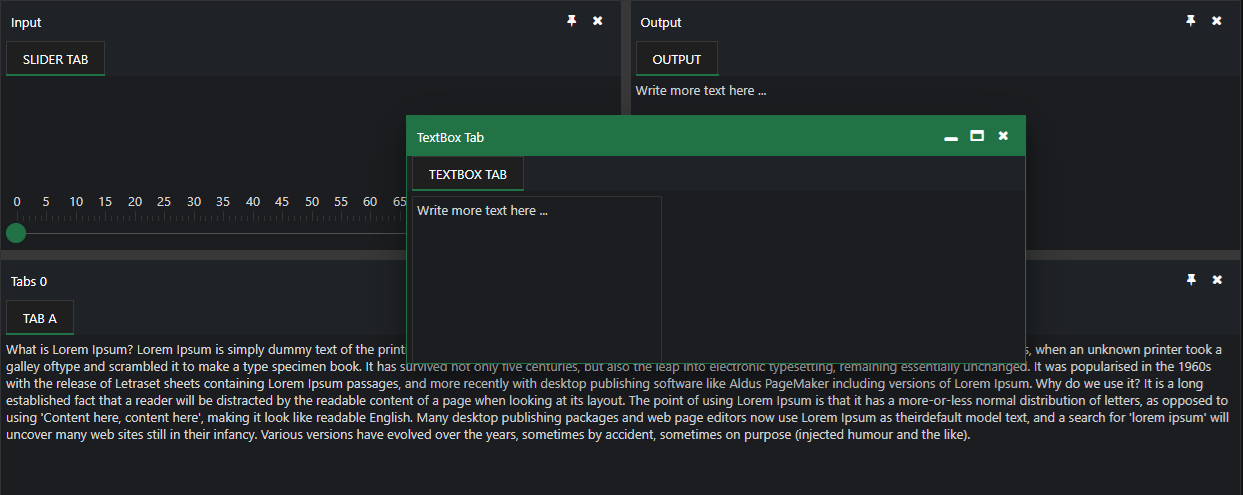
1 Create a Vite + React + TypeScript app
npm create vite@latest my-smart-app -- --template react-ts
cd my-smart-app
thennpm install
2 Install Smart UI for React
npm install smart-webcomponents-react
3 Import styles and render the component
Open src/App.tsx (or App.jsx if you chose JavaScript). The snippet below matches Smart UI React demos for this widget:
import 'smart-webcomponents-react/source/styles/smart.default.css';
import './App.css';
import React, { useEffect } from 'react';
import ReactDOM from 'react-dom/client';
import { DockingLayout } from 'smart-webcomponents-react/dockinglayout';
import { Slider } from 'smart-webcomponents-react/slider';
import { MultilineTextBox } from 'smart-webcomponents-react/multilinetextbox';

const layout = [
  {
    type: 'LayoutGroup',
    orientation: 'horizontal',
    items: [
      {
        type: 'LayoutGroup',
        orientation: 'vertical',
        items: [
          {
            type: 'LayoutPanel',
            id: 'tabPanel',
            label: 'Input',
            items: [
              {
                label: 'TextBox Tab',
                content: '<div style="padding:10px;" id="firstContainer"></div>',
              },
              {
                label: 'Slider Tab',
                content: '<div style="padding:10px;" id="secondContainer"></div>',
              },
            ],
          },
          {
            type: 'LayoutPanel',
            label: 'Output',
            items: [
              {
                id: 'outputTab',
                label: 'Output',
                headerPosition: 'none',
                content: 'Write more text here ...',
              },
            ],
          },
        ],
      },
      {
        id: 'item0',
        label: 'Tabs 0',
        items: [
          {
            label: 'Tab A',
            selected: true,
            content:
              `What is Lorem Ipsum?\nLorem Ipsum is simply dummy text of the printing and typesetting industry. ` +
              `Lorem Ipsum has been the industry's standard dummy text ever since the 1500s, when an unknown printer ` +
              `took a galley of type and scrambled it to make a type specimen book. It has survived not only five centuries, ` +
              `but also the leap into electronic typesetting, remaining essentially unchanged.\n\n` +
              `Why do we use it?\nIt is a long established fact that a reader will be distracted by the readable content ` +
              `of a page when looking at its layout. The point of using Lorem Ipsum is that it has a more-or-less normal ` +
              `distribution of letters, as opposed to using 'Content here, content here', making it look like readable English.`,
          },
        ],
      },
    ],
  },
];

const App = () => {
  const handleReady = () => {
    const firstContainer = document.getElementById('firstContainer');
    const secondContainer = document.getElementById('secondContainer');

    if (firstContainer && !firstContainer.hasChildNodes()) {
      ReactDOM.createRoot(firstContainer).render(<MultilineTextBox />);
    }

    if (secondContainer && !secondContainer.hasChildNodes()) {
      ReactDOM.createRoot(secondContainer).render(<Slider />);
    }
  };

  return (
    <div>
      <DockingLayout layout={layout} onReady={handleReady} />
    </div>
  );
};

export default App;
4 Run the dev server
npm run dev
Open the URL Vite prints (often http://localhost:5173/).
TypeScript Support
Types ship with smart-webcomponents-react. Import the component and prop types:
import type { DockingLayout, DockingLayoutProps } from 'smart-webcomponents-react/dockinglayout';
The generated wrappers expose on* callbacks (for example onChange) whose arguments are standard DOM Event values unless the widget typings narrow them further.
Accessibility
The DockingLayout component follows WAI-ARIA best practices:
- Keyboard navigation - Tab, Arrow keys, Enter, and Escape are supported
- ARIA roles - Appropriate roles and labels are applied automatically
- Focus management - Visible focus indicators for keyboard users
- Screen readers - State changes are announced to assistive technology
- High contrast - Supports Windows High Contrast Mode and forced colors
For custom labeling, set aria-label or aria-labelledby attributes on the component.
Supported stacks: Smart UI targets Angular 17+, React 18+, Vue 3+, Node 18 LTS, and evergreen browsers; pin exact package versions to your org policy.