



Grid for Angular
Angular standalone version of this topic (compatible with Angular 17+). Import both the Smart UI component and module in the standalone component.
What this topic covers: practical setup, the framework-specific API access pattern, and copy-adapt guidance for the examples in this page.
import { Component, ViewChild, ViewEncapsulation } from '@angular/core';
import { CommonModule } from '@angular/common';
import { RouterOutlet } from '@angular/router';
import { GridComponent, GridModule } from 'smart-webcomponents-angular/grid';

@Component({
  selector: 'app-root',
  standalone: true,
  imports: [CommonModule, GridModule, RouterOutlet],
  templateUrl: './app.component.html',
  styleUrls: ['./app.component.css'],
  encapsulation: ViewEncapsulation.None
})
export class AppComponent {
  @ViewChild('grid', { read: GridComponent, static: false }) grid!: GridComponent;
}
<!-- app.component.html -->
<smart-grid #grid></smart-grid>
Use this.grid for API methods in this topic.
The Grid's header and footer options allow you to add your own components to the grid's header and footer.
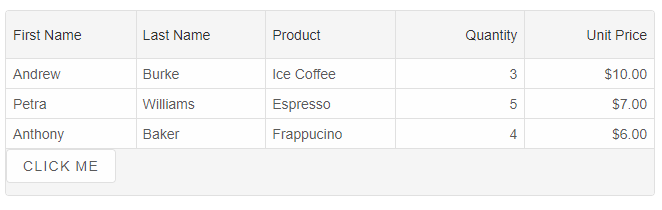
Grid Footer
To turn on the Grid's footer, you can use thefooter property.
The code sample below shows how to show a footer and apply a custom rendering to it.
footer: {
	visible: true,
	template: (element) => {
		element.innerHTML = `<div style="display: flex; height: 100%;">
			<smart-button>Save</smart-button>
		</div>`
	}
}
Another way is to use HTMLTemplateElement. For example:
<template id="footerTemplate">
	<div>
		<smart-button>
			Click Me
		</smart-button>
	</div>
</template>
and the footer property will look like that:
footer: {
	visible: true,
	template: '#footerTemplate'
}
Grid Header
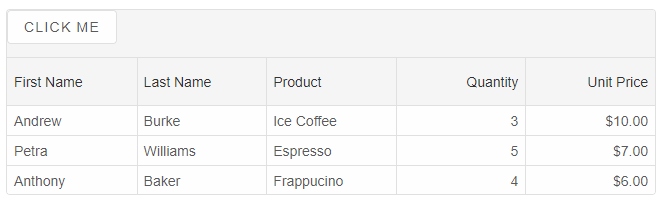
Similarly to the footer, the header is enabled by using theheader property.
header: {
	visible: true,
	template: '#headerTemplate'
}
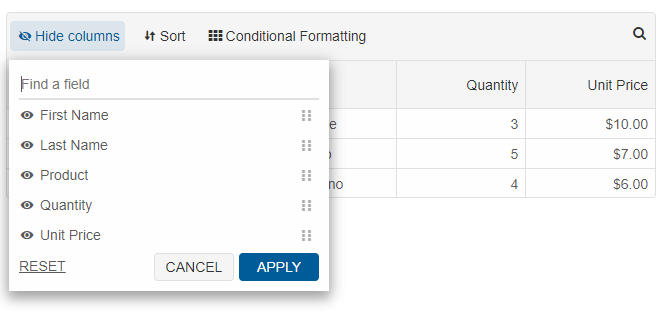
The Grid has built-in header template, so if you do not set the
template property, the default haeder template will be displayed with options to sort, filter, group, search and customize columns.
The header.buttons property determines which buttons in the header will be displayed. The list with buttons is ['columns', 'filter', 'group', 'sort', 'format', 'search'].
For AI tooling
Developer Quick Reference
Topic: grid-header-and-footer Component: Grid Framework: Angular
Main methods: (none detected)
Common config keys: footer, header
Implementation Notes
Compatibility: Angular 17+ (standalone) API access pattern: @ViewChild(...) + this.component.method()
Lifecycle guidance: Bind inputs declaratively and call imperative API through @ViewChild in/after ngAfterViewInit.
Common pitfalls:
- Using @ViewChild API too early (before view init).
- Omitting standalone imports for Smart modules in @Component.imports.
- Type mismatches between configuration fields and template bindings.
Validation checklist:
- Ensure module import exists in standalone component imports array.
- Use typed @ViewChild(..., { read: ComponentType }).
- Call imperative methods after view initialization.