



Grid for React
React version of this topic (compatible with React 19+). Keep the same configuration logic from JavaScript and pass it as component props.
What this topic covers: practical setup, the framework-specific API access pattern, and copy-adapt guidance for the examples in this page.
import React, { useMemo, useRef } from 'react';
import { Grid } from 'smart-webcomponents-react/grid';
import 'smart-webcomponents-react/source/styles/smart.default.css';

export default function App() {
  const componentRef = useRef(null);
  const componentProps = useMemo(() => ({
    // Copy this topic's JavaScript configuration here.
  }), []);

  return <Grid ref={componentRef} {...componentProps}></Grid>;
}
Use componentRef.current for API methods in this topic.
Grid Row Sorting
Enable Sorting
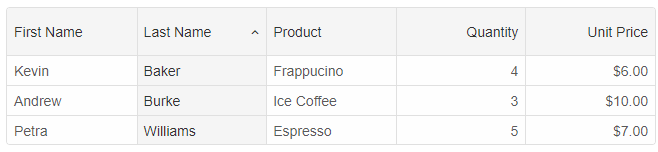
Grid sorting by single column is enabled by setting thesorting.enabled property to true. You can then sort a column by clicking on the column header.
const componentProps = {
    dataSourceSettings: {
        dataFields: [
            { name: 'firstName', dataType: 'string' },
            { name: 'lastName', dataType: 'string' },
            { name: 'productName', map: 'product.name', dataType: 'string' },
            { name: 'quantity', map: 'product.quantity', dataType: 'number' },
            { name: 'price', map: 'product.price', dataType: 'number' },
            { name: 'total', map: 'product.total', dataType: 'number' }
        ]
    },
    behavior: {
        columnResizeMode: 'growAndShrink'
    },
    sorting: {
        enabled: true
    },
    dataSource: [
        {
            firstName: 'Andrew',
            lastName: 'Burke',
            product: {
                name: 'Ice Coffee', price: 10, quantity: 3, total: 30
            }
        },
        {
            firstName: 'Petra',
            lastName: 'Williams',
            product: {
                name: 'Espresso', price: 7, quantity: 5, total: 35
            }
        },
        {
            firstName: 'Kevin',
            lastName: 'Baker',
            product: {
                name: 'Frappucino', price: 6, quantity: 4, total: 24
            }
        }
    ],
    columns: [
        { label: 'First Name', dataField: 'firstName', allowSort: false },
        { label: 'Last Name', dataField: 'lastName' },
        { label: 'Product', dataField: 'productName' },
        { label: 'Quantity', dataField: 'quantity', cellsAlign: 'right' },
        { label: 'Unit Price', dataField: 'price', cellsAlign: 'right', cellsFormat: 'c2' }
    ]
}
Disable Column Sorting
Disable sorting for columns by setting the allowSort column definition to false.
Sort Column when you create the Grid
You can use thesorting.sort property. The property expects an Array with key-value pairs. The key is the column's dataField, the value is the sort order - 'asc' or 'desc'.
sorting: {
	enabled: true,
	sort: [
		{ 'lastName': 'asc' }
	]
}
Sort Multiple Columns
It is possible to sort by multiple columns
sorting: {
	enabled: true,
	mode: 'many',
	sort: [
		{ 'lastName': 'asc' },
		{ 'productName': 'desc' }
	]
}
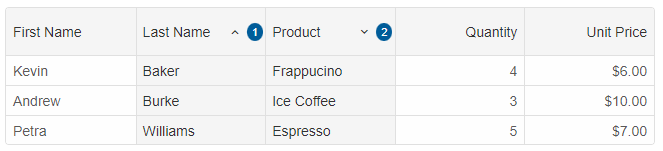
If you want to sort by multiple columns only while you hold the 'Control' key, you can set the
sorting.commandKey property to Control.
sorting: {
	enabled: true,
	mode: 'many',
	commandKey: 'Control',
	sort: [
		{ 'lastName': 'asc' },
		{ 'productName': 'desc' }
	]
}
Clear Sorting API
To clear the sorting, you can use theclearSort() method.
componentRef.current.clearSort();
Sort by Column API
To sort by a column, you can use thesortBy(dataField, sortOrder) method.
componentRef.current.sortBy('productName', 'desc');
Custom Sort
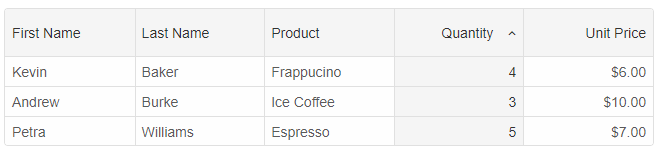
Custom sorting can be configured by using the column'ssortComparator(value1, value2) function.
Example:
const componentProps = {
    dataSourceSettings: {
        dataFields: [
            { name: 'firstName', dataType: 'string' },
            { name: 'lastName', dataType: 'string' },
            { name: 'productName', map: 'product.name', dataType: 'string' },
            { name: 'quantity', map: 'product.quantity', dataType: 'number' },
            { name: 'price', map: 'product.price', dataType: 'number' },
            { name: 'total', map: 'product.total', dataType: 'number' }
        ]
    },
    behavior: {
        columnResizeMode: 'growAndShrink'
    },
    sorting: {
        enabled: true
    },
    dataSource: [
        {
            firstName: 'Andrew',
            lastName: 'Burke',
            product: {
                name: 'Ice Coffee', price: 10, quantity: 3, total: 30
            }
        },
        {
            firstName: 'Petra',
            lastName: 'Williams',
            product: {
                name: 'Espresso', price: 7, quantity: 5, total: 35
            }
        },
        {
            firstName: 'Kevin',
            lastName: 'Baker',
            product: {
                name: 'Frappucino', price: 6, quantity: 4, total: 24
            }
        }
    ],
    columns: [
		{ label: 'First Name', dataField: 'firstName' },
		{ label: 'Last Name', dataField: 'lastName' },
		{ label: 'Product', dataField: 'productName' },
		{
			label: 'Quantity', dataField: 'quantity', cellsAlign: 'right', sortOrder: 'asc',
			sortComparator: (value1, value2) => {
				const result = value1 === value2;

				// When the value is 4, it will bubble up.
				if (value1 === 4) {
					return -1;
				}

				if (value2 === 4) {
					return 1;
				}

				// return 0 for equal values.
				if (result) {
					return 0;
				}

				// return -1, if value1 is smaller than value2.
				if (value1 < value2) {
					return -1;
				}

				// return 1, if value1 is greater than value2.
				return 1;
			}
		},
		{ label: 'Unit Price', dataField: 'price', cellsAlign: 'right', cellsFormat: 'c2' }
    ]
}
For AI tooling
Developer Quick Reference
Topic: grid-row-sort Component: Grid Framework: React
Main methods: clearSort(), sortBy()
Common config keys: behavior, sorting, dataSource, columns
Implementation Notes
Compatibility: React 19+ API access pattern: const componentRef = useRef(null) + componentRef.current.method()
Lifecycle guidance: Use useMemo for large config objects and call imperative API through componentRef.current after first render.
Common pitfalls:
- Recreating columns/dataSource objects on every render can reset component state.
- Calling API methods before ref is available causes runtime errors.
- Mixing controlled and imperative updates without sync can lead to stale UI.
Validation checklist:
- Keep config objects memoized when possible.
- Guard API calls with ref existence checks.
- Verify CSS theme import is present once per app.