



Scheduler for React
React version of this topic (compatible with React 19+). Keep the same configuration logic from JavaScript and pass it as component props.
What this topic covers: practical setup, the framework-specific API access pattern, and copy-adapt guidance for the examples in this page.
import React, { useMemo, useRef } from 'react';
import { Scheduler } from 'smart-webcomponents-react/scheduler';
import 'smart-webcomponents-react/source/styles/smart.default.css';

export default function App() {
  const componentRef = useRef(null);
  const componentProps = useMemo(() => ({
    // Copy this topic's JavaScript configuration here.
  }), []);

  return <Scheduler ref={componentRef} {...componentProps}></Scheduler>;
}
Use componentRef.current for API methods in this topic.
Build your web apps using Smart Custom Elements
Smart.Scheduler - Google Calendar Sync
Smart.Scheduler Google Calendar Events Sync
Google Calendar events can be loaded directly to the Smart.Scheduler via url. By doing so the events between Google Calendar and Smart.Scheduler are in sync. This means that making changes to the events in Google Calendar will automatically reflect to the events in the Smart.Scheduler when the page is reloaded.
This feature is achieved thanks to the Smart.DataAdapter Utilitiy and Google Calendars abbility to reference calendars via url.
In order to sync events beetween both elements first we need to create appointments in the Google Calendar and get the url to the calendar with the appointments. In order to do so the user has to take the following steps:
-
Create appointments in Google Calendar:
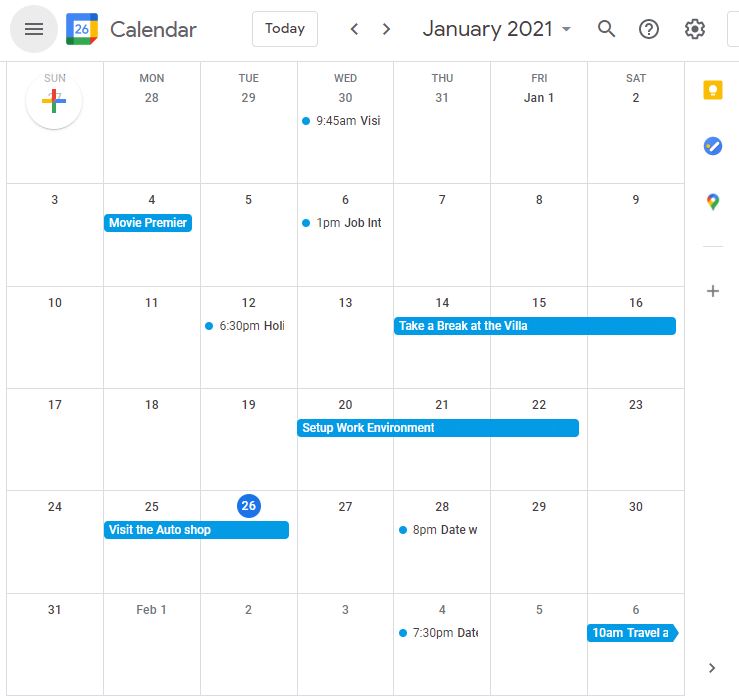
-
Go to the Settings tab of Google Calendar and select the calendar that will be used for the demo:
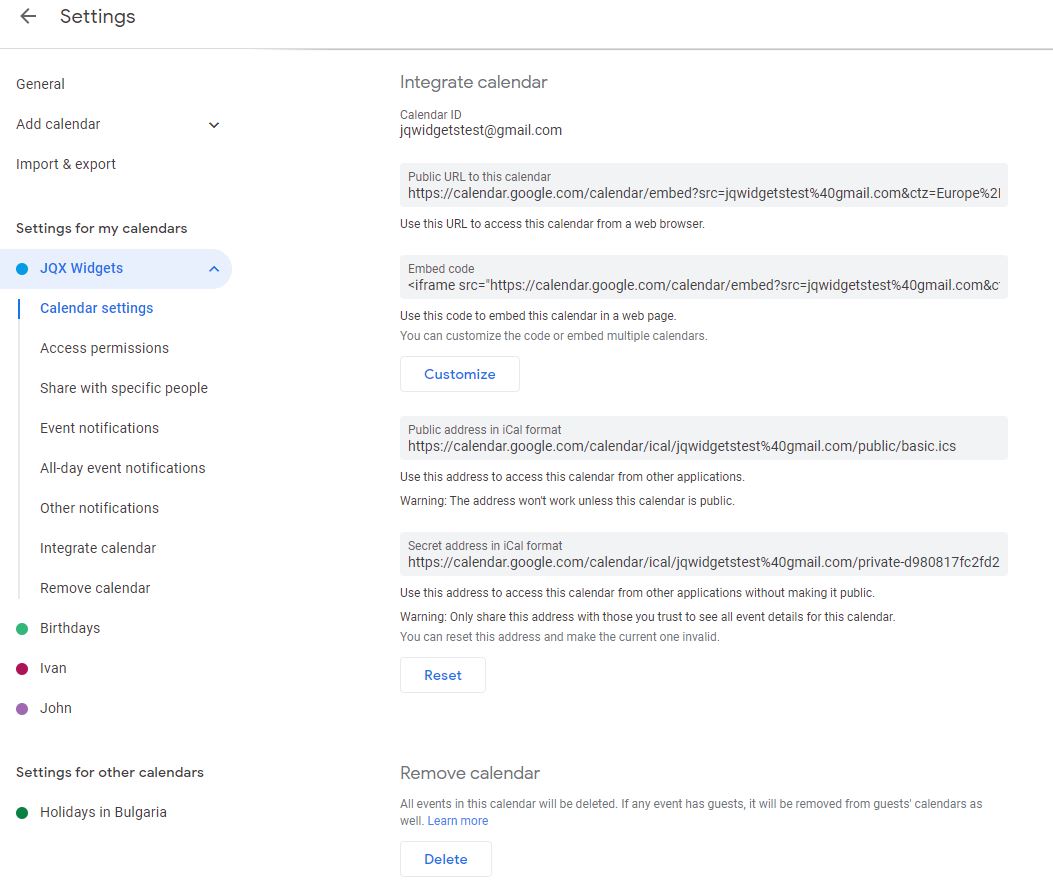
-
Copy the calendar Secret url address that is displayed in the image above. If the calednar is public it is possible to use the public address instead.
In order to bind the dataSource of the Smart.Scheduler to a Google Calendar url the user has to make the following setup:
-
index.html
<html xmlns="http://www.w3.org/1999/xhtml"> <head> <meta charset="utf-8" /> <meta http-equiv="X-UA-Compatible" content="IE=edge" /> <meta http-equiv="Content-Type" content="text/html; charset=utf-8" /> <meta name="viewport" content="width=device-width, initial-scale=1.0, maximum-scale=1.0" /> <link rel="stylesheet" type="text/css" href="../../../source/styles/smart.default.css" /> <script type="text/javascript" src="../../../source/webcomponents-lite.js"></script> </head> <body class="viewport"> <smart-scheduler id="scheduler"></smart-scheduler> <!-- scripts --> <script type="module" src="../../../source/modules/smartscheduler.js"></script> <script type="module" src="index.js"></script> </body> </html> -
index.js
const componentProps = useMemo(() => ({
            //Properties
            view: 'month',
            dateCurrent: new Date(2021, 0, 20),
            dataSource: new window.Smart.DataAdapter({
                dataSource: 'https://calendar.google.com/calendar/ical/jqwidgetstest%40gmail.com/private-d980817fc2fd252df41420619aeeddbb/basic.ics',
                dataSourceType: 'ics',
                dataFields: [
                    { name: 'dateStart', map: 'DTSTART', dataType: 'date' },
                    { name: 'dateEnd', map: 'DTEND', dataType: 'date' },
                    { name: 'label', map: 'SUMMARY', dataType: 'string' },
                    { name: 'location', map: 'LOCATION', dataType: 'string' },
                    { name: 'description', map: 'DESCRIPTION', dataType: 'string' },
                    { name: 'rrule', map: 'RRULE', dataType: 'string' },
                    { name: 'extdate', map: 'EXDATE', dataType: 'string' },
                    { name: 'status', map: 'STATUS', dataType: 'string' },
                    { name: 'reccurenceId', map: 'RECURRENCEID', dataType: 'string' },
                    { name: 'uid', map: 'UID', dataType: 'string' },
                    { name: 'categories', map: 'CATEGORIES', dataType: 'string' },
                    { name: 'alarm', map: 'ALARM', dataType: 'any' }
                ]
            }),
            views: ['day', 'week', 'month', 'agenda']
}), []);
Notice that we pasted the previously copied Google calendar url address to the dataSource attribute of the Smart.DataAdapter.
The dataFields property allows to define the expected properties of the ics file that is references from the url in order to load the appointments.
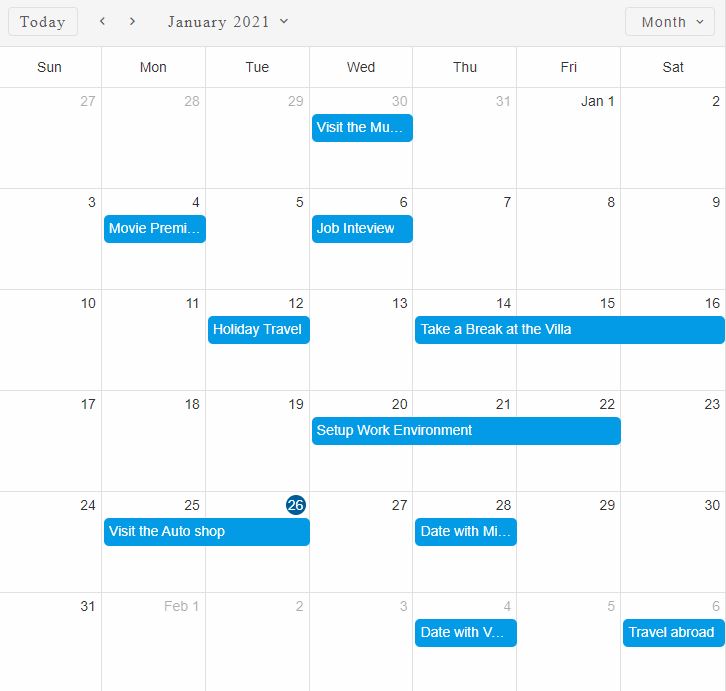
As a result, when the page is loaded the events from Google Calendar will be loaded to the Smart.Scheduler
Demo
For AI tooling
Developer Quick Reference
Topic: scheduler-google-calendar-sync Component: Scheduler Framework: React
Main methods: (none detected)
Common config keys: dataSource, views
Implementation Notes
Compatibility: React 19+ API access pattern: const componentRef = useRef(null) + componentRef.current.method()
Lifecycle guidance: Use useMemo for large config objects and call imperative API through componentRef.current after first render.
Common pitfalls:
- Recreating columns/dataSource objects on every render can reset component state.
- Calling API methods before ref is available causes runtime errors.
- Mixing controlled and imperative updates without sync can lead to stale UI.
Validation checklist:
- Keep config objects memoized when possible.
- Guard API calls with ref existence checks.
- Verify CSS theme import is present once per app.