



Getting Started with CardView Web Component
Smart UI Web Components work with current evergreen browsers and Node 18+ for local tooling; pin package versions to match your project policy.
Smart UI is distributed as the smart-webcomponents NPM package. You can also use the full download from the Download page.
Quick start
- Install the package:
npm install smart-webcomponents
- Load the CardView module (ES module script):
<script type="module" src="node_modules/smart-webcomponents/source/modules/smart.cardview.js"></script>
- Add the default stylesheet (prefer angular.json / bundler entry in app codebases; for plain HTML use a link):
<link rel="stylesheet" type="text/css" href="node_modules/smart-webcomponents/source/styles/smart.default.css" />
- Add markup in one of two ways - semantic custom element (the component tag is in your HTML) or a host
div(you mount programmatically with appendTo):
Semantic element (id matches the selector in Smart()):
<smart-card-view id="cardview"></smart-card-view>
Host container (id matches appendTo on Smart.CardView):
<div id="cardviewContainer"></div>
- Initialize after the module loads: define a const cardviewOptions object, then either bind with Smart('#cardview', ...) on the semantic tag or use new Smart.CardView({ ...cardviewOptions, appendTo: '#cardviewContainer' }) on the host
div:
<script type="module">
	import 'node_modules/smart-webcomponents/source/modules/smart.cardview.js';

	const cardviewOptions = {
				dataSource: new Smart.DataAdapter({
					dataSource: (function generateData(length) {
						const sampleData = [], firstNames = ['Andrew', 'Nancy', 'Shelley', 'Regina', 'Yoshi', 'Antoni', 'Mayumi', 'Ian', 'Peter', 'Lars', 'Petra', 'Martin', 'Sven', 'Elio', 'Beate', 'Cheryl', 'Michael', 'Guylene'], lastNames = ['Fuller', 'Davolio', 'Burke', 'Murphy', 'Nagase', 'Saavedra', 'Ohno', 'Devling', 'Wilson', 'Peterson', 'Winkler', 'Bein', 'Petersen', 'Rossi', 'Vileid', 'Saylor', 'Bjorn', 'Nodier'], petNames = ['Sam', 'Bob', 'Lucky', 'Tommy', 'Charlie', 'Olliver', 'Mixie', 'Fluffy', 'Acorn', 'Beak'], countries = ['Bulgaria', 'USA', 'UK', 'Singapore', 'Thailand', 'Russia', 'China', 'Belize'], productNames = ['Black Tea', 'Green Tea', 'Caffe Espresso', 'Doubleshot Espresso', 'Caffe Latte', 'White Chocolate Mocha', 'Cramel Latte', 'Caffe Americano', 'Cappuccino', 'Espresso Truffle', 'Espresso con Panna', 'Peppermint Mocha Twist'];
						for (let i = 0; i < length; i++) {
							const row = {};
							row.firstName = firstNames[Math.floor(Math.random() * firstNames.length)];
							row.lastName = lastNames[Math.floor(Math.random() * lastNames.length)];
							row.birthday = new Date(Math.round(Math.random() * (2026 - 1926) + 1926), Math.round(Math.random() * 11), Math.round(Math.random() * (31 - 1) + 1));
							row.petName = petNames[Math.floor(Math.random() * petNames.length)];
							row.country = countries[Math.floor(Math.random() * countries.length)];
							row.productName = productNames[Math.floor(Math.random() * productNames.length)];
							row.price = parseFloat((Math.random() * (100 - 0.5) + 0.5).toFixed(2));
							row.quantity = Math.round(Math.random() * (50 - 1) + 1);
							row.timeOfPurchase = new Date(2026, 0, 1, Math.round(Math.random() * 23), Math.round(Math.random() * (31 - 1) + 1));
							row.expired = Math.random() >= 0.5;
							row.attachments = [];
							const maxAttachments = Math.floor(Math.random() * Math.floor(3)) + 1;
							for (let i = 0; i < maxAttachments; i++) {
								row.attachments.push("../../../images/travel/7.jpg");
							}
							row.attachments = row.attachments.join(',');
							sampleData[i] = row;
						}
						return sampleData;
					}(50)),
					dataFields: [
						'firstName: string',
						'lastName: string',
						'birthday: date',
						'petName: string',
						'country: string',
						'productName: string',
						'price: number',
						'quantity: number',
						'timeOfPurchase: date',
						'expired: boolean',
						'attachments: string'
					]
				}),
				columns: [
					{ label: 'First Name', dataField: 'firstName', icon: 'firstName' },
					{ label: 'Last Name', dataField: 'lastName', icon: 'lastName' },
					{ label: 'Birthday', dataField: 'birthday', icon: 'birthday', formatSettings: { formatString: 'd' } },
					{ label: 'Pet Name', dataField: 'petName', icon: 'petName' },
					{ label: 'Country', dataField: 'country', icon: 'country' },
					{ label: 'Product Name', dataField: 'productName', icon: 'productName' },
					{ label: 'Price', dataField: 'price', icon: 'price', formatSettings: { formatString: 'c2' } },
					{
						label: 'Quantity', dataField: 'quantity', icon: 'quantity'
					},
					{ label: 'Time of Purchase', dataField: 'timeOfPurchase', icon: 'timeOfPurchase', formatSettings: { formatString: 'hh:mm tt' } },
					{
						label: 'Expired', dataField: 'expired', icon: 'expired', formatFunction: function (settings) {
							settings.template = settings.value ? '☑' : '☐';
						}
					},
					{ label: 'Attachments', dataField: 'attachments', image: true }
				],
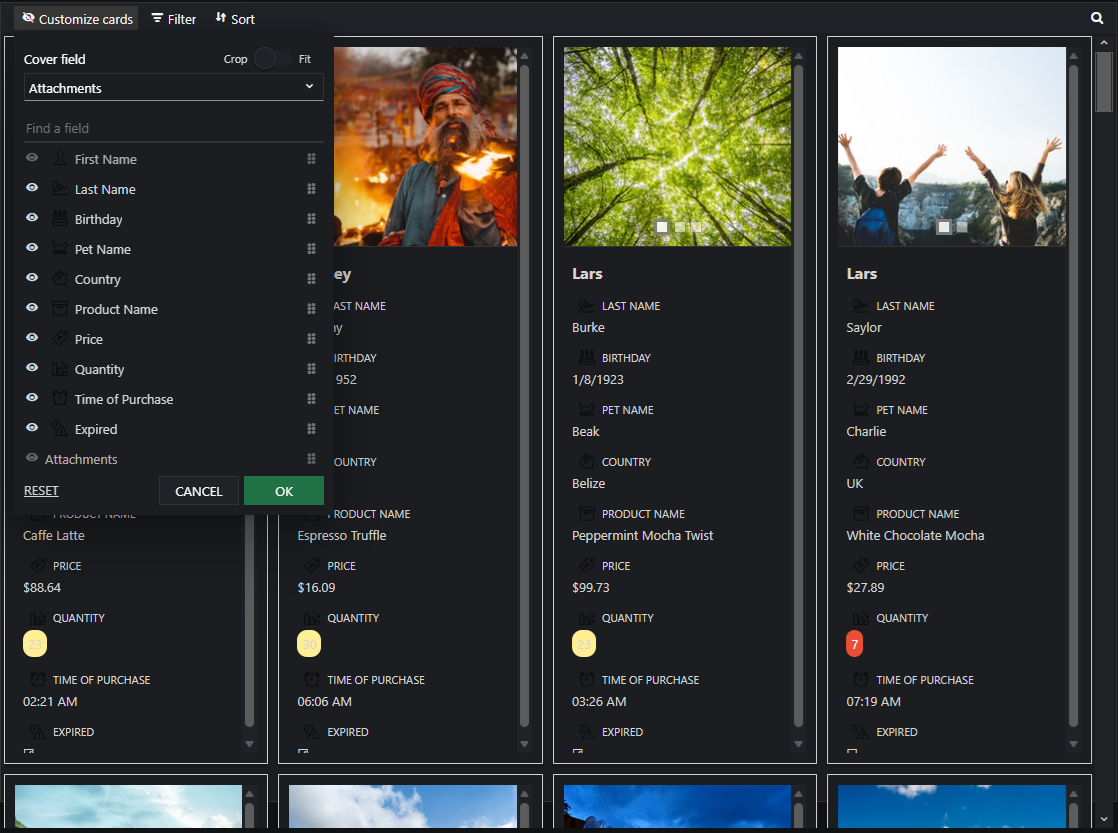
				coverField: 'attachments',
				titleField: 'firstName'
			};

	// Option A - semantic <smart-card-view> with id="cardview"
	Smart('#cardview', class {
		get properties() {
			return cardviewOptions;
		}
	});

	// Option B - host div id="cardviewContainer"
	// const cardviewInstance = new Smart.CardView({
	// 	...cardviewOptions,
	// 	appendTo: '#cardviewContainer'
	// });

	// Option C - constructor(selector, options), then append the returned element yourself
	// const myCardView = new Smart.CardView('#cardview', cardviewOptions);
	// document.body.appendChild(myCardView);
</script>
Uncomment Option B when you use the host
div; use Option A when you use the semantic element. The Runtime cookbook also documents new Smart.CardView('#cardview', cardviewOptions) with appendChild, and document.createElement('smart-card-view') with .props or Object.assign (all are valid patterns; do not combine overlapping patterns for the same instance unless you intend multiple components). - Serve the folder over HTTP (or use your bundler dev server) and open the page.
Runtime cookbook
Alternative creation patterns and imperative APIs. These are all valid ways to create Smart UI components: semantic markup + Smart(); new Smart.CardView({ ...options, appendTo: '#...' }); new Smart.CardView('#cardview', cardviewOptions) plus appendChild on the returned element; and document.createElement('smart-card-view') then assigning options via .props or Object.assign on the element.
Constructor with a selector string and options, then append the returned element (for example const myCardView = new Smart.CardView('#cardview', cardviewOptions)):
	const cardviewOptions = {
				dataSource: new Smart.DataAdapter({
					dataSource: (function generateData(length) {
						const sampleData = [], firstNames = ['Andrew', 'Nancy', 'Shelley', 'Regina', 'Yoshi', 'Antoni', 'Mayumi', 'Ian', 'Peter', 'Lars', 'Petra', 'Martin', 'Sven', 'Elio', 'Beate', 'Cheryl', 'Michael', 'Guylene'], lastNames = ['Fuller', 'Davolio', 'Burke', 'Murphy', 'Nagase', 'Saavedra', 'Ohno', 'Devling', 'Wilson', 'Peterson', 'Winkler', 'Bein', 'Petersen', 'Rossi', 'Vileid', 'Saylor', 'Bjorn', 'Nodier'], petNames = ['Sam', 'Bob', 'Lucky', 'Tommy', 'Charlie', 'Olliver', 'Mixie', 'Fluffy', 'Acorn', 'Beak'], countries = ['Bulgaria', 'USA', 'UK', 'Singapore', 'Thailand', 'Russia', 'China', 'Belize'], productNames = ['Black Tea', 'Green Tea', 'Caffe Espresso', 'Doubleshot Espresso', 'Caffe Latte', 'White Chocolate Mocha', 'Cramel Latte', 'Caffe Americano', 'Cappuccino', 'Espresso Truffle', 'Espresso con Panna', 'Peppermint Mocha Twist'];
						for (let i = 0; i < length; i++) {
							const row = {};
							row.firstName = firstNames[Math.floor(Math.random() * firstNames.length)];
							row.lastName = lastNames[Math.floor(Math.random() * lastNames.length)];
							row.birthday = new Date(Math.round(Math.random() * (2026 - 1926) + 1926), Math.round(Math.random() * 11), Math.round(Math.random() * (31 - 1) + 1));
							row.petName = petNames[Math.floor(Math.random() * petNames.length)];
							row.country = countries[Math.floor(Math.random() * countries.length)];
							row.productName = productNames[Math.floor(Math.random() * productNames.length)];
							row.price = parseFloat((Math.random() * (100 - 0.5) + 0.5).toFixed(2));
							row.quantity = Math.round(Math.random() * (50 - 1) + 1);
							row.timeOfPurchase = new Date(2026, 0, 1, Math.round(Math.random() * 23), Math.round(Math.random() * (31 - 1) + 1));
							row.expired = Math.random() >= 0.5;
							row.attachments = [];
							const maxAttachments = Math.floor(Math.random() * Math.floor(3)) + 1;
							for (let i = 0; i < maxAttachments; i++) {
								row.attachments.push("../../../images/travel/7.jpg");
							}
							row.attachments = row.attachments.join(',');
							sampleData[i] = row;
						}
						return sampleData;
					}(50)),
					dataFields: [
						'firstName: string',
						'lastName: string',
						'birthday: date',
						'petName: string',
						'country: string',
						'productName: string',
						'price: number',
						'quantity: number',
						'timeOfPurchase: date',
						'expired: boolean',
						'attachments: string'
					]
				}),
				columns: [
					{ label: 'First Name', dataField: 'firstName', icon: 'firstName' },
					{ label: 'Last Name', dataField: 'lastName', icon: 'lastName' },
					{ label: 'Birthday', dataField: 'birthday', icon: 'birthday', formatSettings: { formatString: 'd' } },
					{ label: 'Pet Name', dataField: 'petName', icon: 'petName' },
					{ label: 'Country', dataField: 'country', icon: 'country' },
					{ label: 'Product Name', dataField: 'productName', icon: 'productName' },
					{ label: 'Price', dataField: 'price', icon: 'price', formatSettings: { formatString: 'c2' } },
					{
						label: 'Quantity', dataField: 'quantity', icon: 'quantity'
					},
					{ label: 'Time of Purchase', dataField: 'timeOfPurchase', icon: 'timeOfPurchase', formatSettings: { formatString: 'hh:mm tt' } },
					{
						label: 'Expired', dataField: 'expired', icon: 'expired', formatFunction: function (settings) {
							settings.template = settings.value ? '☑' : '☐';
						}
					},
					{ label: 'Attachments', dataField: 'attachments', image: true }
				],
				coverField: 'attachments',
				titleField: 'firstName'
			};
	const myCardView = new Smart.CardView('#cardview', cardviewOptions);
	document.body.appendChild(myCardView);
Create with document.createElement('smart-card-view'), assign properties (same as any custom element), then append:
	const cardviewOptions = {
				dataSource: new Smart.DataAdapter({
					dataSource: (function generateData(length) {
						const sampleData = [], firstNames = ['Andrew', 'Nancy', 'Shelley', 'Regina', 'Yoshi', 'Antoni', 'Mayumi', 'Ian', 'Peter', 'Lars', 'Petra', 'Martin', 'Sven', 'Elio', 'Beate', 'Cheryl', 'Michael', 'Guylene'], lastNames = ['Fuller', 'Davolio', 'Burke', 'Murphy', 'Nagase', 'Saavedra', 'Ohno', 'Devling', 'Wilson', 'Peterson', 'Winkler', 'Bein', 'Petersen', 'Rossi', 'Vileid', 'Saylor', 'Bjorn', 'Nodier'], petNames = ['Sam', 'Bob', 'Lucky', 'Tommy', 'Charlie', 'Olliver', 'Mixie', 'Fluffy', 'Acorn', 'Beak'], countries = ['Bulgaria', 'USA', 'UK', 'Singapore', 'Thailand', 'Russia', 'China', 'Belize'], productNames = ['Black Tea', 'Green Tea', 'Caffe Espresso', 'Doubleshot Espresso', 'Caffe Latte', 'White Chocolate Mocha', 'Cramel Latte', 'Caffe Americano', 'Cappuccino', 'Espresso Truffle', 'Espresso con Panna', 'Peppermint Mocha Twist'];
						for (let i = 0; i < length; i++) {
							const row = {};
							row.firstName = firstNames[Math.floor(Math.random() * firstNames.length)];
							row.lastName = lastNames[Math.floor(Math.random() * lastNames.length)];
							row.birthday = new Date(Math.round(Math.random() * (2026 - 1926) + 1926), Math.round(Math.random() * 11), Math.round(Math.random() * (31 - 1) + 1));
							row.petName = petNames[Math.floor(Math.random() * petNames.length)];
							row.country = countries[Math.floor(Math.random() * countries.length)];
							row.productName = productNames[Math.floor(Math.random() * productNames.length)];
							row.price = parseFloat((Math.random() * (100 - 0.5) + 0.5).toFixed(2));
							row.quantity = Math.round(Math.random() * (50 - 1) + 1);
							row.timeOfPurchase = new Date(2026, 0, 1, Math.round(Math.random() * 23), Math.round(Math.random() * (31 - 1) + 1));
							row.expired = Math.random() >= 0.5;
							row.attachments = [];
							const maxAttachments = Math.floor(Math.random() * Math.floor(3)) + 1;
							for (let i = 0; i < maxAttachments; i++) {
								row.attachments.push("../../../images/travel/7.jpg");
							}
							row.attachments = row.attachments.join(',');
							sampleData[i] = row;
						}
						return sampleData;
					}(50)),
					dataFields: [
						'firstName: string',
						'lastName: string',
						'birthday: date',
						'petName: string',
						'country: string',
						'productName: string',
						'price: number',
						'quantity: number',
						'timeOfPurchase: date',
						'expired: boolean',
						'attachments: string'
					]
				}),
				columns: [
					{ label: 'First Name', dataField: 'firstName', icon: 'firstName' },
					{ label: 'Last Name', dataField: 'lastName', icon: 'lastName' },
					{ label: 'Birthday', dataField: 'birthday', icon: 'birthday', formatSettings: { formatString: 'd' } },
					{ label: 'Pet Name', dataField: 'petName', icon: 'petName' },
					{ label: 'Country', dataField: 'country', icon: 'country' },
					{ label: 'Product Name', dataField: 'productName', icon: 'productName' },
					{ label: 'Price', dataField: 'price', icon: 'price', formatSettings: { formatString: 'c2' } },
					{
						label: 'Quantity', dataField: 'quantity', icon: 'quantity'
					},
					{ label: 'Time of Purchase', dataField: 'timeOfPurchase', icon: 'timeOfPurchase', formatSettings: { formatString: 'hh:mm tt' } },
					{
						label: 'Expired', dataField: 'expired', icon: 'expired', formatFunction: function (settings) {
							settings.template = settings.value ? '☑' : '☐';
						}
					},
					{ label: 'Attachments', dataField: 'attachments', image: true }
				],
				coverField: 'attachments',
				titleField: 'firstName'
			};
	const cardview = document.createElement('smart-card-view');
	Object.assign(cardview, cardviewOptions);
	document.body.appendChild(cardview);
Host on a div with appendTo (import the module, then instantiate when the document is ready; the container id must match appendTo):
	import "../../source/modules/smart.cardview.js";

	document.readyState === 'complete' ? init() : window.addEventListener('load', init);

	function init() {
		const cardviewOptions = {
				dataSource: new Smart.DataAdapter({
					dataSource: (function generateData(length) {
						const sampleData = [], firstNames = ['Andrew', 'Nancy', 'Shelley', 'Regina', 'Yoshi', 'Antoni', 'Mayumi', 'Ian', 'Peter', 'Lars', 'Petra', 'Martin', 'Sven', 'Elio', 'Beate', 'Cheryl', 'Michael', 'Guylene'], lastNames = ['Fuller', 'Davolio', 'Burke', 'Murphy', 'Nagase', 'Saavedra', 'Ohno', 'Devling', 'Wilson', 'Peterson', 'Winkler', 'Bein', 'Petersen', 'Rossi', 'Vileid', 'Saylor', 'Bjorn', 'Nodier'], petNames = ['Sam', 'Bob', 'Lucky', 'Tommy', 'Charlie', 'Olliver', 'Mixie', 'Fluffy', 'Acorn', 'Beak'], countries = ['Bulgaria', 'USA', 'UK', 'Singapore', 'Thailand', 'Russia', 'China', 'Belize'], productNames = ['Black Tea', 'Green Tea', 'Caffe Espresso', 'Doubleshot Espresso', 'Caffe Latte', 'White Chocolate Mocha', 'Cramel Latte', 'Caffe Americano', 'Cappuccino', 'Espresso Truffle', 'Espresso con Panna', 'Peppermint Mocha Twist'];
						for (let i = 0; i < length; i++) {
							const row = {};
							row.firstName = firstNames[Math.floor(Math.random() * firstNames.length)];
							row.lastName = lastNames[Math.floor(Math.random() * lastNames.length)];
							row.birthday = new Date(Math.round(Math.random() * (2026 - 1926) + 1926), Math.round(Math.random() * 11), Math.round(Math.random() * (31 - 1) + 1));
							row.petName = petNames[Math.floor(Math.random() * petNames.length)];
							row.country = countries[Math.floor(Math.random() * countries.length)];
							row.productName = productNames[Math.floor(Math.random() * productNames.length)];
							row.price = parseFloat((Math.random() * (100 - 0.5) + 0.5).toFixed(2));
							row.quantity = Math.round(Math.random() * (50 - 1) + 1);
							row.timeOfPurchase = new Date(2026, 0, 1, Math.round(Math.random() * 23), Math.round(Math.random() * (31 - 1) + 1));
							row.expired = Math.random() >= 0.5;
							row.attachments = [];
							const maxAttachments = Math.floor(Math.random() * Math.floor(3)) + 1;
							for (let i = 0; i < maxAttachments; i++) {
								row.attachments.push("../../../images/travel/7.jpg");
							}
							row.attachments = row.attachments.join(',');
							sampleData[i] = row;
						}
						return sampleData;
					}(50)),
					dataFields: [
						'firstName: string',
						'lastName: string',
						'birthday: date',
						'petName: string',
						'country: string',
						'productName: string',
						'price: number',
						'quantity: number',
						'timeOfPurchase: date',
						'expired: boolean',
						'attachments: string'
					]
				}),
				columns: [
					{ label: 'First Name', dataField: 'firstName', icon: 'firstName' },
					{ label: 'Last Name', dataField: 'lastName', icon: 'lastName' },
					{ label: 'Birthday', dataField: 'birthday', icon: 'birthday', formatSettings: { formatString: 'd' } },
					{ label: 'Pet Name', dataField: 'petName', icon: 'petName' },
					{ label: 'Country', dataField: 'country', icon: 'country' },
					{ label: 'Product Name', dataField: 'productName', icon: 'productName' },
					{ label: 'Price', dataField: 'price', icon: 'price', formatSettings: { formatString: 'c2' } },
					{
						label: 'Quantity', dataField: 'quantity', icon: 'quantity'
					},
					{ label: 'Time of Purchase', dataField: 'timeOfPurchase', icon: 'timeOfPurchase', formatSettings: { formatString: 'hh:mm tt' } },
					{
						label: 'Expired', dataField: 'expired', icon: 'expired', formatFunction: function (settings) {
							settings.template = settings.value ? '☑' : '☐';
						}
					},
					{ label: 'Attachments', dataField: 'attachments', image: true }
				],
				coverField: 'attachments',
				titleField: 'firstName'
			};
		const cardview = new Smart.CardView({
			...cardviewOptions,
			appendTo: '#cardviewContainer'
		});
	}
Append to the DOM:
const container = document.getElementById('cardview-container');
container.appendChild(cardview);
Remove from the DOM:
cardview.remove();
Set a property:
cardview.disabled = true;
cardview.theme = 'dark';
Get a property value:
const isDisabled = cardview.disabled;
const currentTheme = cardview.theme;
Invoke a method:
cardview.refresh();
cardview.focus();
Add event listener:
cardview.addEventListener('open', (event) => {
    console.log('open triggered:', event.detail);
});
Remove event listener:
const handleCardViewEvent = (event) => {
    console.log('open triggered:', event.detail);
};

cardview.addEventListener('open', handleCardViewEvent);
cardview.removeEventListener('open', handleCardViewEvent);
Common Use Cases
-
Configure card layout
Set columns and cover image field
cardView.coverField = 'image';
cardView.titleField = 'name';
-
Handle card click
Respond when user clicks a card
cardView.addEventListener('itemClick', (e) => {
  console.log('Card data:', e.detail.data);
});
Troubleshooting
- How do I customize card templates?
- Use the cardTemplate property to define a custom HTML template with data bindings.
Accessibility
The CardView component follows WAI-ARIA best practices:
- Keyboard navigation - Tab, Arrow keys, Enter, and Escape are supported
- ARIA roles - Appropriate roles and labels are applied automatically
- Focus management - Visible focus indicators for keyboard users
- Screen readers - State changes are announced to assistive technology
- High contrast - Supports Windows High Contrast Mode and forced colors
For custom labeling, set aria-label or aria-labelledby attributes on the component.
Supported stacks: Smart UI targets Angular 17+, React 18+, Vue 3+, Node 18 LTS, and evergreen browsers; pin exact package versions to your org policy.