



Grid for Vue
Vue 3 version using Smart custom elements and template refs.
What this topic covers: practical setup, the framework-specific API access pattern, and copy-adapt guidance for the examples in this page.
<script setup>
import { onMounted, ref } from 'vue';
import 'smart-webcomponents/source/styles/smart.default.css';
import 'smart-webcomponents/source/modules/smart.grid.js';

const component = ref();
const componentProps = {
  // Copy this topic's JavaScript configuration here.
};

onMounted(() => {
  Object.assign(component.value, componentProps);
});
</script>

<template>
  <smart-grid ref="component"></smart-grid>
</template>
Use component.value for API methods in this topic.
Row Styling
To style entire row you can use thesetRowStyle method, onRowClass function and the highlightRow method.
setRowStyle function
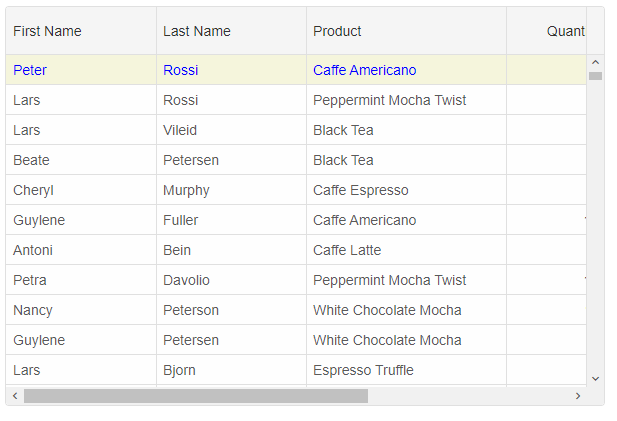
ThesetRowStyle method expects two arguments - rowID and rowStyle object. The rowStyle object may have one or all of the following properties: 'background', 'color', 'fontSize', 'fontFamily', 'textDecoration', 'fontStyle', 'fontWeight'.
component.value.setRowStyle(0, {
	background: 'beige',
	color: 'blue'
});
onRowClass function
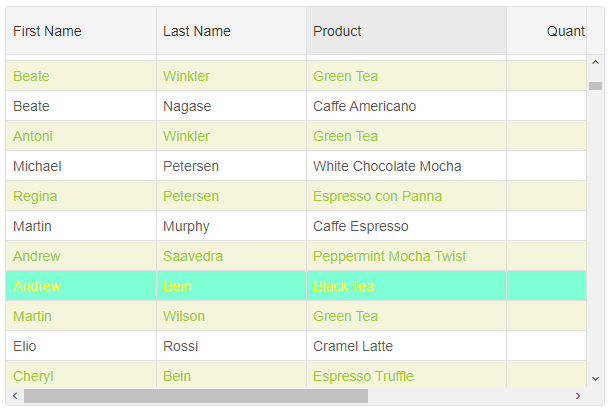
Alternatively, by using theonRowClass function you can dynamically apply a CSS class(es) to an entire row. onRowClass should return a CSS class name string or an array of CSS class names divided by space.
.row-class-1{
	background: beige;
	color: yellowgreen;
}
.row-class-2 {
	background: aquamarine;
	color: yellow;
}
const componentProps = {
    behavior: { columnResizeMode: 'growAndShrink' },
    dataSource: new Smart.DataAdapter({
        dataSource: Data,
        dataFields: [
            'id: number',
            'firstName: string',
            'lastName: string',
            'productName: string',
            'quantity: number',
            'price: number',
            'total: number'
        ]
    }),
    editing: {
        enabled: true
    },
    selection: {
        enabled: true,
        allowCellSelection: true,
        allowRowHeaderSelection: true,
        allowColumnHeaderSelection: true,
        mode: 'extended'
    },
    onLoad: () => {
        component.value.setRowStyle(0, {
            background: 'beige',
            color: 'blue'
        });
    },
    onRowClass(index, data, row) {
        if (index % 2 === 0) {
            return 'row-class-1'
        }
        if (data.firstName === 'Andrew') {
            return 'row-class-2';
        }
    },
    columns: [
        {
            label: 'First Name', width: 150, dataField: 'firstName'
        },
        { label: 'Last Name', width: 150, dataField: 'lastName' },
        { label: 'Product', width: 200, dataField: 'productName' },
        { label: 'Quantity', width: 100, dataField: 'quantity' },
        { label: 'Unit Price', width: 100, dataField: 'price', cellsFormat: 'c2' },
        { label: 'Total', dataField: 'total', width: 200, cellsFormat: 'c2' }
    ]
};
highlightRow function
To apply a CSS class to a row, you can also use thehighlightRow method.
component.value.highlightRow(0, 'row-class-1')
Row CSS Rules
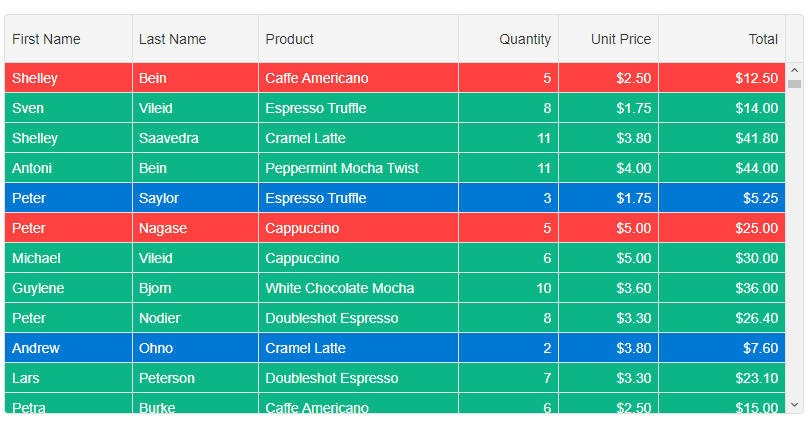
By using Row CSS rules, you can dynamically apply CSS classes to rows depending on your application requirements. The settings object contains the following properties: index, data, row, api.
rowCSSRules: {
	'cell-class-1': settings => settings.data.quantity === 5,
	'cell-class-2': settings => settings.data.quantity < 5,
	'cell-class-3': settings => settings.data.quantity > 5
}
The CSS classes are:
.cell-class-1{
	background: #FF4240;
	color: white;
}
.cell-class-2 {
	background: #0179D4;
	color: white;
}
.cell-class-3 {
	background: #0BB585;
	color: white;
}
For AI tooling
Developer Quick Reference
Topic: grid-styling-rows Component: Grid Framework: Vue
Main methods: setRowStyle(), highlightRow()
Common config keys: behavior, dataSource, editing, selection, columns
Implementation Notes
Compatibility: Vue 3+ API access pattern: const component = ref() + component.value.method()
Lifecycle guidance: Use template refs with